Triple-screen laptop extenders turn a single notebook into a portable multi-tasking workstation. This guide reviews five top-rated triple-monitor solutions from reputable brands, focusing on display quality, portability, plug-and-play ease, and compatibility. Each option supports a three-screen setup that can boost productivity for remote work, coding, design, and presentations. The following selections are particularly well-suited for travelers, students, and professionals who need expansive screen real estate without sacrificing mobility.
Summary of Featured Products
| Product | Brand | Display Size | Key Strength |
|---|---|---|---|
| KYY 15.6″ Triple Screen Extender | KYY | 15.6″ x 2 | One-cable USB-C connects both screens; wide compatibility; 360° rotation |
| KEFEYA 15.6″ Triple Monitor | KEFEYA | 15.6″ | Detachable design; 235° rotation; high color coverage |
| QQH 15.6” Triple Portable Monitor | QQH | 15.6″ | Slim aluminum alloy; single-cable plug-and-play; wide viewing angles |
| 14″ Triple Laptop Screen Extender | BreezyLife | 14″ | Ultra-thin, lightweight; modular stand; strong heat dissipation |
| FLYTOCCA 16″ Laptop Screen Extender | FLYTOCCA | 16″ | Dual-screen rotation; 16:10 aspect; detachable screens |
Note: All products listed are triple-screen or dual/triple-capable extenders designed to expand laptop workspaces while traveling. Each entry includes a brief overview, standout features, and practical considerations to match different workflows and device ecosystems.
KYY 15.6″ Triple Screen Extender

The KYY X90D triple monitor uses two 15.6″ FHD IPS panels and supports a plug-and-play USB-C/Type-A connection for broad compatibility across Windows, macOS, Linux, Android, and Chrome OS. A single USB-C cable connection simplifies setup, reducing cable clutter during travel. The device emphasizes portability with a single-cable design and provides a wide 178° viewing angle for collaborative meetings. Drivers may be required for full functionality, depending on the host system.
Key considerations:
- Single-cable connectivity reduces setup complexity.
- Wide compatibility increases cross-device usability.
- Driver installation may be necessary for certain operating systems.
- 360° rotation supports versatile configurations for meetings or coding sessions.
KEFEYA Laptop Screen Extender 15.6″
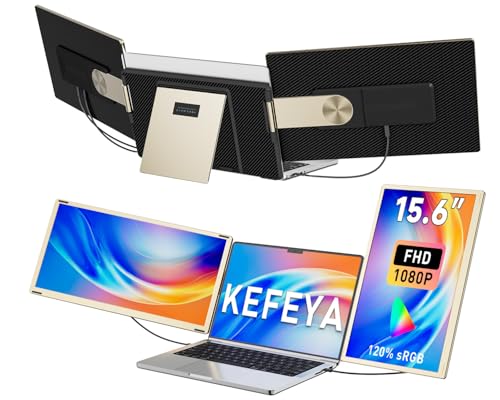
KEFEYA’s triple-monitor solution is designed to be a portable workstation with detachable panels and a leather carrying bag. It supports multiple display modes (mirror, extend, portrait, landscape) and offers up to 235° rotation, enabling a highly customizable viewing experience. The setup is USB-powered and designed to pair with Windows, macOS, Dex, Chrome, and Surface devices, with plug-and-play convenience and a focus on on-the-go productivity.
Key considerations:
- Detachable screens enable flexible configurations and easy transport.
- Wide color and rotation options support versatile work styles.
- Compatibility with a broad range of devices; driver prerequisites may apply.
QQH Laptop Screen Extender, 15.6”

QQH’s 15.6” triple screen extender emphasizes a slim double-screen experience with a robust aluminum alloy chassis. The package typically includes a plug-and-play USB-C or USB-A connection once the appropriate driver is installed. With a 178° viewing angle, 300 nits brightness, and a 1200:1 contrast ratio, this option aims to deliver vivid visuals while remaining slim and travel-friendly. The triple-screen design is positioned behind the laptop to minimize desk space usage.
Key considerations:
- Slim, durable design suitable for frequent travel.
- One-cable connection simplifies setup after driver installation.
- Compatibility notes regarding certain laptop ports and driver requirements.
14″ Triple Laptop Screen Extender

BreezyLife’s 14″ triple-screen extender offers ultra-thin portability with a 0.18-inch profile and a light 2.2-pound weight. The device uses aerospace-grade aluminum, includes a reinforced stand, and supports 180° horizontal rotation for flexible viewing angles. It is compatible with laptops in the 13–17″ range and emphasizes transportability with a protective leather case and robust heat dissipation.
Key considerations:
- Ultra-thin, lightweight design supports easy packing.
- Rotatable screens improve ergonomics for varied tasks.
- Strong heat management and a protective case aid durability on the move.
FLYTOCCA 16″ Laptop Screen Extender

FLYTOCCA’s 16″ extender expands the working area with a 16:10 aspect ratio and a 1200P resolution. The dual-screen rotation capability supports many configurations, including side-by-side multitasking, stacked displays, or single-screen focus. The screens are detachable, enabling flexible use when needed. This option targets users who require higher vertical space for documents or coding, while maintaining travel-friendly dimensions.
Key considerations:
- 16:10 ratio offers extra vertical space for multitasking.
- Detachable screens allow flexible standalone use.
- A broad compatibility range supports many laptops and operating systems.
Buying Guide: Key Purchase Considerations
Choosing a triple-screen laptop extender involves evaluating portability, display quality, ease of use, and device compatibility. Consider the following factors to align a purchase with your typical workflow and travel needs.
- Display size and quality: Larger panels provide more workspace but add weight. Look for IPS panels with 1080p or higher, good brightness, and wide viewing angles for multi-person sessions.
- Connection method: USB-C is preferred for simplicity and power delivery. Some models require USB-A or drivers; check your laptop ports and power needs.
- One-cable versus multi-cable: One-cable designs reduce clutter and speed up setup, but ensure the host device supports full USB-C Display and Power (PD) functionality.
- Rotation and adjustability: 178°–235° rotation ranges, vertical orientation, and detachable screens expand configuration options for coding, design, or presentations.
- Weight and portability: Ultra-thin builds and protective cases help travel lighter and safer. Consider a model with a robust stand or mounting solution.
- Compatibility and drivers: Some devices require drivers or may have limited compatibility with certain OS families (e.g., macOS on newer chips). Verify supported systems before buying.
- Build quality and heat management: Aluminum chassis and effective heat dissipation contribute to long-term reliability during extended sessions.
- Price-to-performance balance: Compare features like panel quality, rotation range, and ease of use against price to determine the best value for your needs.