Choosing the right trackpad can elevate everyday tasks on a Mac, from smooth scrolling to precise cursor control. This guide highlights five top options, spanning Apple’s own Magic Trackpad variants and reliable third‑party alternatives, to help you pick a model that fits your workflow and desk setup. Each entry covers key features, compatibility, and what to consider before buying. Whether you prefer wireless freedom, wired reliability, or a larger touch surface for gesture navigation, there’s a trackpad here to suit your needs.
| Product | Brand | Core Strength |
|---|---|---|
| Apple Magic Trackpad – White Multi-Touch Surface | Apple | Large edge‑to‑edge glass, Multi‑Touch and Force Touch |
| Apple Magic Trackpad – Black Multi-Touch Surface | Apple | Wireless, Force Touch, large glass surface |
| POLARMETA Trackpad with 2.4G USB Receiver | POLARMETA | Plug & Play wireless with USB receiver, frosted glass surface |
| Tacti Trix Wired Trackpad (White) | Tacti Trix | Premium glass surface, wired, multiple gestures |
| Tacti Trix Wired Trackpad (Black) | Tacti Trix | Premium glass surface, wired, multi-gesture |
Apple Magic Trackpad – White Multi-Touch Surface

The Apple Magic Trackpad with a wireless rechargeable design delivers an expansive, edge‑to‑edge glass surface ideal for Mac users who rely on extensive gesture controls. It supports the full suite of Multi‑Touch gestures along with Force Touch, enabling context‑sensitive actions through varying pressure. The large surface area enhances scrolling, swiping, and navigation across content, offering a seamless extension of macOS gestures for productivity and creative workflows.
Apple Magic Trackpad – Black Multi-Touch Surface
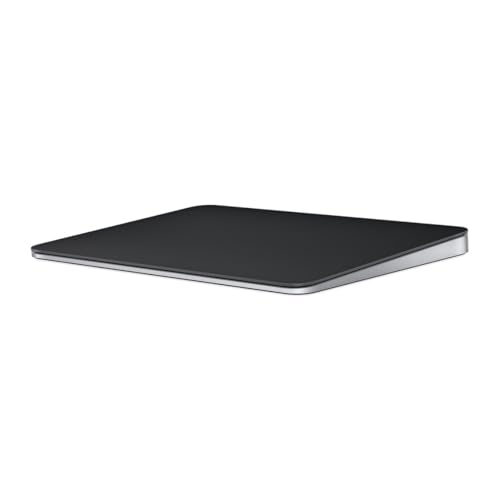
The black variant mirrors the white version in functionality and design, offering wireless and rechargeable operation with the same full range of Multi‑Touch gestures and Force Touch technology. Its edge‑to‑edge glass surface is optimized for long sessions of scrolling and swiping, delivering a precise, responsive feel that integrates deeply with macOS features such as Mission Control and App Exposé. If you prefer a darker aesthetic for your desk, this model maintains Apple’s premium build quality.
Tacti Trix Wired Trackpad White

This wired trackpad from Tacti Trix emphasizes a sturdy build with a premium glass surface and a solid metal base designed for stability on busy desks. It supports multi‑gesture navigation and cursor customization, making it a versatile option for Mac users who want wired reliability without Bluetooth concerns. Note that MacOS Force Touch is not supported on this model, so some pressure‑sensitive gestures may not be available. Left and right physical clicks provide traditional control alongside full‑area single‑click functionality.
Tacti Trix Wired Trackpad Black

The black edition mirrors the white model’s strengths: a premium glass surface, a robust metal base, and wired connectivity for uninterrupted performance. It supports multi‑gesture navigation and allows users to tailor cursor speed and scrolling direction. As with the white variant, MacOS Force Touch is not supported, and the trackpad includes left and right physical clicks for traditional mouse operations, enabling precise selection and drag actions across documents and interfaces.
POLARMETA Trackpad With 2.4G USB Receiver

The POLARMETA trackpad offers a wired wireless option with a dedicated USB receiver for a stable connection, complemented by an included USB‑C cable for charging. Its frosted glass surface provides smooth finger glides and intuitive multi‑gesture navigation suitable for both Mac and Windows environments. It emphasizes compatibility and easy setup, with plug‑and‑play operation and no driver requirements, making it a practical choice for mixed device ecosystems and desk setups that require reliability and simplicity.
Apple Magic Trackpad Compatible With MC380LL/A (Renewed)

Renewed Apple Magic Trackpad offers a like‑new experience at a potentially lower cost. These units are inspected and tested to meet criteria for functionality, with a 90‑day supplier‑backed warranty. The renewed option delivers familiar Trackpad performance including the full range of multi‑gesture controls, inertial scrolling, and the Force Touch surface for enhanced interaction with macOS content and apps. This choice suits users seeking Apple engineering in a budget‑conscious window.
Buying Guide: Key Purchase Considerations
- Compatibility and ecosystem: Apple Magic Trackpad variants deliver seamless macOS integration, while third‑party options may vary in gesture support and Force Touch compatibility. Consider whether you multitask across Windows or macOS; if so, a versatile wired option could reduce Bluetooth interference.
- Connectivity: Wireless models offer freedom but rely on battery life; wired versions provide stable performance with no charging concerns. If you share a workspace or travel frequently, confirm whether a USB receiver is included or if Bluetooth pairing is required.
- Surface and ergonomics: A larger surface improves precision for long sessions but may take up desk real estate. Frosted or glass surfaces affect glide and tracking feel; premium builds with anti‑slip bases help keep the device stable during work.
- gestures and precision: Multi‑Gesture support enables advanced macOS interactions like Mission Control, App Exposé, and gesture‑driven navigation. Force Touch adds pressure sensitivity to certain actions; ensure your chosen model supports the features you rely on.
- Durability and warranty: Official Apple products typically include strong build quality and warranty options; renewals and third‑party models vary in durability and warranty coverage. If investing in a budget option, verify return policies and support terms.
- Use case scenarios: For design, coding, or media work, a larger, highly responsive surface can reduce fatigue and improve accuracy. For travel or shared workstations, compact, reliable wired options may be preferable to avoid pairing issues.
In summary, the best Mac trackpad depends on your priorities: Apple’s own Magic Trackpad variants provide deep Mac integration and gesture support, while third‑party options offer alternative form factors, wired reliability, or compatibility with mixed ecosystems. Consider surface area, connection type, gesture breadth, and build quality to determine which model aligns with your workflow and desk environment.