Looking for a reliable touch screen Windows tablet that fits your on-the-go lifestyle? This guide highlights five solid options, each with a clear best-use scenario. These picks are ideal for students, remote workers, and professionals who want full Windows functionality in a compact form. Below, find quick comparisons and detailed reasons to choose each model.
| Product | Best For | Key Benefit |
|---|---|---|
| 1) 10.1″ Windows 11 Tablet (Intel Celeron, 6GB/128GB) | Light daily tasks, travel, school | Full Windows 11, HDMI, long battery |
| 2) 2-in-1 Laptop/Tablet, 10.1″ FHD (8GB/256GB) | Note-taking & presentations | Detachable keyboard, portability |
| 3) 15.6″ 2-in-1 Windows Laptop (i3, 16GB/256GB) | Power users, multitasking | 360° conversion, robust RAM |
| 4) Fusion5 10.1″ Windows 11 Tablet (12GB/256GB) | Performance-focused travel | High RAM, solid storage |
| 5) 2-in-1 Laptop/Tablet (2026), 10.1″ FHD (8GB/256GB) | Students & remote work | Office 365 included, versatile |
10.1″ Windows 11 Tablet with All‑Day Battery
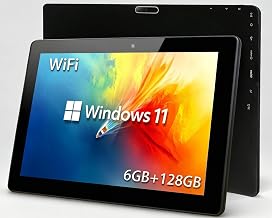
This compact Windows 11 tablet from the XINHENGTAI Store runs on an Intel Celeron quad-core processor with 6GB RAM and 128GB storage. It supports a 512GB TF card for extra space and offers HDMI output for external displays. Best for students and light productivity on the go.
Who it’s best for: travelers and students needing a budget-friendly Windows device for note-taking, streaming, and light editing. Why chosen: strong balance of price, Windows 11 compatibility, and expandability.
Caution: Storage could feel limited for heavy media libraries without the microSD expansion.
2-in-1 Laptop/Tablet, 10.1″ FHD IPS, 8GB/256GB

This 2-in-1 offers a detachable keyboard and a vivid 10.1-inch Full HD IPS touchscreen. Powered by the Intel Pentium Gold 6500Y, it excels at productivity tasks, multitasking, and light creative work. Best for students, remote workers, and light office tasks.
Who it’s best for: anyone who benefits from laptop-style typing on demand. Why chosen: quick transition between typing and tablet use, plus solid RAM and storage for everyday work.
Caution: Keyboard attachment adds bulk; consider desk space when traveling light.
15.6″ 2-in-1 Windows Laptop with i3, 16GB RAM

This larger 15.6-inch convertible laptop offers an i3-10100Y processor and 16GB RAM for smooth multitasking. It includes a 256GB SSD and room to upgrade with a larger drive, making it suitable for more demanding workflows and multimedia tasks. Best for professionals who need a bigger screen on the go.
Who it’s best for: users who require robust performance and a flexible form factor for presentations and longer work sessions. Why chosen: strong RAM, add-on storage potential, and a full Windows experience.
Caution: Heavier and less portable than smaller tablets; consider commute length and bag space.
Fusion5 10.1″ Windows 11 Tablet (USA Assembly)

Fusion5’s compact Windows tablet emphasizes performance with 12GB RAM and 256GB SSD, plus a 512GB microSD slot for expansion. It is proudly assembled in the USA and includes a generous two-year warranty with accidental damage coverage. Best for travelers who need strong multitasking and reliable storage.
Who it’s best for: power users who want solid RAM, fast storage, and backup protection. Why chosen: high memory and local storage in a portable form with domestic assembly.
Caution: Budget-focused features may vary in peripherals; verify included accessories before purchase.
2-in-1 Laptop/Tablet (2026), 10.1″ FHD IPS, Office 365

This 10.1-inch Windows 11 tablet includes a detachable keyboard, a 10.1″ FHD IPS display, and 8GB RAM with a 256GB SSD. It comes with a 1-year Office 365 subscription and 1TB cloud storage, designed for students and professionals who rely on Office apps. Best for homework, note-taking, and light productivity on the move.
Who it’s best for: students and remote workers needing Office readiness and portable versatility. Why chosen: built-in Office 365 for a full year and integrated cloud storage for collaboration.
Caution: Cloud storage depends on internet access; offline work may require local backups.
Buying Guide: Key Considerations For Your Windows Touch Tablet
- Screen size and portability: Smaller tablets excel in travel, while larger screens improve productivity and readability. Consider your typical work environment and whether you need a keyboard or a detachable option.
- Performance and RAM: More RAM helps with multitasking and heavy apps. If you run multiple Office apps, browsers, or light editing, prioritize 8GB or more. For basic tasks, 4–6GB can suffice.
- Storage and expansion: Look for at least 128GB internal storage with microSD support if you store many files or media. External SSDs offer high speed and capacity.
- Battery life: Long-lasting batteries are essential for travel, classes, and remote work. Check reviews for real-world endurance and standby time.
- Connectivity: Dual-band Wi-Fi, Bluetooth, and USB-C are valuable for versatility with peripherals and accessories like keyboards and displays.
- Operating system and ecosystem: All options run Windows; consider app needs, compatibility with Office, note-taking tools, and whether you require enterprise features.
- Durability and build quality: If you travel often or attend classes, a sturdy chassis and reliable keyboard attachment improve long-term usability.
FAQ
- What is the best Windows tablet for students? A compact 10.1″ or 2-in-1 with a detachable keyboard and Office software is typically best for note-taking and class presentations.
- Do these tablets run full Windows applications? Yes, all models listed run Windows and support mainstream Windows apps, including Office suites and browsers.
- Is extra storage important for a Windows tablet? Yes, 128GB internal storage is a baseline; add a microSD or external SSD for larger libraries and media files.
- Should I choose a 2-in-1 with a keyboard? If you value typing ease and productivity, a detachable keyboard 2-in-1 is advantageous for writing and presentations.
- What about battery life? Look for tablets advertising long video playback or all-day endurance; actual life depends on usage and display brightness.
- Are there any cautions to consider? Pay attention to RAM, storage, and portability trade-offs; some models may require accessories like keyboards for optimal use.