When safeguarding your digital memories and expanding storage, choosing the right Time Machine–friendly hard drive is essential. This guide highlights top external drives and duplicators that work well with Time Machine on Mac or serve as reliable backup options for mixed systems. It compares capacity, connectivity, and cloning capabilities to help you pick a dependable solution for daily backups and large-file storage.
Summary of chosen products:
| Product | Brand | Capacity | Interface | Notes |
|---|---|---|---|---|
| Avolusion PRO-Z Series 6TB | Avolusion | 6TB | USB 3.0 | Time Machine compatible; renewed option |
| Seagate Backup Plus Slim for Mac 1TB | Seagate | 1TB | USB 3.0 | Mac-friendly, Time Machine compatible with reformat |
| StarTech Standalone Hard Drive Duplicator SDOCK2U33RE | StarTech.com | Two bays | USB 3.0 / eSATA | Standalone cloning without PC |
| Systor 1:9 HDD/SSD Duplicator SYS609DP | Systor | Multi-drive | Standalone | Snapshot-style copying, no computer needed |
| Systor 1:1 HDD/SSD Duplicator SYS601DP | Systor | Multi-drive | Standalone | Similar standalone cloning with broad compatibility |
Avolusion PRO-Z Series 6TB USB 3.0 External Hard Drive

The Avolusion PRO-Z Series offers 6TB of external storage with USB 3.0 for fast data transfer. This drive is designed to work with MacOS devices and Time Machine for backup and recovery planning. It can expand desktop or laptop storage quickly without opening the case, making it a convenient choice for expanding backup capacity and protecting critical data.
Seagate Backup Plus Slim for Mac 1TB

The Seagate Backup Plus Slim for Mac provides 1TB of portable storage with a minimalist metal enclosure. It connects via USB 3.0 and supports simple backups through Time Machine, with options for scheduling automatic daily, weekly, or monthly backups. Reformatting may be required for full Time Machine compatibility on certain macOS setups.
StarTech Standalone Hard Drive Duplicator SDOCK2U33RE

This dual-bay standalone duplicator supports sector-by-sector copying between 2.5/3.5″ SATA drives without a computer. It can also function as a USB to SATA docking station for quick access to drives. It’s compatible with various drive types and supports cloning tasks at high speeds, useful for creating exact Time Machine backups or mass duplications for multiple Macs.
Systor 1:9 HDD/SSD Hard Drive Duplicator SYS609DP
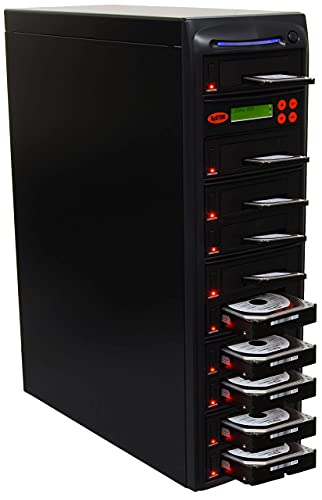
The Systor SYS609DP is a standalone copier and eraser/sanitizer that supports 3.5″ and 2.5″ drives without extra adapters. It offers copy speeds up to 600 MB/s and includes a warranty package. This device enables efficient backup cloning or data sanitization tasks without needing a computer, making it suitable for bulk Time Machine backup environments or preparing drives for deployment across multiple Macs.
Systor 1:1 HDD/SSD Hard Drive Duplicator SYS601DP

The SYS601DP is another standalone duplicator from Systor that supports both 3.5″ and 2.5″ drives. It operates without a PC and is designed for secure and efficient drive cloning, suitable for backing up Mac systems in multi-machine environments or duplicating Time Machine-ready drives for quick deployment.
Buying Guide: Key Purchase Considerations
- Time Machine compatibility: Ensure drives can be formatted appropriately for Time Machine (usually HFS+ or APFS on macOS) or are labeled as Time Machine–ready if preformatted. Some drives may require reformatting depending on macOS version.
- Storage capacity vs. needs: For backups, consider both current data size and projected growth. External drives with larger capacities reduce the frequency of replacements.
- Interface and speed: USB 3.0 offers solid performance for most backups. USB 3.1/3.2 or USB-C can provide faster transfers on newer Macs; consider whether the device supports these interfaces or requires adapters.
- Standalone duplicators vs. traditional backups: Standalone duplicators enable rapid mass cloning without a computer, useful for deploying identical Time Machine drives across multiple machines. For ongoing single-system backups, a straightforward external drive is sufficient.
- Reliability and warranty: Look for devices with reputable warranties and durable enclosures. Duplicators may include longer support lifetimes, while drives with portable designs require careful handling.
- Power delivery: Some dual-bay duplicators rely on external power, while others may draw power from USB. Check your setup to avoid power-related cloning issues.
- Future macOS changes: macOS updates can affect Time Machine compatibility. Choose drives that maintain broad compatibility or allow easy reformatting if needed.
- Operating environment: Consider whether you need portable drives for travel or stationary drives for a dedicated backup station. Portability can influence drive durability and form factor.
In summary, the combination of a Time Machine–ready external drive (for daily backups) and a reliable standalone duplicator (for bulk cloning and deployment) provides a balanced backup strategy. The products listed above cover a range of capacities, interfaces, and use cases, from single-Mac backups to multi-machine rollout in small offices or households.