If you’re shopping for a slim, space-saving keyboard for a PC, you want something that is comfortable to type on, durable, and easy to connect. This guide highlights five compact keyboards that fit those criteria, including wireless and wired options. It explains who each keyboard is best for, why it stands out, and any caveats to consider. Whether you need a stainless steel slim profile or a low-profile membrane keyboard, you’ll find a suitable choice here. Below is a quick summary of the selected models to help you compare at a glance.
| Product | Connectivity | Best For | |
|---|---|---|---|
| Arteck Stainless Steel Ultra Slim Keyboard | Wireless 2.4G | Desktops with a clean, premium feel | Battery life may vary with backlight use |
| X9 Performance Ultra Slim Wired Keyboard | Wired USB | Office work and tasks requiring reliable connection | Wired only; no wireless option |
| TopMate Wireless Keyboard and Mouse Ultra Slim Combo | Wireless 2.4G | All-in-one desk setup with mouse included | Hot-key compatibility varies by OS |
| TECKNET 15-Zone RGB Gaming Keyboard | Wired USB | Gaming and multi-key use with backlighting | RGB features may be more than needed for basic typing |
| Macally Ultra-Slim USB Wired Keyboard | Wired USB | Mac or Windows users needing a slim wired option | Key feel may differ from high-end mechanicals |
Arteck Stainless Steel Ultra Slim Keyboard

Best for: Buyers who want a premium-feel desk setup with a slim profile. The stainless steel construction offers a solid, heavy-duty feel and low-profile keys for quiet typing. This model is ideal for those who value a sleek look and a compact footprint on a home or office desktop.
Why selected: It provides easy setup via a nano USB receiver and a rechargeable battery with long life. The reduced height and quiet keys make it suitable for long typing sessions without disrupting others nearby.
Caution: Battery life is influenced by usage; heavy backlighting or features can reduce the interval between charges.
X9 Performance Ultra Slim Wired Keyboard

Best for: Buyers who prefer a traditional, reliable wired keyboard with a full 104-key layout and dedicated numeric keypad for productivity tasks.
Why selected: This keyboard emphasizes a complete typing experience with multiple keys for shortcuts and a built-in kickstand for ergonomic comfort. It’s plug-and-play and does not rely on batteries, ensuring consistent performance.
Caution: It is a wired model; users seeking wireless flexibility should consider alternatives.
TopMate Wireless Keyboard and Mouse Ultra Slim Combo
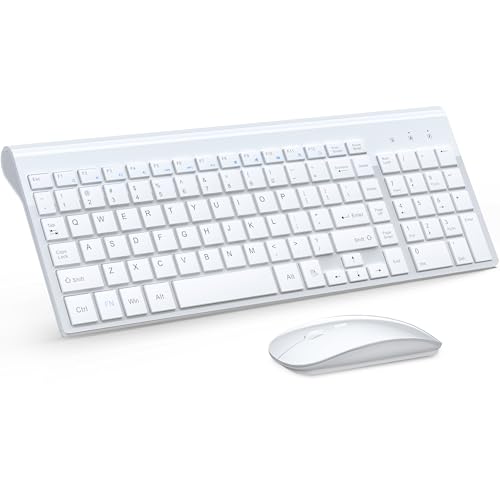
Best for: Users who want a space-saving wireless bundle with a compact 2400 DPI mouse and a silent keyboard for everyday computing or travel setups.
Why selected: The combo offers a stable 2.4G connection and a shared nano receiver for a tidy desk. It includes a full-size keyboard with a numeric keypad and a silent, responsive mouse with adjustable DPI.
Caution: Some hotkeys may not be fully compatible with Mac systems, so Mac users should verify key functionality before purchase.
TECKNET Gaming Keyboard

Best for: Gamers and multi-taskers who want RGB lighting, robust keys, and a strong build for longer sessions.
Why selected: It features ergonomic design, 15-zone rainbow backlighting across 15 RGB modes, and a durable metal base with whisper-quiet switches. The backlighting helps in low-light environments and the 50 million keystroke lifespan supports long-term use.
Caution: Backlighting and extra features can be more than what casual typing requires; consider if you’ll use the RGB effects.
Macally Ultra-Slim USB Wired Keyboard

Best for: Mac users and Windows users who want a compact wired keyboard with a numeric keypad for daily tasks and shortcuts.
Why selected: This keyboard emphasizes broad compatibility and a slim profile with 20 Apple shortcut keys and multimedia shortcuts for Windows, offering a familiar typing experience across OSes.
Caution: Some users report a different tactile feel than higher-end mechanical keyboards; it is a budget-friendly wired option rather than a premium keyboard.
Buying Guide: Thin Keyboard For PC Buyer Considerations
- Connectivity: Choose wired if you need zero-lailty or latency-free input; choose wireless for a cleaner desk and flexibility. 2.4G wireless often provides good range and simple setup.
- Form factor and profile: Low-profile keys reduce travel distance and can make typing quicker for some users, while stainless steel builds add rigidity and premium feel.
- Key layout: Full-size keyboards with numeric keypads suit data-entry tasks; compact layouts trade a number pad for space.
- Backlighting: RGB or single-color backlighting helps in low light but may impact battery life on wireless models.
- Durability and build: Metal bases or stainless steel frames offer sturdy typing surfaces; ensure keycaps and switches match your typing style.
- OS and shortcuts: Some keyboards include Mac-specific shortcuts; verify compatibility with your operating system and required shortcuts.
- Battery life and power: For wireless keyboards, consider lifetime estimates under typical usage to avoid frequent recharges.
Frequently Asked Questions
- What is a thin keyboard best used for? — It is ideal for compact desks, travel setups, and users who want a slim profile without sacrificing full-size key layouts.
- Are wireless keyboards reliable for office work? — Yes, modern 2.4G wireless keyboards offer stable connections suitable for productivity tasks, with the caveat that battery life varies by usage.
- Should I choose a keyboard with backlighting? — Backlighting helps in low-light environments but can impact battery life on wireless models and increase cost.
- Is a numeric keypad important? — It depends on your tasks. Data entry and spreadsheet work often benefit from the numeric keypad, while compact setups may omit it for space.
- What’s the difference between low-profile and standard keyboards? — Low-profile keyboards have shorter key travel, which some users find faster or more comfortable, while standard keyboards may offer a more tactile feel.
- Can I use these keyboards with Mac and Windows? — Many models offer broad compatibility; check the product features for OS support and shortcut availability.