Windows tablets blend portability with desktop-like productivity. The following selections include 5 models that run Windows 11 or higher, offering varying RAM, storage, displays, and performance profiles. Whether you need a lightweight on-the-go companion or a flexible 2-in-1 for school and work, this guide compares key specs to help you choose.
The table below summarizes the featured models to help you compare at a glance:
| Product | Brand | Display | RAM / Storage | Key Strength |
|---|---|---|---|---|
| ADREAMER 10.1″ Win 11 Tablet | ADREAMER | 10.1″ 1280×800 | 8GB / 256GB | 2-in-1 versatility; solid multitasking |
| CHUWI Hi10 X2 | CHUWI | 10.1″ 1280×800 | 8GB / 256GB | Windows 11 pre-installed; 4K mHDMI support |
| AWOW N100 Windows 11 Tablet | AWOW | 10.1″ 1280×800 IPS | 12GB / 256GB | High memory option; strong battery and connectivity |
| Fusion5 FWIN232 PRO N5 | Fusion5 | 10.1″ Full HD | 12GB / 512GB | 2-year warranty; premium RAM/SSD |
| TPSPAD 10.1″ Windows 11 Tablet | TPSPAD | 10.1″ 1280×800 | 6GB / 128GB | Windows 11 Home; solid all-rounder |
Note: All models listed support Windows and offer touchscreens, with varying levels of performance, storage, and expandability. The right choice depends on your workload, portability needs, and whether you value speed, multitasking, or media playback.
ADREAMER 10.1″ Win 11 Tablet

The ADREAMER 2-in-1 tablet features a 12th Gen Intel N150 processor (4 cores, up to 3.6GHz) with Intel UHD Graphics at 1000MHz and Windows 11 Home pre-installed. It delivers 36% more performance than the N5095 and 86% more than the J4120, with a focus on multitasking, creative work, and entertainment. The device ships with 8GB of RAM and a 256GB SSD, expandable to 512GB, enabling fast boot-ups and ample storage for documents, videos, and apps. A 10.1-inch HD touchscreen (1280×800) provides crisp visuals, complemented by dual cameras and premium speakers for meetings and media consumption. Multiple I/O options include Micro HDMI and dual Type-C ports, supporting flexible connectivity for peripherals and displays.
Microsoft Surface Go 10.5″ Tablet (Renewed)

Microsoft’s Surface Go line balances portability with productivity. This renewed model features a 10.5″ PixelSense display, Intel Pentium 4415Y, 4GB RAM, and 64GB SSD. It emphasizes a light form factor, with optional Type Cover accessories sold separately, integrated Intel HD Graphics 615, MicroSD expansion, and a compact footprint suitable for on-the-go work, note-taking, and light multitasking. The renewed status reflects a budget-friendly option while preserving a Windows 11 experience.
TPSPAD 10.1″ Windows 11 Tablet PC

The TPSPAD 10.1″ Windows 11 tablet focuses on a slim, portable design with a 1280×800 display. It includes a quad-core processor, 6GB RAM, and 128GB storage, plus dual-band Wi-Fi and Bluetooth connectivity. The device supports external video output via micro HDMI and offers USB 3.0 for fast data transfer. The Windows 11 Home operating system provides a familiar desktop experience, making it suitable for students and professionals who want a compact Windows tablet for meetings, note-taking, and light productivity.
CHUWI Hi10 X2 Windows 11 Tablet

The CHUWI Hi10 X2 runs Windows 11 on an Intel Core i3 family processor with up to 3.9GHz turbo, delivering responsive multitasking and smooth everyday performance. It ships with 8GB RAM and 256GB SSD for ample storage, and a 10.1″ HD touchscreen with In-Cell 10-point touch. Connectivity includes Micro HDMI with 4K support, USB 3.2 Type-C, and microSD expansion. The device comes with dual cameras (5MP rear, 2MP front) for video calls, and pre-installed Windows 11 to provide a familiar interface for work and learning tasks. A 4K HDMI output makes it a practical portable workstation for presentations.
Fusion5 FWIN232 PRO N5
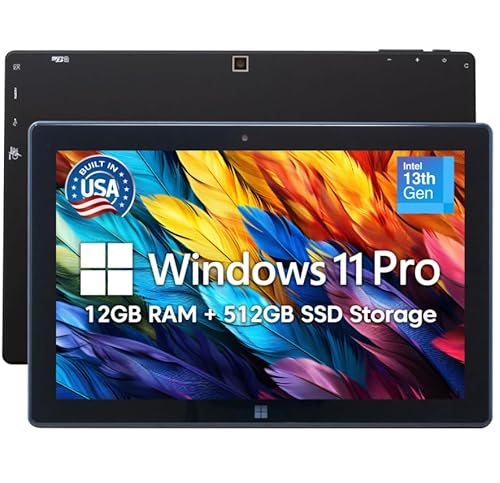
Fusion5’s FWIN232 PRO N5 emphasizes performance and durability with 12GB RAM and 512GB SSD, plus a 512GB microSD card slot for expanded storage. Built as a USA-assembled device, it highlights quality control and a 2-year full warranty that includes accidental damage coverage. The tablet runs Windows 11 and targets users needing robust multitasking, content creation, and offline storage for large files. A Full HD 10.1″ display supports clear media viewing, while USB-C and HDMI outputs assist with external displays and peripherals.
Buying Guide: Key Purchase Considerations
- Operating system and version: Ensure the device ships with Windows 11 or later for modern app support and security updates. Some models are renewed; verify warranty terms and return policies where applicable.
- Performance vs. portability: CPUs like Intel N100/N150 offer solid multitasking, while Core i3-based tablets provide stronger performance for heavier workloads. Balance RAM and storage (8GB/256GB or higher is common for multitasking and file storage).
- Display and portability: Screen size ranges from 10.1″ to 10.5″. Consider resolution, brightness, and whether a higher-resolution display or 2-in-1 design matters for your use case (note-taking, presentations, media).
- Storage expansion: Look for microSD or larger SSD options if you routinely store large media files or software libraries. Some models support expansion up to 512GB or more.
- Connectivity and ports: USB-C, USB 3.0, micro HDMI, and Wi-Fi 6/5 can influence peripheral compatibility and data transfer speeds. Battery life also affects field usability.
- Camera quality and audio: Dual cameras and stereo speakers are useful for video calls and media consumption. Consider built-in mics if you travel often for meetings.
- Accessories and ecosystem: Type covers, docking stations, and keyboard attachments can significantly affect productivity. Confirm accessory availability for each model before purchase.
- Durability and warranty: US-assembled builds and longer warranties may add reliability for frequent travelers or students. Accidental damage coverage is a plus for rugged use.
- Price vs. value: Renewed or refurbished units can offer substantial savings but check warranty details and OEM certification where applicable.
All models in this guide are suitable for a mix of productivity tasks, multimedia consumption, and light creative work. When selecting, align your choice with required performance, storage needs, and the level of portability you prefer, while considering future-proofing through RAM and display features.