This article highlights top tablet stands designed for drawing on 10–16 inch devices. Each pick offers adjustable angles, stable bases, and heat-dissipation or multi-use features suitable for artists, students, and professionals. Use the buying guide below to compare materials, portability, weight, and compatibility before you decide.
| Product | Brand | Compatibility | Key Benefit |
|---|---|---|---|
| Parblo PR 100 Universal Drawing Tablet Stand | Parblo | 10–16 inch tablets | Broad compatibility with adjustable tilt 15°–90° |
| Frunsi Drawing Tablet Stand | Frunsi | 12–17 inch tablets; phones | 9-angle levels; built-in phone holder |
| MAX SMART Tablet Drawing Stand | MAX SMART | 9–16 inch devices | Foldable, slim, lightweight; 15°–39° tilt |
| HUION ST200 Adjustable Drawing Tablet Stand | HUION | 10–16 inch tablets | 20°–60° ergonomic adjustment; portable |
| XPPen AC42 Graphics Tablet Stand | XP-Pen | 9–14 inch devices | Rigid support with 90° upright option |
Parblo PR 100 Universal Drawing Tablet Stand
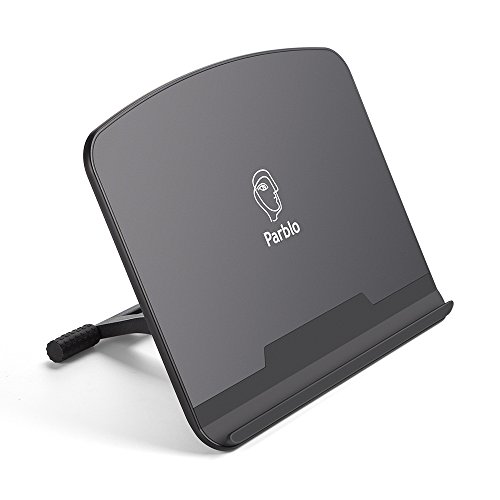
The Parblo PR 100 is a universal drawing tablet desk stand supporting 10 to 16 inch screens. It offers an easily adjustable tilt from 15° to 90°, letting you find the most comfortable angle for sketching or detailing. The contact surfaces are rubberized to minimize movement while drawing, enhancing stability. Built from a blend of alloy and plastic to balance strength and portability, this stand aims to support long sessions without strain.
Frunsi Drawing Tablet Stand (9 Levels)
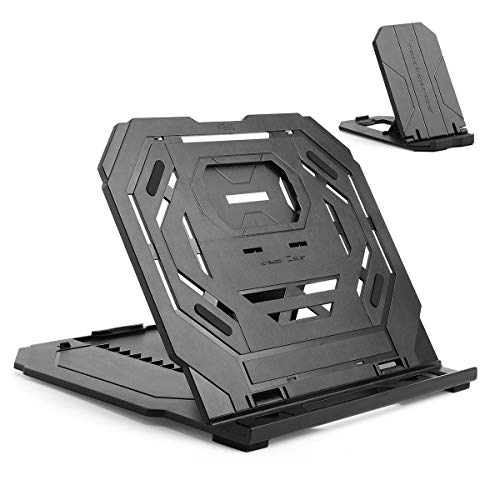
The Frunsi stand is designed for 12–17 inch drawing tablets and includes a built-in phone holder. Its heat-dissipation design features gaps that improve airflow beneath the device. A dual-structure build supports both tablet and optional smartphone use, while the adjustable angles help you maintain a healthy, straight-ahead posture during long sessions, reducing wrist fatigue.
MAX SMART Tablet Drawing Stand

The MAX SMART stand supports 9 to 16 inch devices and emphasizes foldability and light weight at roughly 360 g. It features a slim profile and a versatile tilt range from 15° to 39°, enabling quick transitions between drawing, writing, or viewing. Its portability makes it suitable for artists on the move or for compact desk setups.
HUION ST200 Adjustable Drawing Tablet Stand

HUION ST200 offers universal compatibility for pen tablets and displays. Its ergonomic design allows 20°–60° adjustment to optimize the drawing and typing posture, reducing neck and shoulder strain. The stand is lightweight at about 566 g and slim enough to fold flat for transport, making it convenient for artists who travel or work in multiple spaces.
Frunsi Drawing Tablet Stand (Foldable 9 Levels)

This Frunsi model folds for easy transport and supports 12–17 inch drawing tablets plus laptops, iPads, books, or phones. It features nine height levels for precise viewing angles and a built-in smartphone holder. The heat-dissipation design and dual-structure construction contribute to stability during extended drawing sessions.
XPPen AC42 Graphics Tablet Stand

The XP-Pen AC42 stand is built from ABS and glass fiber, providing a lightweight yet sturdy platform. Designed for 9–14 inch devices, it supports an upright 90-degree position for precise drawing and quick access to controls. The stand’s compact footprint and portable design suit creators who need a stable workspace on the go.
Buying Guide: Key Purchase Considerations
- Device compatibility: Check that the stand supports your tablet size (10–16 inches is common). If you also use laptops or phones, consider a model offering multi-usage or built-in phone holders.
- Adjustability and ergonomics: Look for tilt ranges that match your workflow. Wider ranges (e.g., 15°–90°) help accommodate drawing, shading, and reference work without neck strain.
- Stability and materials: Rubberized contact surfaces and non-slip pads prevent slipping during precise strokes. Aluminum or ABS builds influence weight and portability.
- Heat dissipation: Stands with gaps or airflow considerations can help reduce device heat during long sessions.
- Portability: If you travel or work in multiple spaces, prioritize foldable, lightweight stands with compact storage.
- Additional features: Built-in smartphone holders, multiple levels, and foldability add value for multi-use desks and space-saving setups.
- Durability and warranty: Consider materials, load-bearing capacity, and manufacturer support to ensure long-term use.