For students, professionals, and anyone who writes by hand, tablets that support note taking offer a blend of natural writing feel and digital convenience. This guide highlights five strong options tailored for handwriting, sketching, and quick note capture, without sacrificing performance. Each pick blends pen responsiveness, portability, and smart software to help you capture ideas efficiently. Whether you prefer a dedicated drawing tablet with software integration or a versatile 2-in-1 that doubles as a PC, these tablets stand out as reliable note-taking tools for everyday use.
| Product | Brand | Key Feature |
|---|---|---|
| HUION Inspiroy H640P | HUION | Compact drawing tablet with 8192 pressure levels and customizable hot keys |
| HUION Note | HUION | 2-in-1 digital notebook with battery-free pen and real paper feel |
| XP-Pen 3 in 1 Color Digital Notebook | XP-Pen | 10.95″ Android tablet with multiple color modes and AG NXTpaper display |
| Tylvx 2-in-1 Tablet | Tylvx | Win 11 2-in-1 with stylus, 12GB RAM, 256GB SSD for multitasking |
| Samsung Galaxy Tab S6 Lite | Samsung | S Pen included for natural note-taking and drawing |
HUION Inspiroy H640P Drawing Tablet

The HUION Inspiroy H640P combines portability with practical drawing and note-taking capabilities. It features a compact 6×4 inch active area and a battery-free PW100 stylus with 8192 levels of sensitivity, enabling precise handwriting and sketching. Six customizable express keys streamline your workflow, with driver-based shortcut customization for different apps. At only about 1.41 pounds and 0.3 inches thick, it travels easily between home, school, or office. This makes it a solid choice for quick note capture and light digital artwork on the go.
HUION Note 2-in-1 Digital Notebook

HUION Note pairs a digital pen with an A5 notepad to preserve the tactile feel of writing while creating digital copies. The application transfers handwritten content via the Huion Note app, compatible with iOS and Android. You can record audio to synchronize with your notes, ensuring you never miss context. This setup suits classrooms, meetings, and personal journaling where handwriting remains central, but digital storage and organization are desired.
XP-Pen 3 in 1 Color Digital Notebook

XP-Pen’s 3 in 1 Color Digital Notebook emphasizes a paper-like experience with an AG nano-etched LCD display using TCL NXTpaper 3.0 technology. It integrates multiple color modes (Monochrome, Light, Nature), supports a 90Hz refresh rate for smooth writing, and delivers 16.7 million colors with bright brightness. While not an e-ink device, it’s designed to minimize glare and offer a natural note-taking feel with digital advantages such as easy edits and cloud storage compatibility.
Tylvx 2-in-1 Tablet
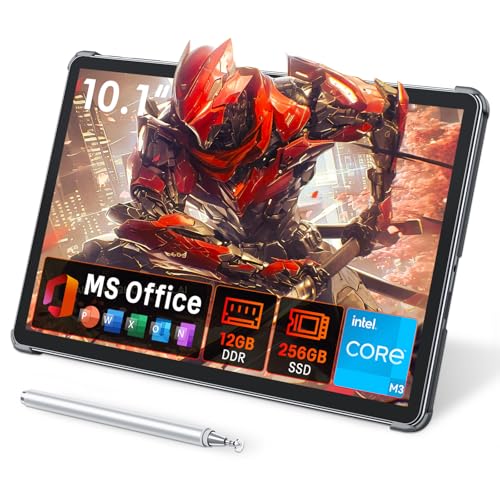
Combining a Windows 11 tablet with a precision stylus, the Tylvx 2-in-1 is aimed at both students and professionals. It offers 12GB of RAM and a 256GB solid-state drive to support demanding note-taking apps, document annotation, and light design work. Its 10.1-inch HD screen provides readable detail, while the all-metal chassis offers durability for on-the-go use. The bundled stylus enables smooth handwriting and accurate sketching, useful for class notes and project planning.
GAOMON PD1161 Drawing Tablet With Screen

GAOMON PD1161 provides a direct drawing-on-screen experience with 11.6 inches of display and a battery-free stylus. It includes an on-screen drawing surface tailored for note-taking, illustration, and editing, with a 72% NTSC color gamut and 16.7 million colors for more lifelike visuals. It’s designed to be connected to a computer, offering a strong option for users who want a larger, pen-enabled canvas for technical notes, diagrams, and creative work in a desktop environment.
Microsoft Surface Go

The Surface Go offers ultra-portable Windows productivity with a 10″ display, a Pentium Gold processor, 8GB RAM, and a 128GB SSD. Its compact form factor is suitable for note-taking, light productivity, and media consumption. The device supports pen input and runs familiar Windows software, making it a flexible option for students and professionals who want a portable all-round tablet-PC for everyday use.
Samsung Galaxy Tab S6 Lite

The Samsung Galaxy Tab S6 Lite bundles an S Pen for natural handwriting and drawing, offering a capable mobile note-taking experience. Its 10.4″ display and expandable storage options support varied use cases—from classroom notes to creative sketching and document markup. This tablet balances portability with a robust ecosystem of apps for education, productivity, and media consumption.
Buying Guide
- Note-taking accuracy: Look for a responsive stylus with high pressure sensitivity and low latency to replicate the hand-writing feel as closely as possible.
- Pen and paper parity: If you value the tactile aspect, consider 2-in-1 notebooks that combine physical paper with digital capture, or displays that mimic paper texture.
- Display size and ergonomics: Smaller tablets are ultra-portable; larger screens provide more writing space but reduce portability. Consider how you will use the device in class, in meetings, or on trains.
- Storage and RAM: For multitasking and app-heavy note-taking, prioritize at least 8GB RAM and 128GB storage, with microSD or cloud options for expansion.
- Software ecosystem: Some devices excel in specific software environments (Android, iPadOS, Windows, or a hybrid). Choose devices that support your preferred note-taking apps and cloud syncing.
- Battery life and portability: Battery life matters for long study sessions. Battery-free styluses save weight and charging hassle but verify compatibility with your workflow.
- Connectivity and compatibility: If you plan to share notes or collaborate, opt for devices with robust wireless compatibility, cloud syncing, and cross-platform apps.