Finding a kid-friendly tablet means balancing fun, safety, and education. This guide highlights five child-focused tablets that are well-suited for younger readers and early learners. Each option includes strong parental controls, durable design, and age-appropriate content. Ideal buyers include busy parents seeking durable devices for ages 3-7, caregivers prioritizing ad-free content, and households wanting dependable parental controls. Below is a quick buying snapshot to compare key picks at a glance.
- Amazon Fire 7 Kids — Best for budget-conscious households seeking ad-free, content-rich experiences for ages 3-7.
- HOTTABLET Kids Tablet 7 — Best for versatile Android access with parental controls and a rugged case.
- Trayoo Kids Tablet 7 — Best for offline learning with preloaded educational resources and robust parental controls.
- ATOZEE Kids Tablet 7 — Best for expandable storage and multi-language support with strong family controls.
- Amazon Fire HD 8 Kids — Best for larger screen experiences and a longer battery life in a kid-friendly package.
Amazon Fire 7 Kids Tablet

Best for: Young children aged 3-7 and families prioritizing a simple, ad-free experience. This model includes a 1-year Amazon Kids+ subscription with thousands of child-friendly books, games, and videos. It ships with a kid-proof case and a 10-hour battery, making it a practical daily device for classroom-like activities or travel. The bundle price-to-value is notable for those seeking a single-package solution. A potential limitation is the auto-renewal policy after the first year, which requires attention to ongoing costs.
Why selected: Its streamlined interface and strong parental controls help guardians supervise content, screen time, and usage. The integration with Amazon Kids+ provides a centralized library of educational content from trusted brands, reducing the need for multiple apps. This option balances cost, content quality, and durability, which is ideal for younger users who need straightforward navigation and safety features.
Careful note: The 16 GB storage may fill up with apps and media; consider cloud storage or periodic cleanup to keep performance smooth.
HOTTABLET Kids Tablet 7 Inch
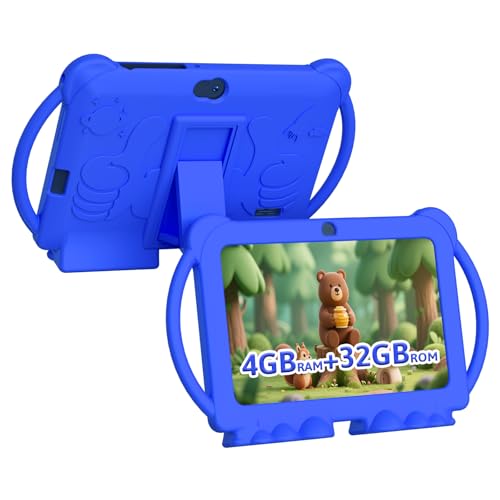
Best for: Families needing a robust Android tablet with parental controls and a protective case. Features include Android 12.0, 4-core CPU, 4GB RAM, 32GB storage (expandable), and a 3000mAh battery offering up to 8 hours of mixed use. It supports Google Play, app downloads, and child-safe profiles, making it flexible for both learning apps and entertainment. A potential limitation is the balance between affordability and higher-end performance; power users may want more RAM for heavy apps.
Why selected: This option emphasizes a strong balance of performance, parental controls, and a durable form factor. The included protective case and kid-specific features help reduce learning disruption from drops or rough handling, which is common with younger children during study or playtime.
Caution: While expandable storage helps, check what apps your child plans to use, as some may require updates or account setup beyond the parental controls.
URAO Kids Tablet 10 Inch

Best for: Families seeking a larger display with robust parental controls and storage expansion. This 10-inch tablet runs Android 16.0, uses a relatively fast octa-core processor, and includes 24GB RAM and 64GB ROM with up to 1TB expansion. It supports Google Play for a wide range of educational apps and content, plus a dedicated kid-friendly experience and profiles. Limitation: The larger screen may be less portable for small hands and pockets, and some users may need more guided onboarding for younger children.
Why selected: The combination of a bigger screen, strong safety features, and expandable storage makes this a long-term option for growing children, enabling more complex apps and reading materials as skills advance.
Best for: Families who want expansive storage and a flexible software ecosystem while keeping supervision intact. Consider if you expect your child to access a wide library of apps and multimedia content.
Trayoo Kids Tablet 7

Best for: Parents seeking offline-friendly learning with a large suite of preloaded resources. Trayoo emphasizes a powerful quad-core setup and Android 11 with Google Play access, plus a robust parental control mode. It includes YouTube and YouTube Kids compatibility, making it a reasonable choice for varied content and controlled exploration. Caution: Some users may prefer newer Android versions for the latest apps, potentially limiting app availability.
Why selected: Trayoo positions itself as a one-tablet solution for both education and entertainment with a focus on kid-safe usage, making it a strong option for daily school-like activities and family time without constant supervision.
ATOZEE Kids Tablet 7

Best for: Families needing strong parental controls and extensive content filtering. ATOZEE offers a 7-inch tablet with 4GB RAM and 32GB ROM, plus micro SD expansion up to 1024GB. It emphasizes Google Play access for educational apps and an iWawa pre-installed experience designed for children aged 3 and up. Caution: Storage expansion is a key feature, but performance is tied to the Android version and app demands, so users should monitor updates and compatibility.
Why selected: The combination of parental controls, expandable storage, and educational content makes this a well-rounded option for younger kids who need both guided content and room to grow with apps.
Buying Guide: Key Purchase Considerations
Screen size and durability matter for small hands. A 7-inch display is compact and portable, while a 10-inch panel is better for reading and drawing. Consider a protective case or bumper to minimize damage from drops.
Parental controls are essential. Look for features like screen-time limits, content filtering, profile switching, and app whitelisting. A simple setup process helps keep kids in a safe environment without excessive supervision.
Content ecosystem matters. A bigger library of kid-friendly apps and media reduces the need for extra devices. Subscriptions like Amazon Kids+ can add value, but check renewal terms and content availability in your region.
Storage and expandability affect how many apps and media you can keep on the device. If you plan to install many apps or download videos for offline use, prioritize devices with larger onboard storage or micro SD expansion.
Battery life is practical for travel and school days. Look for longer battery life to minimize recharging during outings or lessons.
Comparative Snapshot
- Best budget option: Amazon Fire 7 Kids
- Best Android flexibility: HOTTABLET 7 Inch
- Best offline learning: Trayoo 7 Inch
- Best storage and multi-language: URAO 10 Inch
- Best overall for larger display: Amazon Fire HD 8 Kids
Frequently Asked Questions
- What age is appropriate for a kids tablet? Answer: Tablets are commonly recommended for children aged 3 and up, with supervision and limits appropriate to their development and the content accessed.
- Do kids tablets require a subscription? Answer: Some bundles include a free trial or a yearly subscription to a kids-focused service, but ongoing costs may apply after the trial period.
- Can tablets be used without Wi-Fi? Answer: Many tablets offer offline modes and preloaded content, but most features and updates require internet access.
- Are parental controls easy to use? Answer: Most models provide dedicated parental control modes with profile-based restrictions and time limits designed for parents and guardians.
- Which is best for multiple children? Answer: A device with expandable storage and robust parental controls, plus content that scales across profiles, tends to suit households with multiple kids.
- Is screen time health-conscious? Answer: Use built-in time limits and healthy content moderation to promote safe screen time aligned with recommended guidelines.