Whether you study, work with documents, or simply enjoy reading PDFs on the go, a tablet with a sharp display, solid battery life, and reliable stylus support is essential. This guide highlights five tablets well-suited for viewing and annotating PDFs, with features like high-resolution screens, robust processing, and Widevine support for streaming and protected content. Each option offers a different balance of screen size, RAM, storage, and accessory support to fit varied workflows.
| Product | Brand | Display | Key Benefit for PDFs |
|---|---|---|---|
| TECLAST Artpad Pro Android 15 Tablet | TECLAST | 12.7″ 2176×1600 | Large, high-resolution panel; pressure stylus support; tempered glass protector included |
| Tablet 2026 Android 16 with Gemini AI | TABWEE | 11″ FHD 1920×1200 | AI-assisted workflows; light and portable with good RAM/ROM balance |
| Lenovo Tab M8 | Lenovo | 8″ HD | Compact, affordable option for quick PDF reading on the go |
| 12 Inch Tablet Android 15 (QDDQ) | QDDQ | 12″ 2K IPS | High resolution for detailed documents; expandable storage |
| reMarkable 2 Starter Bundle | reMarkable | 10.3″ e-ink-like display | Paper-like writing experience; focused PDF annotation with long battery life |
Note: The listed features come from product descriptions and are intended to help compare PDF-readiness, annotation capabilities, and overall reliability for document workflows.
TECLAST Artpad Pro: Large Screen for PDFs and Drawing
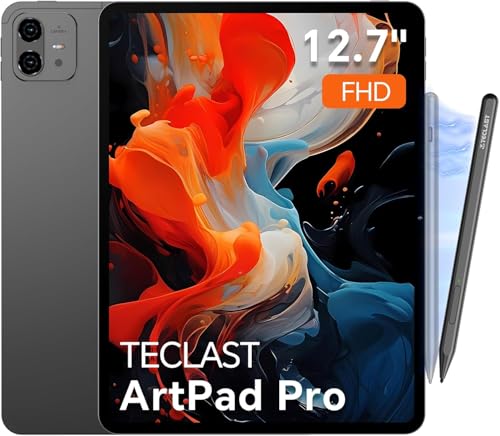
The TECLAST Artpad Pro is designed for PDF viewing and note-taking on a 12.7-inch, high-resolution display. Its 2176×1600 IPS panel delivers bright, detailed text and diagrams, with narrow bezels to maximize reading area. The device uses TDDI technology for efficient light transmittance and faster response, which helps when scrolling through dense documents. A factory-installed tempered glass screen protector is included, reducing glare and scratches during long study sessions. The ArtPad Pro supports the Teclast T-Pen stylus with up to 4096 levels of pressure sensitivity and anti-misclick features, ideal for precise PDF markup and drawing. It also supports other USI 2.0 active styluses for handwriting and annotation. With 20GB RAM and 256GB storage, large PDFs and document libraries load smoothly, and Widevine L1 support ensures compatibility with streaming content when needed.
Useful for: reading complex PDFs with dense imagery, annotating PDFs with a stylus, on-screen note-taking, and multitasking between document apps. The device ships with a dedicated creative app optimized for the T-Pen, augmenting the annotation workflow for professionals and students alike.
Tablet 2026: Android 16 and Gemini AI, 11-Inch Reader

This tablet pairs an 11-inch Full HD display with Gemini AI 2.0, offering enhanced document workflows like turning voice notes into formatted text and auto-optimizing tasks. The 1920×1200 screen with a 120 Hz touch sampling rate provides smooth scrolling for lengthy PDFs and presentation slides. The device emphasizes productivity features, including up to 24GB RAM when combining physical and virtual memory, along with 128GB of built-in storage and microSD expansion up to 2TB. Widevine L1 support ensures secure streaming for multimedia references during study or work. The combination of lightweight design (about 505g) and robust performance makes it a versatile option for annotating PDFs and editing documents on the go.
Best for: on-the-go PDF review with quick note capture, light content creation, and multi-app multitasking with AI-assisted enhancements.
Lenovo Tab M8: Compact PDF Reader

The Lenovo Tab M8 emphasizes portability with an 8-inch HD display and a slim, metal frame. While compact, the device provides a crisp viewing experience suitable for reading PDFs, especially on short commutes or in tight spaces. It runs Android with a straightforward interface, making it easy to open PDFs in various apps and annotate with a compatible stylus or finger input. The tablet’s efficiency is aided by a modest processor and integrated battery optimizations for longer reading sessions. For users who prioritize a simple, affordable option for PDF consumption and light editing, the Tab M8 offers a practical balance of size and performance.
QDDQ 12-Inch Android 15 Tablet: High-Resolution PDF Studio

The QDDQ 12-inch Android 15 tablet features a 2K 2000×1200 IPS display for crisp PDF rendering and improved color fidelity. It ships with 24GB RAM total (8GB physical + 16GB virtual) and 256GB ROM, expandable up to 1TB, delivering ample space for large document libraries and high-resolution PDFs. The Octa-core CPU and GMS certification support fluid multitasking and access to Google apps, aiding productivity workflows that involve PDF annotation, image embedding, or form filling. An 8000mAh battery supports extended reading sessions, while easier USB-C connectivity and a 3.5mm jack provide versatile peripheral use for presentations or note-taking. The tablet’s strong display resolution and expandability make it a robust option for heavy PDF users.
reMarkable 2 Starter Bundle: Paper-Like PDF Annotations

The reMarkable 2 focuses on a paper-like writing experience ideal for PDF reading and annotation. It delivers extended battery life and a minimal digital distraction environment, making it suitable for long PDF review sessions. The Starter Bundle includes a Marker Plus Pen with built-in eraser and spare tips, enabling precise highlighting and annotating directly on PDF documents. The device prioritizes focus over app ecosystems, which can be advantageous for users who want distraction-free PDF markup and reading. The lack of typical app notifications supports sustained concentration and smooth handwriting input on screen.
reMarkable Essentials Bundle: Leather Folio for Portable PDFs

This bundle pairs reMarkable 2 with a premium leather folio, providing a durable, portable setup for PDF reading and annotation. The included Marker Plus Pen with built-in eraser enhances the editing workflow, while the leather folio adds protection and a professional feel when carrying documents between meetings or classes. Like the Starter Bundle, the Essentials Bundle emphasizes a distraction-free environment, long battery life, and seamless PDF note-taking in a tactile, paper-like interface.
Buying Guide: Key Considerations for Choosing the Best PDF Tablet
- Display quality and size: Larger displays with high resolution improve readability for dense PDFs and diagrams. Consider whether you prefer 10–12 inches for comfort or a more compact 8-inch option for portability.
- Stylus support and handwriting: For annotation, pressure sensitivity, accurate palm rejection, and a responsive stylus system are essential. Verify compatibility with your preferred pen across devices.
- Storage and RAM: PDFs with images or interactive content can be heavy. Devices with at least 8–16GB RAM equivalent and ample storage (128GB or more, expandable) help maintain smooth performance.
- Software and ecosystem: Systems with strong PDF apps (annotation, bookmarking, form filling) and reliable app stores improve productivity. AI features can help organize notes and workflows.
- Battery life: Long battery life supports extended reading and annotation sessions without frequent recharging.
- Content protection and streaming: Widevine L1 or similar protection matters if you plan to stream protected content while researching PDFs.
- Portability vs. functionality: Balance screen real estate against weight and battery to fit your typical use case—travel, commuting, or desk work.
- Accessibility and updates: Regular OS updates and robust customer support reduce long-term maintenance issues and improve compatibility with new PDF formats.