Artists seeking portable, computer-free drawing solutions can rely on standalone tablets that run drawing apps, come with a stylus, and offer ample storage. This guide highlights five capable options that fit a range of budgets and skill levels, from beginners to creatives who need desktop-like performance on the go. Each entry includes a quick snapshot of its strengths to help you compare at a glance.
| Product | Brand | Key Strength |
|---|---|---|
| PicassoTab A10 Drawing Tablet | Simbans | Affordable, bundled accessories, Android apps |
| XPPen Magic Drawing Pad 12.2 | XP-Pen | 16K pressure levels, paper-like display |
| Viewedge Standalone Drawing Tablet | Viewedge | 11″ display, 90Hz, long battery life |
| X11 PicassoTab 11″ | PicassoTab | Learning package with tutorials, immersive screen |
| Frunsi-T8 Standalone Drawing Tablet | Frunsi | 8″ screen, Android 13, strong value |
PicassoTab A10 Drawing Tablet

The PicassoTab A10 is a standalone drawing tablet designed for creativity and productivity. It ships with an active stylus and pre-installed apps for drawing, animation, and note-taking, making it a versatile option for artists, students, and hobbyists. In the box, a protective case, a drawing glove, a universal power adapter, and a pre-installed screen protector add value. Powered by an octa-core processor, the 10-inch display offers clear visuals, while 128GB of storage enables a wide app library from the Play Store.
XPPen Magic Drawing Pad 12.2

The XPPen Magic Drawing Pad 12.2 stands out with 16K pressure levels in its X3 Pro stylus, offering extremely precise line work. It features a 12.2-inch AG-etched display with a paper-like texture, a wide color gamut, and a high-resolution screen that enhances color accuracy and shading. The stylus is battery-free, and the device supports tilt input for more expressive drawing, making it a strong choice for serious digital artists seeking natural pen-on-screen feedback.
Viewedge Standalone Drawing Tablet
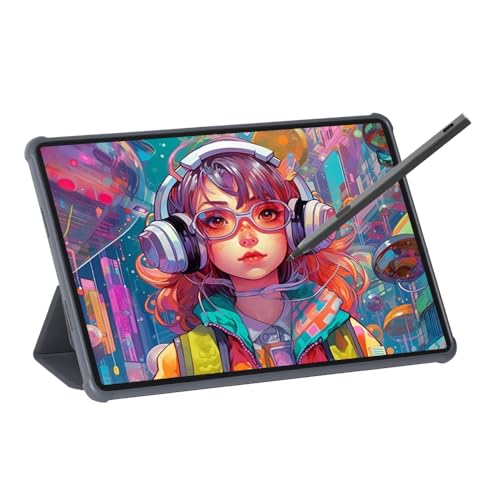
The Viewedge tablet emphasizes an immersive 11-inch display with a 90Hz refresh rate and an anti-glare surface. A rechargeable pen with 4096-level pressure sensitivity and tilt support enables smooth strokes and nuanced shading. The full-laminate, soft-light glass design reduces glare and eye strain, while an anti-fingerprint coating helps maintain a clean screen during long drawing sessions. This blend of display quality and pen performance targets artists who value comfort during extended work periods.
X11 Drawing Tablet by PicassoTab

The X11 combines learning resources with a robust drawing experience. It includes premium apps like Concepts and Infinite Painter, providing step-by-step tutorials for beginners and a pathway to develop skills. The 11-inch Full HD screen is fully laminated with anti-glare tech, delivering a paper-like feel and precise stylus interaction for a smooth, immersive drawing process. This makes it suitable for students and new artists who want guided practice alongside their creative work.
Frunsi-T8 Standalone Drawing Tablet

The Frunsi-T8 is an 8-inch standalone tablet running Android 13 with a MTK octa-core processor. It ships with a stylus and pre-installed drawing apps and tutorials, making it a strong option for beginners and casual artists who want portability and quick access to creative tools. With 4GB RAM and 64GB storage (expandable via TF card), users can run multiple apps for sketching and light animation without major slowdowns, all in a compact form factor.
Buying Guide: Key Purchase Considerations
- Display quality and size: Larger screens with high resolution offer more drawing space and detail. Look for laminated, anti-glare displays to reduce parallax and eye strain.
- Pen tech and sensitivity: Higher pressure levels and tilt support yield more natural line variation. Battery-free styluses simplify use and maintenance.
- Storage and RAM: More storage and memory let you install more drawing apps and keep large project files locally without external storage.
- Android/iOS compatibility: If you rely on specific apps, verify platform compatibility and availability of Creative Suite apps on the device’s OS.
- Battery life and charging: A long-lasting battery is essential for on-the-go use. Check whether the tablet supports fast charging or USB-C power delivery.
- Accessories: Bundled cases, screen protectors, gloves, and stand options add value and protect your investment.
- Learning resources: Some devices include tutorials or access to premium drawing apps, which can accelerate skill development for beginners.
- Expandability: If available, consider devices with microSD or TF card support to store additional artwork and resources.
- Weight and ergonomics: Lighter tablets with comfortable grips are preferable for long drawing sessions, especially if you travel.
- Price-to-performance: Compare core features (display, pen feel, storage) against price to find the best value for your needs.
These standalone tablets provide varying balances of screen quality, pen responsiveness, and bundled software. When choosing, align features with your typical drawing tasks—sketching, illustration, animation, or note-taking—and your preferred workflow.