Answer: These tablets are specifically chosen to enhance Bible reading with clear text, comfortable brightness, and easy navigation. They are best for readers who want portable, dedicated devices for daily devotionals, study, and church notes. The top picks below cover small to larger screens, built-in audio options, and eye-friendly displays for long reading sessions. A quick buying summary is provided after the introduction.
Buying Summary Table
| Product | Screen Size | Best For | Notes |
|---|---|---|---|
| 7 Inch Tablet, Android Reading Tablet | 7″ | Budget readers, basic reading, on-the-go study | Expandable storage, Eye Health Mode |
| Azpen 8″ HD Touchscreen Digital Bible eReader | 8″ | Comfortable Bible reading, built-in audio | Preloaded NKJV/NIV options |
| Award Winning Audiobook Speaker Electronic Bible, 8″ eReader | 8″ | Audio-focused Bible study | Includes speakers, leather case |
| The Four Gospels – Digital Visual Bible | — | Immersive Gospel study with video | Authentic Holy Land footage |
| Daily Meditation NIV Audio Bible Player | — | Audio-first devotionals, portable | NIV with six meditation tracks |
7 Inch Tablet for Reading and Light Travel

Best for: budget-minded readers who want a compact device for Scripture, PDFs, and basic web lookup. This 7-inch Android tablet offers Eye Health Mode, a crisp 1024×600 display, and expandable storage up to 512GB, making it suitable for daily devotionals and light study on the go.
Why selected: Its Eye Health Mode reduces blue light, helping comfort during long reading sessions. The quad-core processor keeps up with eBooks and articles, while the microSD expansion supports large libraries without frequent file management.
Caution: The screen resolution is modest by modern standards, so very small text in complex PDFs may require zooming for readability. Battery life is typical for entry-level tablets and may vary with app usage.
Azpen 8″ HD Touchscreen Digital Bible eReader

Best for: readers who want a dedicated Bible reader with preloaded translations and a simple interface. The 8″ IPS screen offers comfortable typography, and the device supports adjustable brightness and font size for improved readability.
Why selected: Focused, distraction-free reading helps maintain concentration during scripture study. The device emphasizes a clean UI and comfortable controls, making it suitable for seniors and first-time e-reader users.
Caution: While designed for Bible reading, it may have limited app versatility compared with multipurpose tablets. Battery performance depends on brightness and usage patterns.
Award Winning Audiobook Speaker Electronic Bible 8″ eReader
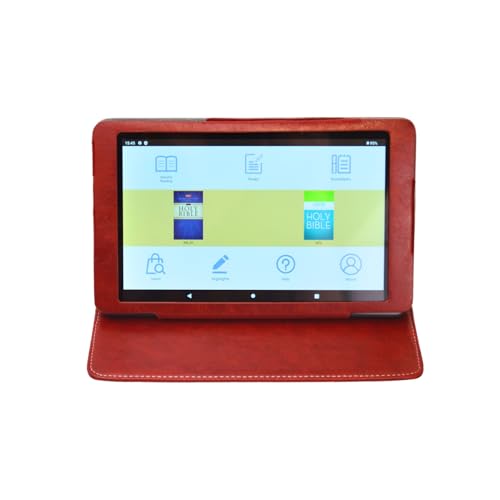
Best for: readers who prefer audio-driven Bible study, with the ability to listen to the text while following along on an 8″ touchscreen. Built-in speaker and optional headphones support flexible listening in various settings.
Why selected: Preloaded NKJV and NIV audio Bibles enable immediate use for devotionals and scripture memorization without extra downloads. The included case and hard shell packaging add to portability and protection.
Caution: Audio playback quality depends on the included accessories and speaker output. If you primarily read visually, you may favor a device focusing more on text clarity than audio features.
Award Winning Audiobook Speaker Electronic Bible, 8″ eReader (Black)

Best for: devotional readers who want a robust, portable Bible study device with solid reading and audio capabilities. The black variant maintains a sleek, travel-friendly look for everyday use.
Why selected: The device mirrors the NKJV and NIV audio Bible experience with a readable IPS display, adjustable font size, and brightness for day or night reading. It supports scripture search and note-taking features for study sessions.
Caution: Like other dedicated Bible devices, occasional firmware updates may be required to access new features or fix minor issues. Text customization is helpful but not unlimited.
Wonder Bible NIV Audio Bible Player

Best for: listeners who want an audio-first experience with the complete NIV Bible, including meditative tracks. This device supports hands-free reading and portable listening.
Why selected: It provides the full NIV text audio alongside the ability to skip to chapters and books, making it suitable for audio devotionals and commutes.
Caution: It focuses more on audio playback than on large, high-resolution reading text. If you primarily read visually, consider another device with a larger screen.
Daily Meditation NIV Audio Bible Player

Best for: devotional routines that combine Bible reading with meditation music and a straightforward navigation experience. This is ideal for daily quiet time and travel.
Why selected: Preloaded NIV audio Bible with a compact design and simple controls supports quick access to chapters and verses, plus built-in meditation music tracks for reflection.
Caution: The device emphasizes audio and navigation for the NIV text; text customization may be limited compared with tablet-based readers.
UikJOY Book Stand With Light For Tablet Bible Reading
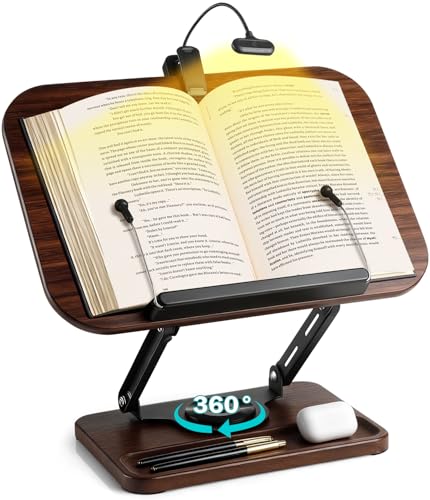
Best for: readers who want a hands-free Bible reading setup with a stable stand, adjustable height and angle, and a built-in reading light for nighttime study. Compatible with tablets and other reading devices.
Why selected: The stand provides 360° rotation and a 7.3-inch height adjust, making it suitable for reading at a desk or in bed. Built-in storage helps keep study essentials organized.
Caution: This is a stand accessory rather than a standalone tablet device, so it pairs best with a separate tablet or Bible reader for a complete setup.
Buying Guide: How to Choose a Tablet For Bible Reading
- Look for a high-contrast, readable LCD/IPS display with adjustable brightness and font size. For long sessions, a device with Eye Health or blue light filtering helps reduce eye strain.
- If you listen along with Scripture, consider devices with built-in speakers or reliable audio playback. If you study visually, prioritize clear text rendering and compatibility with eBook formats.
- 32GB is common, but Bible libraries can be large. Choose expandable storage or cloud access if you plan to store many translations and study aids.
- Simple navigation, a distraction-free interface, and one- or two-tap access to major Bible translations help users stay focused during devotionals.
- Smaller screens are lighter and easier to carry; larger screens improve readability but may be less convenient for travel. Consider a protective case for daily carry.
- Preloaded translations (NIV, NKJV), adjustable font options, night-reading modes, and the ability to search Scripture quickly can improve study efficiency.
- Some devices are dedicated Bible readers with audio focus, while others are multipurpose tablets. Choose based on how you prefer to study and read.
Frequently Asked Questions
- What screen size is best for Bible reading? A size between 7″ and 8″ offers a good balance of readability and portability for most readers.
- Do these devices support offline Bible reading? Many are designed for offline reading with preloaded translations, but some features may require an internet connection.
- Can I listen to Bible audio on these devices? Yes, several models provide built-in audio playback or preloaded audio Bibles for listening while reading along.
- Are there devices that are easier for seniors? Devices with larger screens, simple interfaces, and adjustable font sizes are typically easier for seniors to use.
- Is an e-reader better than a tablet for Bible study? It depends on your needs: dedicated Bible readers often offer a distraction-free interface, while tablets provide broader app access and features.
- What should I avoid when choosing? Avoid devices with very limited storage or poor readability, as they can hinder long devotional sessions or study efficiency.