If you’re browsing for a surge protector for a dorm room, you want compact, reliable, and capacity-packed options that won’t block other outlets. The top picks below are ideal for students who need to charge multiple devices without clutter. Each product suits different setups—from slim wall-facing strips to tall towers with built-in USB-C PD ports. The table summarizes key choices to compare at a glance.
| Product | Outlets / USB | Special Feature | Best For |
|---|---|---|---|
| HANYCONY 12-in-1 | 8 AC, 4 USB | Ultra-thin flat plug | Small dorm desks with limited space |
| Pluackg 16-in-1 Tower | 12 AC, 4 USB (2 C) | Smart charging, 30% faster USB-C | Multi-device charging at a desk |
| kakyanill 17-in-1 Tower | 9 AC, 8 USB (4 C) | Retractable cord | Large device sets, high power needs |
| Addtam 16-in-1 | 12 AC, 4 USB | 10 ft extension, flat design | Long reach, behind furniture |
| UWIWUTEI Tower | 12 AC, 5 USB (3 C) | PD 20W USB-C port | Laptop and phone charging with fast PD |
HANYCONY 12-in-1 Power Strip

The HANYCONY power strip gives 8 AC outlets plus 4 USB ports, charging up to 12 devices simultaneously. It features 2.2 inches of spacing between outlets to accommodate large adapters. The ultra-thin 0.35 inch flat plug and 45-degree right-angle design let it sit flush against walls, behind furniture, or under a desk. Best for students who need many powered devices in a compact package. Caution: placed near heat sources or in cluttered cords may limit air flow.
Pluackg 16 In 1 Tower Surge Protector

This tower provides 12 AC outlets and four USB ports (including 2 USB-C), supporting up to 16 devices simultaneously. Smart USB charging detects devices for optimal speeds, with USB-C delivering up to 3.4A total. The flat, 0.31 inch plug and 45-degree design help it stay flush against walls. Choose this if you have a busy desk with many peripherals and need quick USB-C charging in one compact unit. Limitation: high device count may still require attention to total wattage.
kakyanill 17-In-1 Power Strip Tower

Designed as a space-saving tower with a 6-foot retractable cord, this unit fits behind beds or desks. It powers 9 AC outlets and 8 USB devices (4 USB-C, 4 USB-A) at once, with a total USB output up to 4.8A. A 1875W/15A circuit breaker supports high-wattage devices like printers. Best for dorm rooms with multiple devices that need organization and reach. Caution: retractable cord mechanism should be used carefully to avoid wear over time.
Addtam 12-Outlet 10-Ft Power Strip

With 12 widely spaced outlets and a long 10-foot extension cord, Addtam’s power strip reduces plug-blocking and increases reach. The 3-side design and 45-degree plug keep it unobtrusive behind furniture. Four USB ports enable everyday charging for smartphones and accessories. Best for fans of long cords who still want a neat surface. Limitation: longer cords can be a tripping risk in tight dorm layouts if not managed.
UWIWUTEI Tower With PD Port
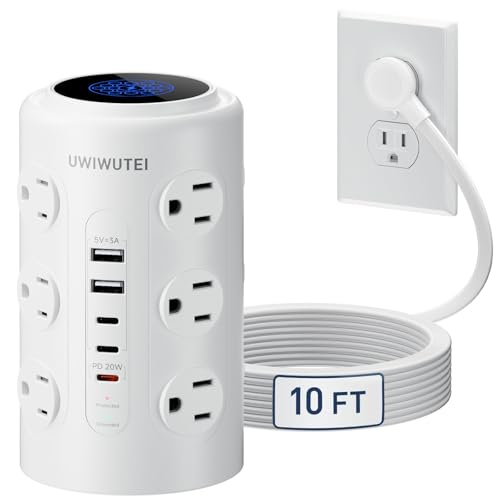
This 17-in-1 tower includes a dedicated 20W USB-C PD port for fast charging, plus 12 AC outlets and multiple USB ports. It’s designed to power a wide range of devices from laptops to earbuds, making it ideal for students with heavy charging needs. Best for those who want a fast PD option and an all-in-one charging hub. Caution: PD performance depends on connected devices and overall power load.
Buying Guide
What should you consider when choosing a dorm room surge protector?
- Outlets and USB: Balance the number of AC outlets and USB ports with the size of your devices. If you own several bulky adapters, look for wider outlet spacing.
- Flat plug design: A flat plug helps keep furniture flush against the wall and reduces protrusion behind beds or desks.
- Cord length: Longer cords offer flexibility, especially in dorm layouts where outlets are far from desks or beds. Beware of excessive length creating clutter.
- Surge protection: Check joule ratings and safety features. Higher joules provide better protection during surges; fire-retardant housings add safety for student use.
- Smart charging: USB-C ports with power delivery (PD) can accelerate charging for phones, tablets, and laptops. Look for automatic device detection for optimal speeds.
- Space efficiency: Tower designs save desk space; flat plug strips fit tight nooks behind furniture; consider retractable cords for tidy storage.
- Safety features: Look for overload protection, temperature control, and a tested regulatory listing for dorm environments.
FAQ
- How many devices can a surge protector safely power at a dorm desk?
Typically up to the rated total wattage (often 1875W/15A). Do not exceed the sum of all device power draws.
- Is a PD port necessary for dorm use?
PD ports are beneficial for fast charging laptops and phones, especially when you have limited outlets.
- Should I buy a tower or a flat power strip for a dorm room?
Towers are great for many devices and easy organization; flat strips are better when space behind furniture is tight.
- What about long cords and clutter?
Choose models with retractable cords or hooks and use cable organizers to keep the area tidy.
- Are there safety certifications I should look for?
Yes, look for ETL or UL listings and built-in overload and fire-retardant protections.