For creators, gamers, and professionals, 4K streaming webcams offer sharper detail, better color, and advanced autofocus. This guide highlights five top options that balance image quality, audio, and versatility for live streams, video calls, and content creation across platforms.
Summary of chosen products:
| Product | Brand | Key Benefit |
|---|---|---|
| EMEET S600 4K Webcam for Streaming | EMEET | High-definition 4K sensor, PDAF autofocus, dual mics, adjustable field of view |
| Logitech MX Brio Ultra HD 4K | Logitech | 4K at 30fps, 1080p at 60fps, GameChat support, AI-enhanced image |
| Elgato Facecam 4K | Elgato | DSLR-like image quality, 4K60, software-controlled effects |
| acer 4K Webcam | acer | All-metal unibody, PDAF, privacy cover, robust cooling |
| Logitech Brio 4K Webcam | Logitech | 4K/30fps, RightLight 3, multiple FOV presets |
EMEET S600 4K Streaming Webcam

The EMEET S600 uses a Sony 1/2.55” sensor delivering high-definition 4K streaming with options for 4K at 30FPS or 1080P at 60FPS. Advanced PDAF autofocus increases speed and precision across scenes, while auto light balance maintains detail in varying lighting. Dual noise-reduction mics can be managed via EMEETLINK software to suit quiet rooms or noisy environments. Field of view adjusts from 40° to 73° at 1080P, with a fixed 73° FOV at 4K for stability and image quality. This webcam is designed for live streaming, gaming, and beauty/commerce content creation.
Logitech MX Brio Ultra HD 4K

Logitech MX Brio delivers Ultra HD 4K at 30fps and 1080p at 60fps, currently featuring the GameChat mode for Nintendo Switch 2. It uses larger pixels for improved sharpness and AI-enhanced image processing. The webcam supports auto-exposure, auto white balance, noise reduction, and autofocus, making it suitable for professional calls and streaming in varied lighting. Its color and exposure adjustments help maintain clear faces and accurate skin tones in dynamic environments.
Elgato Facecam 4K

Elgato Facecam 4K offers 4K60 capture with DSLR-like control, designed for creators who want premium image fidelity. The camera delivers uncompressed video and works with Elgato Camera Hub to fine-tune exposure, color, and focus. The compact body and USB-C compatibility enable straightforward setups for streaming studios, content creation, and video conferencing with consistent, professional visuals.
acer 4K Webcam
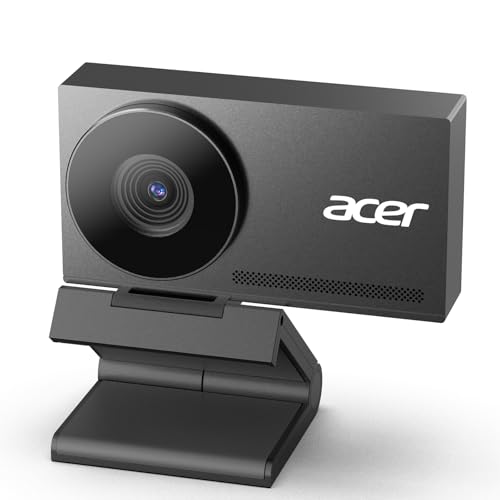
acer’s 4K webcam features a robust all-metal unibody, a Sony 1/2″ sensor, and PDAF autofocus. It includes privacy cover and dual noise-reduction mics. The design emphasizes cooling for steady streaming performance and a premium, durable feel. It suits users seeking a high-end, long-lasting webcam for live commerce, gaming, and professional meetings in 4K clarity.
Logitech Brio 4K Webcam

Logitech Brio 4K delivers Ultra HD 4K at 30fps with RightLight 3 to optimize lighting. It also provides option up to 90° FOV presets and advanced autofocus for sharp, consistent video quality across different viewing setups. The webcam is compatible with major conferencing platforms and supports Windows Hello for quick login on Windows devices, enhancing security and convenience during calls and streams.
Buying Guide
- Resolution and frame rate: For most streaming and conferencing, 4K at 30fps or 1080p at 60fps provides smooth, detailed video. Some models offer 4K at 60fps, which benefits fast-moving content but may require more processing power.
- Autofocus and exposure: PDAF or advanced autofocus helps in dynamic scenes. Look for cameras with auto exposure, white balance, and light balancing capabilities to maintain consistent image quality.
- Field of view: A wider FOV catches more of the scene, useful for desk setups, while narrower angles reduce background distortion. Many cameras offer adjustable FOV or fixed wide angles like 73° or 90°.
- Audio quality: Built-in mics with noise reduction are important. If possible, check for dual mics or software options to suppress background noise for clearer voice capture.
- Privacy and mounting: A built-in privacy cover protects privacy, and a sturdy tripod or stand expands placement options. Consider metal housings for durability and heat management.
- Software and compatibility: Software like Camera Hub or manufacturer apps can unlock advanced features. Ensure compatibility with your preferred platforms (Zoom, Teams, Meet) and, if needed, game consoles or mixed environments like a Nintendo Switch.
- Ergonomics and setup: Some webcams ship with tripods or flexible mounts. If you need full-body framing or studio-style angles, choose a camera with a versatile mounting system or a compatible tripod.
- Price-to-performance balance: Compare image quality, autofocus speed, audio capabilities, and software features to find the best value for your streaming or conferencing needs.