If you’re shopping for a streaming stick to watch Netflix easily, this guide helps you choose the right device for your setup. The top picks here cater to different needs—compact design, 4K/Dolby Vision quality, long-range Wi‑Fi, and strong voice control. Whether you want budget-friendly HD streaming or premium 4K with smart features, there’s a fit for most living rooms. The buyers below are best for: casual Netflix viewing on a single TV, or a multi-room setup with higher picture quality, or hands-free search and quick app access.
Summary of chosen products:
| Product | Resolution / Key Benefit | Best For | Notes |
|---|---|---|---|
| Roku Streaming Stick HD | HD | Budget-friendly Netflix viewing on a single TV | Compact, powers from TV |
| Roku Streaming Stick 4K | 4K HDR | 4K Netflix with long-range Wi‑Fi | Dolby Vision support |
| Roku Streaming Stick Plus | 4K HDR | Balanced quality and compact design | Strong Wi‑Fi, no extra cords |
| Amazon Fire TV Stick 4K Max | 4K HDR with AI search | Fast interface and smart search | Wi‑Fi 6E capable |
| Google TV Streamer 4K | 4K HDR with personalized recommendations | Smart recommendations and apps in one grid | Voice search remote |
Roku Streaming Stick HD — HD Streaming Device for TV with Roku Voice Remote

Best for budget-friendly Netflix viewing on a single TV. The Roku Streaming Stick HD focuses on simple setup and access to popular apps and free content. It powers from the TV itself, so no extra cords are needed, keeping a clean entertainment area. The included Roku Voice Remote lets you search and launch shows hands-free. This model is ideal for basic Netflix streaming without 4K requirements.
Who this is for: viewers who want a straightforward, compact streaming stick that fits behind a TV and doesn’t require a wall outlet.
Limitations: This device is HD only, so it won’t deliver 4K Netflix content or premium HDR experiences.
Roku Streaming Stick 4K — HDR & Dolby Vision Roku Streaming Device

Best for Netflix fans who want sharper pictures and cinematic color. The Roku Streaming Stick 4K supports Dolby Vision and HDR10+, bringing richer contrast and lifelike tones. It provides long-range Wi‑Fi so you can place the TV farther from the router while still streaming smoothly. The design remains compact and TV-powered, reducing clutter.
Who this is for: households prioritizing 4K streaming with vivid HDR visuals on a main living room TV.
Limitations: Requires a 4K-capable TV and a compatible internet connection to enjoy full 4K HDR content.
Roku Streaming Stick Plus — 4K & HDR Roku Device

Best for a compact, powerful streaming upgrade in a family room. The Roku Streaming Stick Plus delivers 4K streaming with strong, reliable Wi‑Fi in a slim form factor. It features a long-range receiver and a sleek design that won’t block adjacent HDMI ports. The included voice remote enables quick searches and simple control across apps, including Netflix.
Who this is for: viewers who want better Wi‑Fi performance in a multi-device home without adding clutter.
Limitations: While small, it may require a steady Wi‑Fi connection for optimal 4K playback in larger homes.
Amazon Fire TV Stick 4K Max — AI-Powered Search
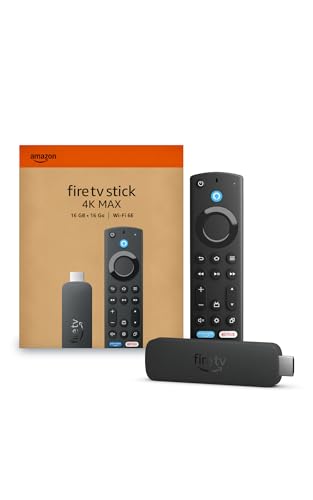
Best for faster navigation and smart search across apps. The Fire TV Stick 4K Max features a modern Fire TV experience with AI-driven search, a fast processor, and access to a wide app library, including Netflix. It supports Wi‑Fi 6E and offers personalized recommendations via Alexa. This is a strong pick for households that want quick access to Netflix and other streaming apps without delays.
Who this is for: viewers who want snappy performance, broad app access, and AI-powered search for Netflix and beyond.
Limitations: Some features depend on Alexa integration and an active internet connection; interface updates may vary by region.
Google TV Streamer 4K — Fast Streaming With Voice Search

Best for a platform with integrated recommendations and Netflix alongside other services. Google TV Streamer 4K combines 4K HDR streaming with a personalized home screen that surfaces content from multiple apps, making it easy to find Netflix shows. The voice search remote helps you navigate quickly and discover new content across services.
Who this is for: households that want a centralized, smart interface with strong search across apps for Netflix and more.
Limitations: The user experience leans heavily on Google services; some users may prefer a different app ecosystem.
Buying Guide
What resolution do you need?
Choose HD if your TV is older or you mainly stream standard-definition content. For Netflix in higher quality, pick 4K HDR options such as Roku 4K, Roku Plus, Amazon Fire TV Stick 4K Max, or Google TV Streamer 4K. Dolby Vision or HDR10+ support can improve color and contrast.
How important is Wi‑Fi performance?
Long-range or strong Wi‑Fi helps when streaming in larger rooms or multi-TV homes. Devices labeled as “Plus” or those with advanced Wi‑Fi may handle signal distances better without buffering, particularly for 4K content.
Which ecosystem suits you best?
Roku devices emphasize a neutral platform with many apps including Netflix. Fire TV devices integrate tightly with Alexa and Prime Video. Google TV emphasizes integrated recommendations and voice search across multiple services. Pick the ecosystem that aligns with your preferred apps and voice assistants.
What about remote control features?
All listed devices include voice remotes, which speed up searching for Netflix titles. If hands-free search is a priority, verify that the remote supports the features you want in your region and language.
Is 4K worth it for Netflix?
4K is beneficial if you have a 4K TV and access to compatible Netflix plans. For many households, 4K HDR enhances detail and color, but it requires a fast internet connection to consistently stream without buffering.
Setup and power considerations
Most sticks draw power from the TV via USB or a small included adapter. Ensure there’s a nearby USB port or outlet for reliable operation and to minimize clutter behind the TV.
Which product best fits multi-room or multi-TV setups?
4K options with strong Wi‑Fi, like Roku 4K or Fire TV 4K Max, are versatile for multiple rooms if you want consistent quality across televisions. If you mainly need Netflix on one TV, a budget-friendly HD model may suffice.
Short FAQ
- Will these devices work with Netflix only? These sticks support Netflix among many apps, but you’ll access Netflix via each device’s app store.
- Do I need a subscription to use Netflix on these sticks? Netflix access depends on a subscription with Netflix, not the streaming stick itself.
- Can I control these devices with my phone? Many sticks support companion apps for setup, search, and playback control on mobile devices.
- Is 4K HDR content always available on Netflix? Netflix offers certain 4K HDR titles; availability varies by plan and title.
- Do these devices require a wall outlet? Most primarily draw power from the TV USB, but some setups may use a wall outlet for steadier power.
- Can I use these sticks with poor network connections? Lower-resolution streaming is often possible, but 4K content may buffer if the connection is weak.