Looking to upgrade your home entertainment with a 4K streaming device? This guide highlights top 4K streaming sticks and boxes that deliver sharp picture, HDR color, and fast performance across popular apps and live TV. Each option supports 4K UDH with HDR formats and voice control, so you can watch your favorites with ease. Explore devices from Roku, Google, Amazon, and ONN to find the best match for your TV, home network, and preferred ecosystem.
| Product | Brand | Key Benefit |
|---|---|---|
| Roku Streaming Stick Plus 2025 | Roku | Brilliant 4K with HDR; compact design; power from TV |
| ONN Android TV 4K UHD | ONN | Android TV access to Google Play; voice search |
| Amazon Fire TV Stick 4K Max | Amazon | AI-powered search; Wi‑Fi 6E; vast app library |
| Google TV Streamer 4K | Personalized recommendations; 4K HDR; multiple services | |
| Roku Streaming Stick 4K | Roku | 4K with Dolby Vision; long-range Wi‑Fi |
Roku Streaming Stick Plus 2025

The Roku Streaming Stick Plus 2025 offers 4K streaming with HDR for vivid colors and sharp detail. It integrates a wide library of apps across news, entertainment, and live TV, making it easy to find something to watch. The device is designed to be compact and power-efficient, pulling power from the TV’s USB port so it stays out of sight behind the TV. The remote supports voice search for quick navigation and hands-free control. This model emphasizes user-friendly setup and a clean, clutter-free entertainment center.
ONN Android TV 4K UHD Streaming Device
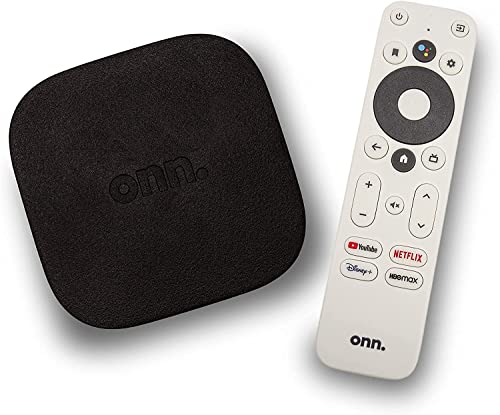
This ONN Android TV 4K UHD streaming device brings Android freedom to your living room, offering access to a broad Google Play Store app catalog and 4K Ultra HD visuals. The device comes with a voice remote featuring Google Assistant for easy content search, playback control, and smart home commands. Its Android ecosystem supports frequent updates and a familiar app experience for Android users, making it a versatile option for those who want a broad range of apps beyond the essentials.
Amazon Fire TV Stick 4K Max
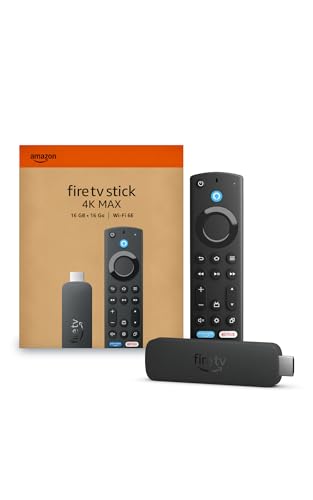
The Fire TV Stick 4K Max pairs a powerful processor with AI-powered search to speed up app launches and navigation. It supports 4K streaming, including access to thousands of apps and channels, with Fire TV’s smart search across services. Wi‑Fi performance and cloud gaming options broaden entertainment choices, while Alexa-powered voice control helps you find content, control playback, and manage smart home devices with simple voice commands.
Google TV Streamer 4K

The Google TV Streamer 4K emphasizes personalized recommendations and an intuitive home screen that brings together content from multiple services. With 4K HDR support and HDMI 2.1 compatibility (cable sold separately), it provides a smooth viewing experience across live TV, streaming apps, and games. The remote enables voice search for quick access, while smart home controls extend convenience beyond the television, making it a cohesive hub for media and devices.
Roku Streaming Stick 4K

The Roku Streaming Stick 4K delivers stunning 4K with Dolby Vision and HDR10+, providing lifelike color and sharp detail. The long-range Wi‑Fi receiver helps maintain smooth streaming across larger spaces or rooms farther from the router. Its interface is designed for quick app launches and easy navigation, with a voice-enabled remote that makes finding movies, shows, and live TV fast and convenient.
Roku Ultra

Note: This section focuses on the five selected devices. If you prefer premium performance, Roku Ultra offers 4K streaming with HDR10+ and Dolby Vision, plus a rechargeable Voice Remote Pro with backlit buttons and advanced controls. It’s designed for speed and power users who want the fastest interface and the broadest app compatibility, including live TV options. For most living rooms, the smaller sticks provide ample performance with easier placement.
Buying Guide
- Streaming quality and formats: Look for 4K, HDR10, Dolby Vision, and HDR10+ support to maximize picture quality on compatible TVs.
- Platform and ecosystem: Choose Roku, Google, or Amazon ecosystems based on preferred apps, voice assistants, and smart home integration.
- Remote and voice control: Consider remotes with voice search, on-device keyboards, or rechargeable remotes for convenience.
- Network compatibility: If your Wi‑Fi is constrained, opt for devices with strong Wi‑Fi reception or optional Ethernet adapters for stable streaming.
- Content availability: Verify access to your favorite streaming services and live TV options, including any free or ad-supported channels you use.
- Plug-and-play vs. extra hardware: Some models pull power from the TV, reducing clutter; others may require a separate power outlet for constant performance.
- Storage and performance: While most streaming sticks rely on cloud apps, some devices offer more storage for games or offline content and faster processors for snappy navigation.