Whether building a media ministry or upgrading an existing livestream, the right streaming camera can dramatically improve church services. This guide focuses on PTZ and AI-tracking cameras ideal for worship spaces, sermons, and events. It highlights models suited for different budgets and room sizes, from small chapels to large sanctuaries. The top picks emphasize clear 4K or 1080p video, reliable auto-tracking, and easy integration with OBS, vMix, Zoom, and YouTubeLive.
Summary at a glance: the following five cameras cover a range of needs, from AI auto-tracking for hands-free operation to traditional 4K PTZ with long-range optical zoom. Use the Buying Guide to compare features like AI tracking, output options, and compatibility to choose the best fit for your church’s sanctuary size and streaming setup.
| Product | Best For | Key Benefit |
|---|---|---|
| KATOVJJTS PTZ Camera 4K UHD | Medium to large sanctuaries | 58.7° wide view with 20X optical zoom, reliable 4K/30FPS |
| TONGVEO Conference Room PTZ (AI Auto Tracking) | Mid-sized rooms | AI tracking with multi-mode framing, plug-and-play USB/HDMI |
| TONGVEO 4K NDI PTZ Camera (AI Auto-Tracking) | Larger venues or streaming studios | NDI integration and 4K/30FPS via HDMI, AI tracking |
| TONGVEO 4K AI PTZ Camera with Auto Tracking | Church stages with presenters | 20X optical zoom, flexible control, easy setup |
| iuZee 4K UHD PTZ Camera AI Auto Tracking | Educational halls and houses of worship | 4K/30FPS, 20X zoom, robust AI auto-tracking |
KATOVJJTS 4K UHD PTZ Camera with 20X Zoom

Best for mid-to-large church spaces needing detailed coverage across multiple angles. The KATOVJJTS PTZ camera provides 20X optical zoom and a wide 58.7° field of view, enabling clear close-ups of the pulpit or choir while maintaining a broad scene. It streams in 4K UHD at 30FPS, ensuring smooth motion for both static sermons and dynamic worship. Its 340° pan and 120° tilt offer flexible positioning, and a long transmission distance supports sizable venues.
Who it’s for: churches that require high-resolution live streams with strong optical zoom and broad room coverage without frequent camera swapping. Why selected: strong all-around performance, stable framing, and solid compatibility with common streaming software.
Limitation: no built-in mic; audio capture must be integrated via an external system.
TONGVEO AI Auto-Tracking 20X PTZ (Conference Room)

Best for mid-sized spaces that benefit from automated framing. This model features intelligent AI tracking with multiple modes, including single-person tracking and multi-person auto framing. The camera captures 1080P at 60FPS with a 20X optical zoom for clean, smooth movement. It supports HDMI and USB 3.0 outputs, enabling easy plug-and-play with OBS, vMix, Zoom, Teams, and YouTube.
Who it’s for: churches that want automated, reliable subject tracking to free operators during services. Why selected: strong AI tracking makes it easier to maintain professional framing during worship and sermons. Limitation: 1080P output on some configurations means 4K might require HDMI 4K-capable devices.
TONGVEO 4K NDI PTZ Camera with AI Auto-Tracking

Best for churches needing advanced streaming workflows and networked production. The NDI variant supports seamless integration with professional software like OBS, vMix, and other NDI-enabled tools, delivering 4K at 30FPS via HDMI with IP-based streaming options. AI auto-tracking helps keep speakers and presenters centered. The device is designed for flexible setups, including church worship, events, and education.
Who it’s for: production teams seeking robust networked streaming and formal broadcast-grade features. Why selected: official NDI integration simplifies multi-camera workflows, while AI tracking makes routine services more predictable. Limitation: 1-tracking target at a time, which may affect larger group shots.
TONGVEO 4K AI PTZ Camera With Auto Tracking
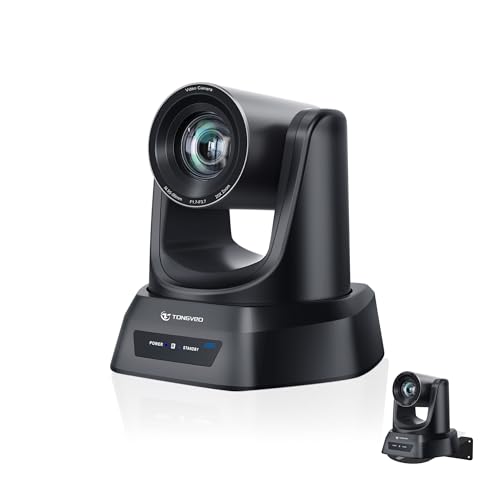
Best for churches that want a complete AI-based tracking solution on stage. This camera features crystal-clear 4K video and a 20X optical zoom for capturing choir and pulpit detail. AI auto-tracking can follow presenters with face and body recognition, offering multiple presets for different shot compositions. It supports HDMI, USB 3.0, LAN, and PoE, making setup straightforward and flexible for OBS, Zoom, Teams, and Facebook Live.
Who it’s for: houses of worship that require hands-free operation and flexible control. Why selected: versatile outputs and strong tracking for pulpit-to-zoom transitions. Caution: AI tracking can misidentify in crowded scenes if faces are obscured.
IFWATER HDMI 4K USB Camera

Best as a supplementary or secondary camera in worship spaces. The IFWATER camera supports simultaneous HDMI and USB outputs. It delivers ultra HD 3840×2160 30FPS via USB and HDMI 1080P, with 5-50mm manual focus and 10X total zoom. It supports multiple video formats and encoding options, enabling flexible streaming workflows for classrooms, small services, or multi-camera configurations.
Who it’s for: teams needing an affordable secondary camera with flexible outputs. Why selected: strong output versatility; caution: manual focus may require operator adjustment for fast-moving scenes.
Buying Guide: Key Considerations for Streaming Cameras in Churches
- Room size and seating layout: Choose a camera with sufficient zoom and a wide field of view to cover the altar, pulpit, and congregants without frequent pan-tilt repositioning.
- Video resolution and frame rate: 4K is ideal for large sanctuaries; 1080p60 is often sufficient for mid-sized rooms and easier streaming bandwidth management.
- Auto-tracking versus manual control: AI auto-tracking reduces operator load, but ensure it supports your shot list (presenter, choir, other speakers) and check for one-person tracking limits in crowded scenes.
- Output compatibility: Confirm HDMI, USB, IP/NDI options align with your streaming software (OBS, vMix, Zoom, Teams) and your switcher setup.
- Networking and power: PoE support simplifies wiring; ensure network stability for IP streaming and that power provisions meet continuous-use requirements.
- Mounting and space: Check ceiling or wall-mount compatibility and space for camera movement without obstruction.
- Future-proofing: Consider cameras with upgrade paths (NDI compatibility, software updates) for evolving church tech needs.
Frequently Asked Questions
- What is the advantage of a PTZ camera for church services?
PTZ cameras provide remote control for wide and intimate shots, reducing the need for multiple fixed cameras and enabling smooth, coordinated coverage of sermons and performances. - Is 4K necessary for church livestreams?
4K offers sharper detail in larger spaces and on high-resolution displays, but 1080p can be sufficient for many online audiences and smaller venues when bandwidth is a concern. - What about AI auto-tracking reliability?
AI tracking can improve consistency, but it may struggle with occluded subjects or crowded scenes. It’s best paired with preset shot lists and occasional manual tweaks. - Which connection type should I prioritize?
USB 3.0 and HDMI are common for direct computer and switcher connections; IP/NDI enables multi-camera studio-like workflows and longer cabling flexibility. - Do these cameras require special software?
Most listed models work well with OBS, vMix, Zoom, and YouTube via standard video inputs. Ensure drivers are not required or are minimal for easier setup. - Can I upgrade a church’s camera system over time?
Yes. Start with a core PTZ camera and add a secondary camera or NDI-enabled solution to scale production as needs grow.