The Steam Deck can heat up during extended gaming sessions, impacting performance and comfort. This guide highlights five top cooling and cooling-dac solutions designed to keep temperatures down, extend playtime, and maintain performance. Each option covers a mix of protective cases, docks, and dedicated cooling fans that work with or without cases. Explore how modular cases, docking stations, and active cooling can help you game longer without overheating.
| Product | Brand | Type | Key Cooling Feature |
|---|---|---|---|
| JSAUX ModCase for Steam Deck/Steam Deck OLED | JSAUX | ModCase (Cooling + Case) | Modular protection with a cooling-oriented back shell and metal bracket |
| Steam Deck Fan Cooler | Aha&Lucky | Standalone Cooling Fan | Radiator-based cooling with stepless speed control |
| JSAUX Upgraded Docking Station 4K@120Hz | JSAUX | Docking Station | High-performance cooling via docked setup and 100W charging |
| Cooling Modcase for Steam Deck LCD/OLED | HandheldDIY | Modcase (Heat Management Shell) | Expanded intake vents and heat spreader for better airflow |
| Dual Cooling Fans 12 in 1 Docking Station | ChampSun | Docking Station with Dual Fans | Dual RGB fans for accelerated cooling and 4K@60Hz output |
Across these options, you’ll find a balance between protective enclosures, practical docks with built-in cooling, and portable fans. When choosing, consider whether you primarily play with or without a case, your need for external power, and how much extra cooling headroom you want for long sessions or high-performance modes.
JSAUX ModCase for Steam Deck/Steam Deck OLED

The JSAUX ModCase combines complete device protection with a modular design to accommodate cooling features. It uses eco-friendly PC-ABS and silicone to prevent scratches and cracks, and it includes a protective back case, metal stand, strap, and a front cover. Designed specifically for the Steam Deck (2022), its port cut-outs are precisely aligned for easy access while the case is on. This setup supports fans and heat management elements through a sturdy, adjustable frame, making it suitable for users who want added protection plus cooling potential during long sessions.
Steam Deck Fan Cooler

The Steam Deck Fan Cooler from Aha&Lucky features a patented radiator-style cooling solution designed to reduce CPU and backplane temperatures rapidly. It supports both with-case and without-case configurations and includes an extending rubber attachment plus adhesive pads for secure mounting. With stepless speed regulation, the fan aims to keep noise at a minimum while delivering meaningful temperature drops, potentially extending playtime and improving comfort during intense gameplay.
JSAUX Upgraded Docking Station 4K@120Hz

This 6-in-1 docking station enhances external display and connectivity while delivering robust power delivery up to 100W. It supports HDMI 2.1 output at 4K@120Hz and includes fast USB ports and a Gigabit Ethernet connection. The design aligns with Steam Deck OLED and other handhelds like ROG Ally X, Legion Go, and MSi Claw, making it a versatile hub for extended play sessions on a larger screen. The heightened thermal load from all ports is mitigated by efficient internal layout and cooling-friendly design.
Cooling Modcase for Steam Deck LCD/OLED
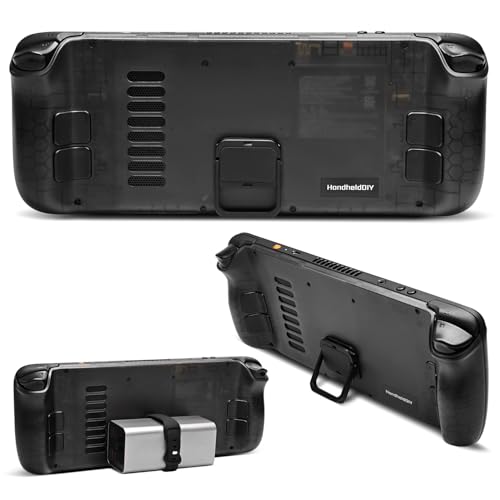
HandheldDIY’s Cooling Modcase emphasizes heat management with an emphasis on airflow and vent design. The kit includes a heat spreader and silicone pads to lower temperatures; broadened intake vents raise airflow by 20% or more. Installation involves eight screws, making it a relatively straightforward upgrade for users seeking a noticeable reduction in thermal throttling during peak gaming sessions. The combination of shell, vents, and pads targets sustained performance rather than just momentary temperature dips.
Dual Cooling Fans 12 in 1 Docking Station

ChampSun’s 12-in-1 handheld docking station transforms the Steam Deck’s USB-C into a robust hub with 4K@60Hz output, Gigabit Ethernet, multiple USB ports, and a PD charging path up to 100W. The dual cooling RGB fans actively dissipate heat, helping to keep the console cooler under load. The setup is designed for users who want extensive connectivity, external display support, and reliable cooling in a single, portable package.
Buying Guide
Key considerations when selecting a Steam Deck cooling solution include compatibility, cooling capacity, and use-case fit. If you often play while traveling or in environments where the Deck is uncooled, a portable cooling fan or a modular case with integrated cooling can offer meaningful temperature reductions. For static setups, a high-performance docking station with dual fans and 4K output can provide both improved cooling and expanded display options. When evaluating options, note:
- Compatibility: Confirm your Steam Deck model (LCD/OLED) and whether a case is required or supported with the cooling accessory.
- Thermal performance: Look for active cooling (fans, radiators) vs. passive designs. Dual-fan and radiator-based devices generally deliver stronger temps control.
- Power delivery: If the solution charges the device, ensure it supports safe PD charging and matches or exceeds your charger’s wattage needs.
- Portability: Docking stations add bulk; modular cases and fans offer lighter options for travel.
- Ease of installation: Quick-install designs reduce downtime and risk of misalignment.
- Durability: Materials like PC-ABS and silicone provide protection while withstanding travel and daily use.
These products offer varying blends of protection, cooling, and expansion capabilities. When choosing, align the solution with your typical gaming setup, transport habits, and performance goals to ensure a cooler, more stable Steam Deck experience.