When upgrading or expanding a PC’s storage, a reliable SSD mounting bracket can simplify installation and improve airflow. This guide highlights five well-suited options for converting 2.5″ drives to 3.5″ bays, or expanding a drive bay with additional solid-state drives. Each pick targets a different buyer type—from budget-conscious builders to performance-focused enthusiasts—so you can choose the bracket that best fits your system and needs.
Summary table of selected products:
| Product | Best For | Key Benefit | Interface |
|---|---|---|---|
| Corsair Dual SSD Mounting Bracket | Systems needing two 2.5″ SSDs in a 3.5″ bay | Easy installation; supports up to two 2.5″ drives | SATA |
| SABRENT 2.5 Inch To 3.5 Inch Internal Bracket Kit BK-HDDH | Upgrade in older desktops with flexible drive bays | Converts two 2.5″ drives into one 3.5″ bay | SATA |
| ORICO 2.5 to 3.5 Hard Drive Adapter Inner Bay | Simple hot-swapping and plug-and-play | Supports 7/9.5/12.5mm drives with SATA III | SATA III |
| Mougerk SSD/HDD Mounting Bracket 2-Pack | Budget-friendly multi-pack for multiple builds | Includes mounting screws for easy install | SATA |
| Cable Matters 2-Pack 2.5 to 3.5 Bracket Kit | Two-drive upgrades in a single kit | Includes cables and screwdriver for complete install | SATA |
Corsair Dual SSD Mounting Bracket (3.5” to 2.5”)
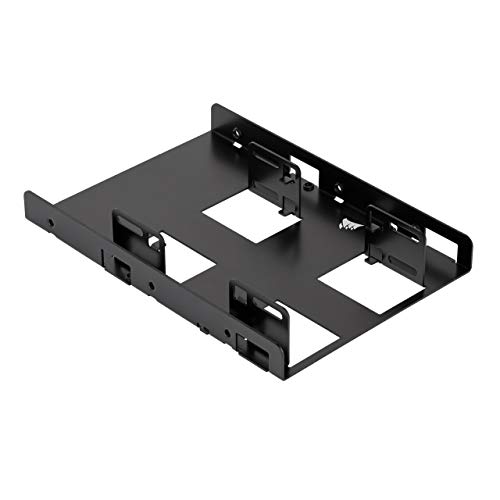
The Corsair bracket fits a standard 3.5″ drive bay and adapts it for up to two 2.5″ SSDs. This solution is best for builders who need a compact, clean upgrade path without adding extra components. The bracket is straightforward to install and helps keep cables organized inside tuned desktops. Best for users who want a simple, low-profile upgrade in cases with a single 3.5″ bay.
Who it’s best for: PC builders aiming to maximize space in compact towers or workstations. Why selected: it directly enables two 2.5″ SSDs in a single bay with straightforward mounting.
Caution: ensure your case supports two 2.5″ drives in the available 3.5″ bay height and clearance for wiring.
SABRENT 2.5 Inch to 3.5 Inch Kit (BK-HDDH)

The SABRENT BK-HDDH kit converts two 2.5″ hard drives into a single 3.5″ drive bay. It’s ideal for older desktops lacking modern 2.5″ drive bays or for users who want a simple upgrade without additional cables. Best for budget upgrades in legacy systems.
Who it’s best for: upgraders with limited space and a need to consolidate two 2.5″ drives into one bay. Why selected: it provides a straightforward, complete mounting solution with quick installation.
Limitation: some cases may require additional cable routing or spacers, depending on chassis design.
Mougerk 2-Pack SSD/HDD Mounting Bracket

This 2-pack from Mougerk includes two brackets designed to mount 2.5″ drives into a 3.5″ bay. The kit uses standard M3 screws and fits most desktop cases with a standard 3.5″ drive bay. Best for users who want a cost-effective option to expand or refresh drives in multiple desktops.
Who it’s best for: budget-conscious builders or technicians handling several PCs. Why selected: the two-pack provides extra value and flexibility for multi-system setups.
Limitation: screws and mounting hardware are included, but verify screw compatibility with your motherboard trays and drive cages.
Cable Matters 2-Pack 2.5 to 3.5 Bracket Kit

The Cable Matters kit includes two 3.5 to 2.5 inch adapters, plus mounting brackets, data and power cables, and a screwdriver. It’s a complete install package designed for upgrading with minimal extra shopping. Best for users who want an all-in-one solution that includes cables for immediate use.
Who it’s best for: DIY builders seeking a turnkey upgrade that minimizes loose cables. Why selected: comprehensive components reduce the need for additional parts beyond the bracket.
Caution: confirm that the included cables match your drives’ cable lengths and your motherboard’s header layout to avoid tension or misrouting.
Buying Guide: How To Choose The Right SSD Mounting Bracket
What to consider when selecting a bracket: drive compatibility, bay height, case form factor, and cable needs. If your case has a single 3.5″ bay, a bracket that converts to hold two 2.5″ drives can maximize capacity without larger chassis changes. For compact builds, choose low-profile or tool-less designs to simplify maintenance. If you want a complete installation, look for kits that include cables, screws, and a screwdriver.
Drive compatibility and height
Most brackets support 2.5″ drives in 7mm or 9.5mm profiles. Confirm the drive height your case supports and check if the bracket can accommodate both SSDs and HDDs. Some options are explicitly marketed as compatible with 7mm and 9.5mm drives, which matters for newer SSDs.
Installation ease and included hardware
All-in-one kits with cables and tools save time. If you’re replacing drives in multiple systems, a two-pack or kit form is cost-effective. Tool-less designs can speed up future upgrades and maintenance.
Cable management and airflow
Brackets that minimize cable clutter help maintain airflow and thermals in tight builds. Solid metal enclosures provide better heat dissipation than plastic in some designs, which matters for performance and longevity.
Case compatibility and form factor
Check your case’s physical space and internal layout. Some brackets require a larger clearance in front of the bay or additional clearance behind the drive bay for routing cables. In small form factor cases, prioritize slim profiles and ease of installation.
Upgrade goals: single vs. multi-drive configurations
If you only need to add one SSD, select a single-drive adapter in a 3.5″ bay. For expanding storage without a new bay, a dual or multi-drive bracket becomes more valuable. Consider whether you prefer combining multiple 2.5″ drives into a single bay or distributing them across separate bays for organization.
FAQ: Quick Answers About SSD Mounting Brackets
Can I install two 2.5″ SSDs in a single 3.5″ bay?
Yes, several brackets are designed to hold two 2.5″ drives in one 3.5″ bay, increasing storage without needing extra bays.
Do these brackets require additional cables?
Some kits include all necessary cables and a screwdriver, while others might require separate SATA data cables or power cables depending on the package.
Are brackets compatible with all PC cases?
Most are designed for standard desktop cases with a 3.5″ internal drive bay. Always verify clearances and mounting hole compatibility with your chassis.
Is it necessary to replace a 3.5″ drive with a 2.5″ drive?
No, these brackets convert 2.5″ drives to fit into a 3.5″ bay or expand bays to accommodate more drives.
What should I consider for heat management?
Metal brackets with good airflow and spacing can help dissipate heat better than compact plastic assemblies, especially in hot or high-usage systems.