Answering the question, which ethernet port splitter fits your needs, this guide reviews top options for expanding a single port to multiple devices. Ideal for home offices, streaming setups, and small workspaces, these devices let two or more devices share one connection at up to Gigabit speeds. The best pick depends on how many devices you need to network, cable compatibility, and whether you require USB power. The following selections are sized for easy setup and robust compatibility across common network environments.
Summary table of selected products
| Product | Best For | Max Bandwidth | Ports | |
|---|---|---|---|---|
| LIEZHUA Gigabit Ethernet Splitter 1 to 2 | Small home office, two-device setups | 1000 Mbps | 2 outputs | USB power cable included; LED indicators |
| TP-Link Ethernet Splitter 1 to 2 | Budget-friendly dual-device use | 1000 Mbps | 2 outputs | Aluminum case, plug-and-play |
| NEWCARE Gigabit Ethernet Splitter 1 to 4 | Small workstations with multiple devices | 1000 Mbps | 4 outputs | Includes 3.3 ft cable |
| Dockteck Ethernet Splitter 1 to 3 | Three-device sharing in homes/offices | 1000 Mbps | 3 outputs | USB-powered |
| LIEZHUA Ethernet Splitter 1 to 4 | Medium setups needing four devices | 1000 Mbps | 4 outputs | Cat 5e/6/7/8 compatible |
LIEZHUA Gigabit Ethernet Splitter 1 to 2

This 1-to-2 splitter expands one Ethernet port to two active ports, supporting up to 1000 Mbps total bandwidth. It’s best for a two-device setup where you need simultaneous network access, such as a PC and a smart TV. The device uses a USB power cable to maintain stability, and six LEDs help identify active connections. Suitable for Cat 5–8 cables, it works with routers, hubs, switches, and other Ethernet-enabled devices.
Best for: a compact two-device home office or streaming setup where clear LED status helps troubleshoot connections.
Limitation: total bandwidth is shared between the two devices; actual speeds depend on network conditions and connected hardware.
TP-Link Ethernet Splitter 1 to 2

TP-Link’s dual-port splitter converts one Gigabit port into two active ports with up to 1000 Mbps total bandwidth. It’s designed for easy, plug-and-play setup and supports cascading for future expansion. The aluminum case adds durability, making it suitable for desks and small setups that require reliable performance with minimal wiring.
Best for: users who want a budget-friendly, durable dual-port splitter with straightforward setup and potential for growth via cascaded connections.
Limitation: bandwidth is shared between connected devices; actual speed varies by network environment and connected equipment.
NEWCARE Gigabit Ethernet Splitter 1 to 4

This 1-to-4 splitter shares a single Gigabit port across four devices, offering a convenient solution in small offices or media setups. It includes a 3.3-foot LAN cable for immediate use and supports Cat 5e–8 cables. The design is plug-and-play, with no drivers needed, making it suitable for routers, TVs, set-top boxes, and more.
Best for: multi-device environments needing four simultaneous connections without adding extra network hardware.
Limitation: when four devices are connected, bandwidth is shared, so individual performance may vary with network load.
Dockteck Ethernet Splitter 1 to 3

Dockteck’s 1-to-3 splitter enables three devices to share a single LAN line. It is USB-powered for convenience and supports speeds up to 1000 Mbps. This option suits small offices or living rooms where multiple devices require network access without installing extra cables. It supports cables up to 100 meters in length in tested scenarios.
Best for: households or small offices needing three connections from one port without extra power adapters beyond the included USB cable.
Limitation: overall bandwidth is shared among three devices; actual speeds depend on connected equipment and network conditions.
LIEZHUA Ethernet Splitter 1 to 4
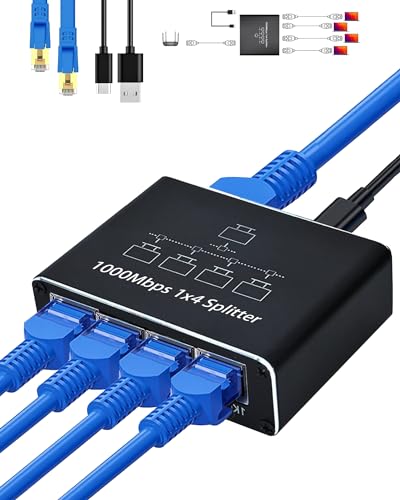
This 1-to-4 splitter distributes one gigabit port to four devices, enabling simultaneous connections with up to 1000 Mbps. It emphasizes universal compatibility with Cat5–8 cables, making it versatile for different network layouts. It is a practical choice for expanding a single connection to multiple devices in a medium-sized setup.
Best for: users needing four-device sharing in a compact form with broad cable compatibility.
Limitation: expect bandwidth sharing among four devices; may not sustain high speeds on all devices at once in busy networks.
Buying Guide: Key Considerations
- How many devices need network access? Choose 2-port, 3-port, or 4-port models based on your setup. Clustering more devices increases the likelihood of bandwidth sharing reducing per-device speed.
- What cables will you use? All listed options support Cat5e to Cat8. If your cables are older, verify compatibility to avoid bottlenecks.
- Do you need power? Some models include USB power to improve stability with multiple devices. If power is not available, prefer passive splitters with fewer devices.
- Is plug-and-play important? Most options are plug-and-play, with no driver requirements. This simplifies setup for non-technical users.
- What is the environment like? For desktop setups, an aluminum or metal-case splitter can add durability. For temporary or travel use, a smaller plastic unit might be preferable.
- Future expansion? If you anticipate needing more ports later, consider models that support cascading or that offer higher port counts in the same family.
Frequently Asked Questions
- What is an ethernet splitter vs extender? A splitter divides one port into multiple active ports, while an extender increases the reach and quality of existing cables. Look for devices labeled 1-to-2, 1-to-3, or 1-to-4 to identify splitters.
- Can all devices run at full speed from a splitter? Not always. When multiple devices connect, bandwidth is shared, so not every device can achieve the full 1000 Mbps simultaneously.
- Do I need to power the splitter? Some devices require USB power for stable operation when multiple devices are connected, while others are passive. Check the product description for power requirements.
- Will a splitter work with any Ethernet cable? Yes, most splitters in this guide support Cat5e through Cat8. Ensure your cables meet your network’s bandwidth needs.
- Can I cascade splitters for more ports? Cascading is often supported, but performance depends on your network and router. Plan port count by your immediate needs and future growth.
- Which option is best for a two-device setup? The LIEZHUA 1-to-2 and TP-Link 1-to-2 are straightforward, cost-effective choices for two devices needing reliable gigabit speeds.