Selecting the right television for a classroom involves balancing display size, smart features, durability, and ease of use for both teachers and students. The following options emphasize classroom-friendly interfaces, reliable streaming capabilities, and the ability to project and annotate lessons. Each entry includes key features useful in a teaching environment, from 4K and HD resolutions to built-in apps and multiple HDMI inputs. Use this guide to compare performance, connectivity, and classroom suitability across popular models.
Summary Of Chosen Products
| Product | Brand | Display | Key Benefits |
|---|---|---|---|
| KEINONE Interactive Smart Board for Classroom | KEINONE | 55” 4K | 8GB RAM, 128GB SSD, Android OS, 20 touch points, 6ms latency |
| INSIGNIA 50″ F50 Series 4K UHD | INSIGNIA | 50” 4K | Fire TV built-in, Alexa remote, broad app access |
| Hisense 40-Inch A4 Series | Hisense | 40” FHD | Built-in DTS Virtual:X, Game Mode, Alexa built-in |
| INSIGNIA 32″ F20 Series | INSIGNIA | 24–32” HD | Alexa voice control, Fire TV access |
| VIZIO 40” Full HD Smart TV | VIZIO | 40” FHD | VIZIO OS, HDR10, Auto Low Latency Mode |
KEINONE Interactive Smart Board for Classroom

The KEINONE interactive board combines a 55” 4K touchscreen with robust multimedia capabilities. Its 8GB RAM and 128GB SSD create a flexible work environment suitable for classroom tasks, video playback, and collaborative activities. The built-in Android OS and app ecosystem enable quick access to educational tools, digital whiteboarding, and content sharing. Students can annotate, draw, and interact with images or PDFs in real time, enhancing engagement during lessons. The device also doubles as a large monitor or display for presentations, lectures, and remote teaching scenarios.
Educational features include KEINONE’s whiteboard tools and text recognition, designed to support lesson planning and quick markup of teacher resources. The multi-user support with low latency (6ms) supports dynamic brainstorming sessions and group work. Teachers can transition between documents, slides, and instructional apps while maintaining a clear, high-resolution display for the entire class. The board’s 4K visuals help ensure sharp diagrams, charts, and written text for students at the back of the room.
Key classroom considerations include ease of setup, Android app availability, and the ability to annotate over various content sources. The included ecosystem is useful for transformative teaching strategies, such as flipped classrooms, interactive demonstrations, and collaborative projects. When used with compatible projectors or displays, the KEINONE board can serve as a central hub for lesson delivery and student collaboration.
INSIGNIA 32″ Class FE Series LED Full HD Smart Fire TV
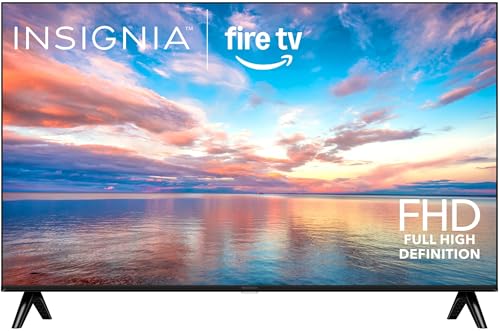
This 32” Insignia model offers a compact option suitable for smaller rooms or breakout spaces. Full HD resolution provides clear image quality for teaching materials, videos, and interactive lessons. Integrated Fire TV access enables streaming and app support without extra devices, while the Alexa-enabled remote allows hands-free navigation for quick search and content switching during a class. The combination of a reliable display and familiar smart TV experience makes it a practical addition for curriculum demonstrations or student stations.
Considerations for classrooms include the balance between screen size and visibility from back rows, the breadth of available apps, and the ease of controlling content with voice commands. The compact size can be ideal for teacher stations, reading corners, or student workstations. Teachers can preload educational apps and streaming resources to minimize interruptions during class time.
Connectivity remains straightforward with standard HDMI inputs for laptop or media players. Accessibility features, such as captions and adjustable display settings, help accommodate diverse learners. The Fire TV platform also supports multiple streaming services, which can broaden the range of instructional videos and documentaries used in lessons.
Hisense 40-Inch Class A4 Series FHD Smart Fire TV

This 40-inch Hisense model brings Full HD clarity with a modern Fire TV experience and built-in Alexa. The device offers streaming access to a wide range of services, allowing classrooms to pull up instructional videos, lectures, and or live streams without additional streaming hardware. Its DTS Virtual:X audio can enhance video presentations and classroom media consumption by providing richer sound without external speakers in some installations.
From a classroom perspective, the A4 Series delivers a compact yet capable display with reliable performance for everyday teaching. Quick app switching and voice control help maintain classroom flow, while the built-in streaming platform reduces the need for extra equipment. The TV’s simple interface is beneficial for teachers and students learning to navigate digital resources, with the flexibility to project content from laptops or tablets via HDMI connections.
INSIGNIA 50″ Class F50 Series LED 4K UHD Smart Fire TV

This larger 50” 4K UHD model delivers classroom-appropriate scale for dense content, visuals, and group viewing. The Fire TV platform provides access to a broad library of educational videos, streaming channels, and apps. Alexa integration enables voice searches for content, reducing the need for teachers to touch the remote during demonstrations or while delivering live lessons. The 4K resolution enhances graphs, charts, and high-detail imagery used in science, geography, and math lessons.
Teachers can use the built-in apps for direct access to lesson materials, while students benefit from a clear, immersive display. The smart TV design supports quick switching between instructional videos, presentations, and interactive software. This model is particularly suitable for larger classrooms or computer labs where a single display serves many learners at once.
VIZIO 40-Inch Full HD Smart TV

The VIZIO 40” model offers a solid balance of display quality and smart features. A built-in VIZIO OS provides apps and streaming services, with HDR10 support for enhanced color and contrast. The model includes Google Cast and Bluetooth compatibility, enabling easy content sharing from laptops, tablets, and phones. Auto Low Latency Mode ensures a smoother experience during interactive activities when connected to gaming devices or educational apps.
From a classroom perspective, the VIZIO option emphasizes straightforward app access and content sharing, which is essential for lesson demonstrations and student-led activities. The built-in platform helps streamline classroom tech without requiring external streaming devices. The 40” size is versatile for classrooms that need a mid-sized display or multiple small stations connected to a single screen.
Buying Guide: Key Purchase Considerations And Comparisons
- Screen size and viewing distance: Larger classrooms may benefit from 50” or bigger displays for front-row visibility, while smaller rooms can work well with 32”–40” screens. Consider whether you need a wall mount or cart for flexible placement.
- Smart platform and app ecosystem: Fire TV models (Insignia) offer broad streaming access; VIZIO OS emphasizes built-in apps and casting. Choose a platform that aligns with your school’s content and licensing needs.
- Connectivity options: HDMI inputs, USB ports, and wireless casting are essential for connecting laptops, tablets, and student devices. Check for ARC support if you plan to integrate soundbars or external speakers.
- Touch and annotation capabilities: If you plan to annotate directly on the screen, consider interactive boards like KEINONE or boards with compatible peripherals. Look for low latency and multi-touch support to support collaborative activities.
- Durability and classroom control: Favor TVs with robust remote controls or integrated controls that teachers can use from their desks. Some models offer voice control, which can minimize disruption during lessons.
- Audio performance: In classrooms, audio clarity matters. Look for built-in speakers with features like DTS Virtual:X or support for external speakers if room acoustics require it.
- Budget and total cost of ownership: While big 4K displays offer exceptional clarity, ensure the model fits your budget, and factor in accessories such as mounts, sound systems, or external computing devices.
- Ease of setup and maintenance: Choose models with straightforward on-screen menus, simple app installation, and reliable customer support. Compatibility with school IT policies and network configurations is also important.
- Content availability: Ensure the chosen model provides access to educational apps, streaming services, and teaching tools commonly used in your curriculum. Some devices allow local content playback without internet access, which can be advantageous in network-restricted environments.
- Future-proofing: A model with ample processing power (RAM, storage) and an updatable operating system helps ensure compatibility with new apps and teaching methods over several school terms.