Smart door locks with handles combine convenience, security, and stylish hardware for modern homes. This guide highlights five leading options that support fingerprint, keypad, app, and voice control, all while integrating with door handles for a cohesive look. Whether you’re upgrading an entryway or securing an apartment, these models offer multiple unlocking methods, remote monitoring, and guest access management. Below is a quick overview of the featured products to help you compare features at a glance.
| Product | Brand | Unlock Methods | Connectivity | Key Feature |
|---|---|---|---|---|
| Evanshow Smart Door Lock With Knob | Evanshow | Fingerprint, Passcode, NFC, App, Mechanical Key | Tuya App | 0.5s fingerprint unlock |
| Philips Smart Lock With Handles | Philips | Fingerprints, PIN, Keys, App | Bluetooth (built-in), optional Wi-Fi gateway | Multiple unlock options with remote control via gateway |
| Philips Wi‑Fi Smart Lock With Handle | Philips | Fingerprint, PIN, Keys, App | Wi‑Fi (built-in, gateway needed for remote) | Remote control and real-time alerts |
| eufy Security Smart Lock C33 | eufy Security | Fingerprint, App, Keypad | Wi‑Fi (built-in) | Remote access with event history |
| Philips Wi‑Fi Smart Door Lock With Handle | Philips | Fingerprints, PIN, Keys, App, Voice | Wi‑Fi via gateway | Integrated Wi‑Fi and multiple unlocks |
All five options emphasize seamless integration with door handles while providing robust access management, activity logs, and flexible guest codes. The list includes models with built‑in Wi‑Fi for remote control and others relying on a gateway, so you can tailor the setup to your existing home network. Battery life, installation ease, and compatibility with voice assistants are also considered for busy households seeking reliable security and hands‑free convenience.
Evanshow Smart Door Lock With Knob

The Evanshow model combines a fingerprint door knob with a handle, delivering keyless entry through the Tuya app and a multifaceted unlocking set. In addition to biometric access, users can enter via a keypad, NFC card, or a mechanical key as a backup. The system supports remote management, enabling the assignment of permanent or temporary access for family, guests, or deliveries. Entry logs help monitor who comes and goes, while a privacy mode keeps occurrences discreet when needed.
Key considerations include the reliance on the Tuya ecosystem for app control, potential compatibility with existing smart home routines, and the speed of biometric recognition. The 0.5-second unlocks provide quick entry, which is valuable during busy mornings or when carrying packages. Battery replacement timing and software updates may impact long‑term reliability, so plan for periodic maintenance to ensure uninterrupted access.
Philips Smart Lock With Handles
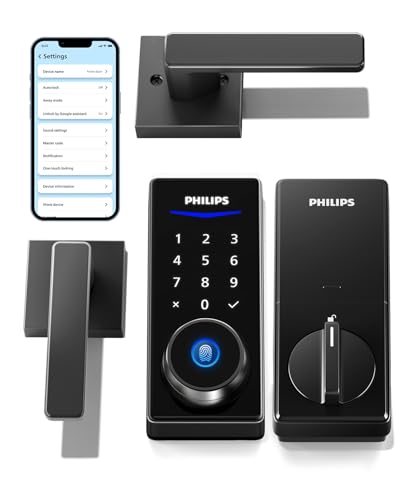
This Philips setup includes two lever handles paired with the smart lock, offering a cohesive aesthetic and multiple unlocking methods. The four primary methods—fingerprints, PIN codes, keys, and the companion mobile app—provide flexible access for family members and visitors. A built‑in Bluetooth option enables smartphone control within range, and adding a Wi‑Fi gateway expands remote capabilities, permission sharing, and unlocking records. Regular battery maintenance improves long‑term performance.
Consider how often you access the home remotely and whether a gateway is already part of your network. The Philips system emphasizes a balanced mix of local and remote control, making it suitable for households that want straightforward keyless entry plus the ability to monitor activity from anywhere.
Philips Wi‑Fi Smart Lock With Handle

This Philips model adds built‑in Wi‑Fi to the handle‑set lock, enabling remote lock, unlock, and monitoring from a smartphone. It supports several unlocking methods—fingerprints, PINs, keys, and the app—plus the ability to share permissions and view unlocking records. The device is designed for front doors and works best with the gateway for full remote comfort. Real‑time alerts help keep homeowners informed about entry activity.
Users should consider network reliability and gateway compatibility. If you already use Philips products or a Philips gateway, this lock integrates smoothly with existing ecosystems. The option to remotely manage access makes it appealing for households with frequent deliveries or short‑term guests.
Philips WiFi Keypad Door Lock With Handle

The Philips 4200 Series Wi‑Fi keypad door lock combines a fingerprint‑enabled handle with built‑in Wi‑Fi and remote control. It stores up to 100 PIN codes and supports five unlocking methods, including app access and voice control via Alexa or Google Assistant. The system emphasizes a robust access audit trail and real‑time notifications, helping administrators oversee entry activity. A dedicated gateway is typically required for full remote functionality.
Consider whether you need a large PIN capacity and whether voice control aligns with your privacy preferences. This model balances convenience with ample customization for households that manage multiple guests and service personnel.
Philips Wi‑Fi Smart Door Lock With Handle (Touchscreen)

This Philips option features a fast fingerprint door handle system and a touchscreen keypad, delivering secure access in as little as 0.3 seconds. It stores up to 50 fingerprints and supports remote control through the Philips HomeAccess App when connected to the gateway. The blend of touchscreen convenience and biometric security makes it a strong choice for households that want a quick, intuitive entry experience and detailed access events.
Key trade‑offs include the need for efficient battery management and gateway setup for remote features. The touchscreen interface offers a modern user experience, while the biometric speed supports rapid entry during busy times.
Buying Guide: Key Purchase Considerations
- Unlock methods and user management: Assess how many authentication options you need (fingerprint, PIN, app, voice, or mechanical key) and whether you want temporary access codes for guests or service personnel.
- Connectivity and ecosystem: Decide between locally controlled locks (Bluetooth) and remote control via Wi‑Fi gateway. If you often access doors remotely, a gateway‑enabled model simplifies monitoring and permissions.
- Security and privacy: Look for trusted encryption, tamper alerts, and audit trails. Consider whether the model stores fingerprints locally and how it handles data in the cloud.
- Battery life and maintenance: Check battery type, estimated life, and replacement cadence. Some models support power backup options or alert notifications when power is low.
- Installation and compatibility: Confirm door dimensions, handle compatibility, and whether the unit fits existing hardware. Some locks replace only the interior hardware, while others require full lever changes.
- Voice and smart home integration: If you use Alexa, Google Assistant, or other platforms, verify compatibility and required hubs or gateways for remote access and routine automation.
- Security audits and warranty: Review independent security assessments where available and consider manufacturer warranty terms for electronics and mechanical components.
Overall, the right smart lock with a handle depends on your need for speed, remote visibility, guest management, and integration with your home network. For high‑traffic entryways, models offering rapid biometric unlocks and strong audit logs are particularly valuable. If you prioritize remote access from anywhere, choose a product with built‑in Wi‑Fi or a compatible gateway to ensure consistent notifications and control. Consider your aesthetic preferences as well, since a handle‑style lock should harmonize with your door hardware and interior decor.