Smart boards are transforming how teachers present lessons and how students engage with content. This guide highlights top 5 classroom-ready interactive whiteboards that blend 4K displays, touch collaboration, and open app ecosystems. Each option supports multi-user interaction, cloud sharing, and classroom-friendly connectivity to empower hybrid and in-person learning environments. Below is a quick summary of the selected products to help you compare features at a glance.
| Product | Brand |
|---|---|
| COOLHOOD 65″ Smart Board | COOLHOOD |
| KEINONE Interactive Smart Board 55” | KEINONE |
| JASZDOT 55” Smart Board | JASZDOT |
| Vibe S1 4K UHD Smart Board | Vibe |
| HKMLC Smart Board 55 Inch | HKMLC |
COOLHOOD 65″ Smart Board

The COOLHOOD 65-inch smart board delivers a 4K UHD interactive display with 20-point multi-touch and Android 13 integration. Powered by an octa-core processor and 128GB storage, it handles complex classroom tasks and multimedia content with smooth performance. The device supports wireless screen sharing across Mac, Windows, iOS, and Android, enabling real-time collaboration on student projects and teacher demonstrations. Annotation tools, smart voting, screenshots, and a built-in timer enhance classroom interactions and decision-making. The wall-mount comes included, while the separate stand option offers flexibility for different layouts.
KEINONE Interactive Smart Board 55”

KEINONE combines 8GB RAM and 128GB storage in a 55-inch 4K touchscreen with built-in Android OS and open app ecosystem. It functions as a multimedia hub, suitable as a classroom display, TV, projector, or high-resolution monitor. The device emphasizes 20-point touch with low latency, enabling multiple students to annotate and collaborate on shared content simultaneously. Built-in educational tools support educators in creating engaging lessons, with easy transitions between teaching modes and media-rich content for diverse learners.
JASZDOT 55” Smart Board
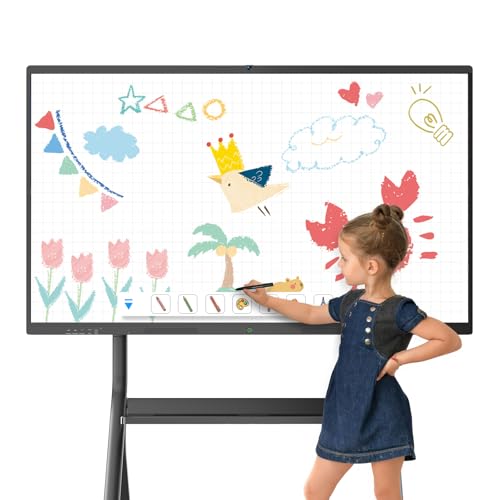
Powered by Android 13 with 8GB RAM and 128GB storage, the JASZDOT 55″ smart board provides a true 4K UHD touchscreen with high brightness for vibrant classroom displays. It supports wireless connectivity for hybrid learning, making it suitable for both in-person and remote sessions. The built-in camera and microphone enhance video conferencing, while its fast responsiveness supports dynamic lessons, annotations, and real-time collaboration across devices and participants.
Vibe S1 4K UHD Smart Board

The Vibe S1 fuses a 55-inch 4K UHD display with Chrome OS and access to 250+ free apps, designed for flexible classroom and office environments. It emphasizes complete collaboration on an open ecosystem with enterprise-grade data protection. The device supports cloud-based whiteboarding, unlimited canvas ideation, and quick sharing of notes and PDFs. An 8ms pen input latency delivers a natural writing feel for teachers and students, enabling smooth handwriting and annotations during lessons and meetings.
HKMLC Smart Board 55 Inch

The HKMLC 55-inch all-in-one interactive whiteboard emphasizes multi-user collaboration with infrared touch technology and 2mm high-precision positioning. It supports up to 20-point touch with an 8ms response time for a natural writing experience. The device is designed to integrate remote meetings and cloud-based collaboration, letting teams move seamlessly between work sessions and revisiting notes or documents from prior meetings.
Buying Guide
- Display quality and touch performance: Look for 4K UHD resolution, high brightness, wide viewing angles, and multi-touch support (prefer 10–20 points) to ensure crisp visuals and responsive collaboration.
- Operating system and app ecosystem: Android-based boards offer broad app availability, while Chrome OS devices provide a familiar interface and tight integration with Google Workspace. Consider open ecosystems for flexibility in lesson planning and third-party tools.
- Connectivity and collaboration features: Wireless screen sharing, annotation tools, screen casting from multiple devices, and built-in conferencing capabilities are crucial for hybrid teaching. Confirm compatibility with your existing devices (Windows, macOS, iOS, Android).
- Ease of setup and mounting options: Wall-mount kits are common, with optional stands available. Assess room layout, accessibility, and cable management needs when selecting a mounting option.
- Storage and processing power: Larger internal storage (e.g., 128GB) helps store apps, whiteboard content, and media. A capable processor and adequate RAM support smooth multitasking during lessons and meetings.
- Security and data protection: Enterprise-grade protections and cloud-based backups help safeguard student data and lesson materials in both local and remote use scenarios.
- Cost of ownership and maintenance: Consider warranty, long-term support, and the cost of accessories like stands or replacement parts. Some vendors offer bundled kits with mounting hardware.
These smart boards represent a cross-section of current classroom-ready options, balancing large displays, robust touch experiences, and flexible software ecosystems designed for schools. When evaluating, prioritize how the board fits your room size, teaching style, and IT infrastructure to maximize student engagement and educator workflow.