Finding compact, reliable laser printers that deliver crisp black-and-white output without cluttering your workspace is essential for home offices and small teams. This guide highlights top small laser printers renowned for efficiency, easy setup, and mobile printing capabilities. Each model below offers strong performance for everyday tasks like documents, reports, and forms, while keeping footprints small and affordable running costs in check.
| Product | Brand | Key Benefit | Highlights |
|---|---|---|---|
| Brother HL-L2405W Wireless Compact Monochrome Laser Printer | Brother | Solid everyday workhorse | 30 ppm, wireless, USB, mobile printing |
| HP LaserJet M110w Wireless Black & White Printer | HP | Smallest footprint in class | Up to 21 ppm, wireless, easy setup |
| Canon imageCLASS LBP6030w | Canon | Ultra-compact with wireless | 19 ppm, white model, space-saving |
| HP LaserJet MFP M140w Wireless Mono Printer | HP | All-in-one for small teams | Print/scan/copy, 21 ppm, wireless |
| Brother HL-L2460DW Wireless Monochrome Printer | Brother | Duplex efficiency for less paper | 36 ppm, wireless, duplex, mobile print |
Below are five carefully selected models that balance speed, size, and cost, with a focus on reliable monochrome printing for everyday business tasks. Each product section includes a quick look at why it suits small spaces and teams, followed by practical features that matter most when choosing a printer for a busy desk.
Brother HL-L2405W: Reliable Home Office Printer

The Brother HL-L2405W is a compact monochrome laser printer designed for homes and at-home offices. It delivers crisp black-and-white documents with a print speed up to 30 pages per minute. Its dual-band wireless connectivity (2.4GHz/5GHz) and USB interface support multiple devices, making it easy to share a single printer across a network or a single computer. Brother’s Mobile Connect app enables remote management, mobile printing, toner tracking, and quick replacement ordering, which helps keep workflows uninterrupted.
HP LaserJet M110w: Small Size, Big Value

The HP LaserJet M110w emphasizes a minimal footprint while delivering dependable black-and-white prints for small teams. This model is well-suited for spaces where a printer must disappear into a corner, yet still provide reliable performance for daily documents. With easy setup and wireless printing, it supports quick, on-the-go tasks for users who rely on mobile devices or laptops.
Canon imageCLASS LBP6030w: Ultra-Compact Wireless

The Canon imageCLASS LBP6030w offers a compact, space-saving design paired with wireless connectivity. It’s an ideal choice for users who need a straightforward monochrome printer that fits neatly in home offices, dorms, or small workspaces. It prints up to 19 pages per minute and leverages wireless access to print from mobile devices, tablets, or laptops.
HP LaserJet M209d: Standalone Speed and Simplicity

The HP LaserJet M209d focuses on essential black-and-white printing with automatic duplexing and a straightforward USB connection in its baseline variant. It is tailored for home offices that require reliable single-function performance and the option to print two-sided documents to save paper and reduce costs. The kit includes a USB cable for quick setup and immediate use.
HP LaserJet M209dw: Wireless All-Rounder
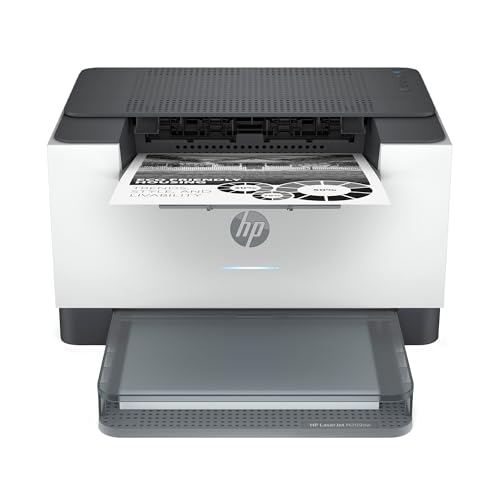
The HP LaserJet M209dw adds wireless networking and mobile printing to the M209 series, making it a practical choice for small teams. It features fast black-and-white prints, auto two-sided printing, and compatibility with Instant Ink programs. It helps teams stay productive with reliable, quality output across documents, reports, and forms.
Brother HL-L2460DW: Duplex Ready, Dynamic Performance

The Brother HL-L2460DW is designed for home offices and small teams seeking fast monochrome printing with duplex (two-sided) capability. It supports wireless, Ethernet, and USB connections for flexible deployment. At speeds up to 36 pages per minute and duplex printing, this model helps reduce paper usage while maintaining strong print quality and easy mobile print options via Brother’s app.
Buying Guide
Print Speed And Volume
For busy desks, print speed matters. Look for models offering at least 20–30 pages per minute for everyday documents. If duplex printing is a priority, ensure the printer can automatically print on both sides to save time and paper.
Connectivity And Compatibility
Wireless printing is essential in modern offices. Check for dual-band Wi-Fi, Ethernet, and USB options. Also verify compatibility with your devices and mobile printing apps to streamline workflows across laptops, tablets, and smartphones.
Size, Footprint, And Office Fit
Compact designs fit smaller desks or shelves, but verify the actual footprint and paper tray capacity. A model with a modest tray and the ability to add an all-in-one function like scanning can boost versatility in small workspaces.
Cost Per Page And Toner Management
Consider the long-term cost per page, not just the upfront price. Some brands offer subscription or easy toner replacement programs, which can help maintain consistent output and predictable costs over time.
Ease Of Setup And Maintenance
Printers that pair with mobile apps and cloud printing services reduce setup friction. Verify that the printer supports straightforward driver installation, simple maintenance routines, and reliable feed mechanisms to minimize jams and wasted pages.
All-In-One vs. Single-Function
For homes and small teams, an all-in-one device (print, scan, copy) can save space and provide extra functionality without expanding the hardware footprint. If scanning and copying are rarely used, a dedicated single-function printer might suffice and keep costs down.
These small laser printers offer a range of features—from ultra-compact designs to duplex-capable devices—tailored for home offices and small teams. When choosing, align the model with your typical documents, workspace size, and the level of connectivity you require for seamless daily operations.