Choosing the right inkjet printer for a small business or home office requires balancing print quality, speed, and connectivity with ongoing printing costs. The following selections emphasize reliability, cloud compatibility, and multi-function capabilities to handle documents, marketing materials, and everyday tasks. Each entry reflects a model commonly used in small offices and rated for productivity and cost efficiency.
| Product | Brand | Key Benefit |
|---|---|---|
| Brother Work Smart 1360 (MFC-J1360DW) | Brother | Compact multifunction with automatic duplex and easy cloud app integration |
| HP OfficeJet Pro 9125e | HP | AI-enabled color prints with robust office features and large input tray |
| Canon MegaTank G3270 | Canon | Low-cost high-volume ink with wireless printing |
| Brother INKvestment 4555 (MFC-J4555DW) | Brother | High-capacity ink system and touchscreen, strong cloud support |
| HP OfficeJet Pro 8139e | HP | Home office-friendly with AI features and multiple trays |
Brother Work Smart 1360 MFC-J1360DW

Designed for small offices, the Brother Work Smart 1360 is a compact all-in-one with print, copy, and scan functions. It supports automatic duplex printing and features a 1.8” color display to simplify job setup. Cloud app connectivity enables printing from and scanning to Google Drive, Dropbox, Box, OneDrive, and more. With print speeds up to 16 pages per minute in black and 9 ppm in color, it suits everyday administrative workflows while staying space-efficient.
HP OfficeJet Pro 9125e Wireless All-in-One

The OfficeJet Pro 9125e targets busy offices with rapid color printing and strong document handling. It delivers up to 18 ppm color and 22 ppm black, and HP AI helps format pages precisely for clean results. Features include auto 2-sided printing, scanning, a generous 250-sheet input tray, and a modern AI-enabled workflow to optimize layouts, reducing wasted pages and improving efficiency in everyday office tasks.
Canon MegaTank G3270 All-in-One

The MegaTank G3270 emphasizes low-cost operation with an exceptionally high yield from the included ink set. This wireless all-in-one prints, scans, and copies, and is designed for high-volume usage with up to thousands of pages per set of inks. It’s a practical choice for small businesses that require steady output while keeping per-page costs low, especially for documents and standard color graphics.
Brother INKvestment 4555DW
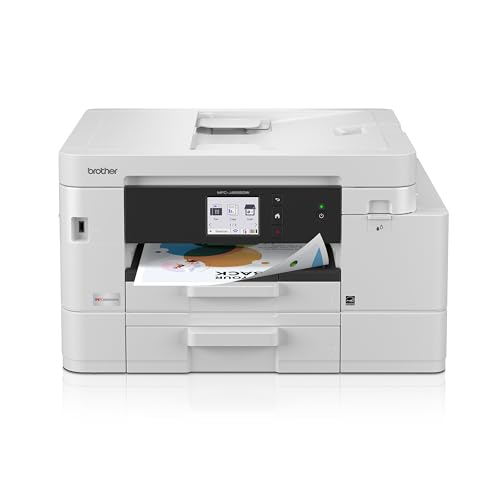
The INKvestment 4555DW blends a high-capacity ink system with a 2.7” color touchscreen. It also offers multiple connectivity options including Ethernet, wireless, USB, and Wi-Fi Direct for direct printing without a network. The printer supports cloud app connections and features dual paper trays, making it well-suited for small offices that run varied document tasks and require reliable, long-term ink costs.
HP OfficeJet Pro 8139e Wireless All-in-One

Designed for home offices with professional output, the OfficeJet Pro 8139e delivers solid color and sharp text. It offers auto duplex, a capable input tray setup, and AI-enabled features that optimize document formatting and reduce wasted pages. The printer supports versatile connectivity and is built to handle everyday business documents, reports, and marketing materials with reliability.
Buying Guide: Key Purchase Considerations
- Print volume and ink strategy: If you expect high page counts, consider models with high-capacity ink systems (INKvestment line or MegaTank) to reduce per-page costs.
- Multi-function capabilities: For a small office, a printer that can print, scan, copy, and occasionally fax provides flexibility for administrative tasks and client-facing documents.
- Connectivity and cloud integration: Look for devices with cloud app compatibility and mobile printing features to streamline workflows from anywhere in the office or home.
- Duplex printing and ADF: Automatic two-sided printing saves paper, while a reliable ADF supports efficient scanning of multi-page documents.
- Paper handling: Consider the number and type of trays, input capacity, and whether a rear bypass tray is needed for envelopes or specialty media.
- AI and layout optimization: AI-enabled features can help reduce waste and improve formatting, especially for business reports, proposals, and marketing collateral.
- Initial and ongoing cost: Balance purchase price with ink costs, yield per cartridge, and the convenience of subscription trials or refresh programs.
- Warranty and support: Evaluate manufacturer support options and regional availability to minimize downtime in a small business setting.
These options offer a blend of reliability, efficiency, and cost-conscious operation suitable for small business needs, ranging from home offices to compact small offices. Each model supports modern workflows while emphasizing affordability and ease of use.