Looking for cheap security camera monitors that still deliver clear live feeds and reliable local viewing? This guide highlights five affordable options that pair compact screens with solid camera support. Each pick targets a different buyer type—from outdoor floodlight setups to compact DIY NVR-style monitoring—so you can choose the one that best fits your surveillance needs. Below, compare features, best uses, and practical cautions to help you decide quickly.
| Product | Best For | Why It Stands Out |
|---|---|---|
| CasaCam Wireless Security Camera Pro, 10.1″ Monitor | Outdoor area monitoring with AI alerts | Integrated 2K cameras, AI detection, local 64GB SD card |
| ANNKE Wireless Security Camera System, 7″ Monitor | Small property or apartment setups | 4-channel NVR, two-way audio, IP66 outdoor cams |
| Jexiop 16inch Security Monitor | DIY surveillance kiosks or larger home setups | Wall-mount, USB playback, AV/HDMI/VGA inputs |
| ZOSHING 17inch Security Monitor | Mid-size rooms or garage spaces | Multiple inputs, built-in speaker, remote control |
| othoig 10.1 Inch Security Monitor | Versatile CCTV, DVR, NVR viewing | IPS screen, multiple inputs, remote control |
CasaCam Wireless Security Camera Pro

The CasaCam option combines a 10.1-inch touchscreen with two 2K cameras and offline local viewing via a 64GB SD card. It is best for outdoor entryways or a porch area where easy access to live feeds and alerts is valued. Its AI detection helps distinguish activity, reducing false alerts. Local storage supports privacy-conscious setups without monthly fees.
ANNKE Wireless Security Camera System

The ANNKE system features a 7-inch touch monitor with 64GB storage, two wireless outdoor cameras, and 100-foot night vision. It supports human detection and two-way audio, making it suitable for entry doors and small yards. It is best for budget-conscious buyers who want plug-and-play setup with straightforward monitoring. A potential limitation is that its 7-inch screen is smaller than some competitors, reducing at-a-glance viewing in busy feeds.
Jexiop 16inch Security Monitor

The Jexiop 16-inch monitor supports USB playback and multiple input types, making it suitable for larger home setups or DIY surveillance kiosks. It’s best for users who want flexible playback options and wall-mounting. The larger display helps with at-a-glance monitoring. A limitation is that some users may prioritize IP-based NVR features over USB media playback, depending on their system design.
ZOSHING 17inch Security Monitor
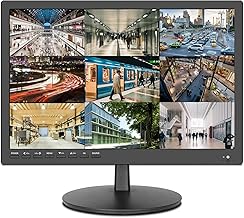
The ZOSHING 17-inch monitor is designed for wall-mount setups with multiple inputs (AV/HDMI VGA, etc.) and a built-in speaker. It suits mid-size rooms, garages, or hobbyist surveillance stations. It provides a larger viewing area for easier motion detection. A potential drawback is that it may require additional adapters for some camera systems to ensure full compatibility.
othoig 10.1 Inch Security Monitor

The othoig 10.1-inch monitor provides 1366×768 IPS display with built-in speakers and a remote. It supports HDMI, VGA, BNC, AV inputs and a USB port for playback. This option is best for compact spaces or desk-based surveillance where a small footprint matters. A caveat is that the smaller screen may require closer viewing distances for detailed feeds or precise on-screen information.
Buying Guide
What to consider when choosing a budget security camera monitor:
- Display size and resolution: Larger screens help with quick motion checks; higher resolution improves detail for faces or license plates.
- Input options: Ensure the monitor supports HDMI, VGA, BNC, or AV used by your cameras or DVR/NVR gear.
- Storage and local viewing: Local SD storage or USB playback can improve privacy and eliminate subscription needs.
- Power and installation: Outdoor-friendly mounting, weather resistance, and reliable power (AC-powered units) simplify placement.
- Audio features: Built-in speakers and two-way talk can be helpful for door cameras or perimeters.
- Detection and alerts: AI or human-detection features help reduce false alarms and improve relevance of notifications.
Practical buyer tips
- Choose a monitor that fits the size of the space you monitor. A 7-inch panel may be cramped for multiple feeds.
- Verify compatibility with your existing cameras or NVR, especially input types and transmission methods.
- Consider local storage size if you want to retain footage without cloud services.
Quick comparison by scenario
- Best for outdoor entry monitoring: CasaCam with AI detection and 2K cameras.
- Best for apartment or small yard: ANNKE system with plug-and-play setup.
- Best for DIY kiosks or wall-mounted needs: Jexiop 16-inch with multiple inputs.
- Best for garage or workshop spaces: ZOSHING 17-inch with built-in speaker and remote.
- Best all-around portable option: othoig 10.1-inch with versatile inputs and HDMI/VGA support.
FAQ
- Do these monitors require a monthly subscription? No, many offer local storage and do not require ongoing fees.
- Will these monitors work with existing cameras? Most support HDMI, VGA, BNC, or AV inputs and are compatible with common CCTV setups.
- Is a larger screen always better for security? Larger screens improve at-a-glance viewing but may not be necessary for compact spaces.
- Can I use these indoors and outdoors? Outdoor-rated options are listed; always verify weather resistance before external mounting.
- Do they support two-way audio? Some models offer two-way talk; check the product features if this is needed for your setup.
- What is the benefit of AI detection? AI helps filter irrelevant motion, reducing alert fatigue and focusing on meaningful events.