Adding a dedicated second screen can dramatically boost productivity on a MacBook, whether you’re coding, designing, or coordinating multiple tasks. The following selections are top-rated portable monitors that pair well with MacBook models, offering plug-and-play setup, crisp displays, and dependable performance. Each option prioritizes portability without sacrificing image quality or color accuracy, so you can boost your workflow on the go or at your desk.
Summary of chosen products:
| Product | Brand | Display | Connection | Notes |
|---|---|---|---|---|
| InnoView Portable Monitor | InnoView | 15.6″ FHD 1920×1080 | USB-C, HDMI | Power pass-through; travel-friendly; built-in speaker |
| Yodoit Portable Monitor | Yodoit | 15.6″ FHD 1920×1080 | USB-C, Mini HDMI | Lightweight; smart cover; versatile compatibility |
| ForHelp True 4K Portable Monitor | ForHelp | 15.6″ UHD 3840×2160 | USB-C, HDMI | 4K clarity; wide color range; slim bezel |
| UK BONITOYS Laptop Screen Extender | UK BONITOYS | 14″ 1080p FHD | USB-C, HDMI | Ultra-thin; durable build; lightweight |
| UPERFECT Portable Monitor | UPERFECT | 18.5″ 1080p | HDMI, USB-C | High refresh rate; large screen; travel-ready |
InnoView 15.6″ Portable Monitor For MacBook
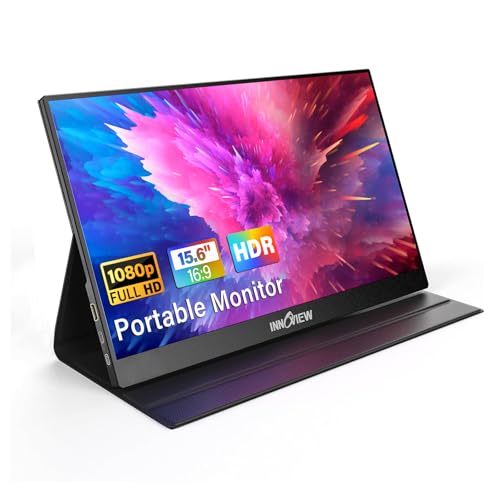
The InnoView 15.6-inch portable monitor is designed for travelers and remote workers who need a larger work surface without dragging a full secondary computer. It offers plug-and-play setup with two full-function USB-C ports and an HDMI input, allowing a single USB-C connection to power and drive the display on compatible devices. If your MacBook supports Thunderbolt 3.0/4.0 or USB 3.1 Type-C DP Alt Mode, you can simplify connections and power delivery. The IPS panel delivers wide viewing angles and vivid color with HDR functionality, reducing eye strain for long sessions. A protective case makes it easy to transport between offices and coffee shops.
Key features include a 1920×1080 resolution for crisp text and images, 178-degree viewing angles for flexible seating, and a protective design aimed at on-the-go use. The monitor is lightweight and travel-friendly, ideal as a secondary display for multitasking between documents, design apps, and communication tools. Some users may prefer to connect via HDMI if their device does not support USB-C video, though power delivery from the HDMI path may require an external power source.
Yodoit 15.6″ Portable Monitor For Laptop

The Yodoit 15.6″ portable monitor emphasizes broad compatibility and easy setup, making it a practical second screen for MacBook users. It supports USB-C for power and signal transfer and provides a second connection option via mini HDMI to HDMI, which helps when USB-C video isn’t available or when you need to chain power. The IPS panel provides a 178-degree viewing angle with accurate color reproduction, which is valuable for tasks that demand color fidelity, such as photo editing or UI design. A smart cover helps protect the screen during travel.
For MacBook users, the key caveat is to avoid using certain USB-C cables that may not carry video signals, depending on the cable and port configuration. The monitor remains portable at roughly two pounds, making it easy to slip into a bag for on-the-go productivity. In addition to extended desktop usage, this display is suitable for gaming, presenting a flexible option for mobile setups that require both work and entertainment.
ForHelp True 4K Portable Monitor
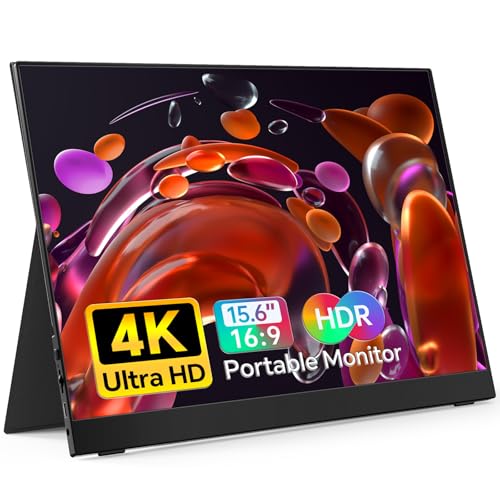
ForHelp offers a true 4K portable monitor option for MacBook users seeking ultra-high detail for photography, video editing, or design work. At 15.6 inches, the screen packs 3840×2160 resolution with IPS panel technology and wide color support (up to 100% Adobe RGB), delivering rich, accurate visuals with a bright image (up to 400 nits). The display is slim and light, with a slim 0.3-inch bezel design that minimizes overall footprint. A combination of USB-C and HDMI inputs gives flexibility for a broad range of devices, including MacBook models, PS consoles, and gaming rigs.
Users should consider color management and color-space needs when choosing this option, as 4K requires ensuring that content is color-calibrated. The 16.7M color depth and high contrast ratio offer cinematic visuals, and the stand design supports stable viewing angles. Its portability makes it a compelling choice for photographers and developers who require high-resolution reference panels on the road.
UK BONITOYS Laptop Screen Extender
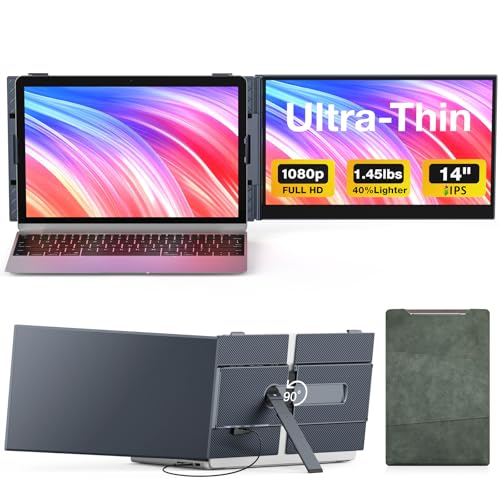
UK BONITOYS markets a 14-inch ultra-thin portable monitor that pairs well with MacBooks for extended screen real estate. The device weighs about 1.45 pounds and is only 0.12 inches thick, making it highly portable for travel. The monitor uses an aircraft-grade aluminum body with a durable blue finish and UV coating to reduce scratches and fingerprints. It includes dual top hooks and auto-tension springs to attach securely to the top edge of your laptop, providing a wobble-free experience. It supports 1080p FHD and offers 60Hz refresh, which is sufficient for general productivity, web browsing, and coding tasks while traveling.
Pros include a slim profile, robust build, and straightforward plug-and-play setup. A potential drawback is brightness and color coverage that may not meet high-end photo or video editing standards. This model excels as a compact secondary screen for spreadsheets, emails, and document editing, especially when you require minimal drag-and-drop setup and steadiness on a busy commute or in meetings.
UPERFECT Portable Monitor 18.5 Inch

UPERFECT introduces a larger portable display option at 18.5 inches with a 1080p resolution and a 120 Hz refresh rate, designed to support games and fast-paced workflows. The monitor includes VESA compatibility and a built-in stand, along with multiple connectivity options, including USB-C and HDMI, to work with MacBooks, PCs, and gaming devices. The 350-nits brightness and 125% sRGB color coverage contribute to a vibrant image, and the FreeSync support helps reduce tearing during gaming or high-frame-rate tasks.
For MacBook users who value screen real estate and responsive performance, this model provides a larger canvas that can serve as a primary secondary screen for design work, programming, or media consumption. The weight and bulk are higher than smaller portable options, so consider travel patterns and bag space before choosing this large-screen alternative.
Buying Guide: Key Considerations When Picking a Second Screen For MacBook
- Display size and portability: Choose a size that fits your travel routine. 15.6″ and 14″ models are highly portable, while 18.5″ options offer more real estate but require more space.
- Resolution and color accuracy: For photo editing or design work, prioritize 1080p or higher with IPS panels and wide color gamut (sRGB/Adobe RGB). 4K provides crisp detail but can demand more power from your MacBook.
- Connectivity: Look for USB-C with power delivery and video signals to minimize cables. If your MacBook lacks alt-mode USB-C, ensure the monitor includes HDMI input and the necessary power path.
- Power delivery: If possible, select a monitor that can be powered through USB-C from the MacBook, reducing cable clutter and outlets needed.
- Color management: If color-critical work is part of your workflow, check color profiles and calibration capabilities for a consistent on-screen result.
- Ergonomics and stand design: A flexible stand or adjustable kickstand helps you create an ergonomic workspace whether at a desk, coffee shop, or coworking space.
- Build quality and protection: For frequent travel, choose models with sturdy housings and protective cases to guard against bumps and scratches.
- Price-to-performance balance: Consider your primary use-case—coding, design, or media consumption—and balance the need for high resolution, refresh rate, and color accuracy with budget constraints.
- Compatibility notes: Some USB-C cables don’t carry video signals from certain devices. If needed, keep a compatible USB-C to USB-C or HDMI cable handy.
- Software integration: While most portable monitors are plug-and-play, some users appreciate built-in features like auto-rotation, on-screen display controls, and simple brightness adjustments.
In summary, the best second screen for a MacBook depends on your priorities—compact portability and ease of use, or larger displays with higher resolution for professional-grade tasks. The options covered here provide a spectrum from compact travel-friendly models to larger monitors designed for immersive multitasking, enabling you to tailor your MacBook workspace to your daily workflow.