The right SATA docking station can dramatically simplify expanding storage, cloning drives, or backing up data. This guide highlights five reliable options that balance speed, compatibility, and ease of use for American households and small offices. Each entry includes key features to help you compare at a glance, plus practical considerations for different setups.
| Product | Brand | Drive Type | Key Feature |
|---|---|---|---|
| SABRENT USB 3.0 to SATA External Docking Station EC-DFLT | SABRENT | 2.5″/3.5″ SATA HDD/SSD | UASP support, USB 3.0 with firmware updates |
| SABRENT USB 3.0 to SATA Dual Bay EC-HD2B | SABRENT | 2.5″/3.5″ SATA HDD/SSD (dual bay) | Offline clone, up to 10TB per drive |
| ORICO External USB 3.0 to SATA Dock DD18 | ORICO | 2.5″/3.5″ SATA HDD/SSD | Up to 24TB support, 180-degree heat dissipation |
| Inateck RGB SATA to USB 3.0 Dock SA02003 | Inateck | 2.5″/3.5″ HDD/SSD | RGB indicator, offline cloning, UASP |
| SABRENT USB Type C EC-CH2B Dual Bay | SABRENT | 2.5″/3.5″ HDD/SSD (dual bay) | Offline cloning, up to 5Gbps USB 3.0 |
Note: All products support common SATA drives and USB interfaces, with varying levels of cloning, speed, and capacity features. When choosing, consider how many drives you’ll manage, whether you need offline cloning, and the maximum drive capacity you plan to use.
SABRENT EC-DFLT: USB 3.0 to SATA Docking Station

This lay-flat docking station supports 2.5″ and 3.5″ SATA drives, making it suitable for both HDDs and SSDs. It connects via USB 3.0 for faster transfers and includes UASP support to improve throughput on compatible hosts. Firmware updates are available to maximize compatibility with larger capacity drives.
SABRENT EC-HD2B: Dual Bay Dock with Clone Function

Designed for two drives, this dock supports simultaneous operation of 2.5″ and 3.5″ SATA HDDs/SSDs and includes a cloning function that allows duplication without a PC. It supports drives up to 10TB per bay and is plug-and-play, with no driver installation required on most systems.
ORICO DD18: External Dock Up to 24TB

ORICO’s 18 series dock lays flat for improved airflow and supports a single drive up to 24TB. It uses USB 3.0 with UASP for fast data transfer and is compatible with Windows, Mac, and Linux devices, making it a flexible option for backups and data transfer across platforms.
Inateck SA02003: RGB Dock with Offline Clone
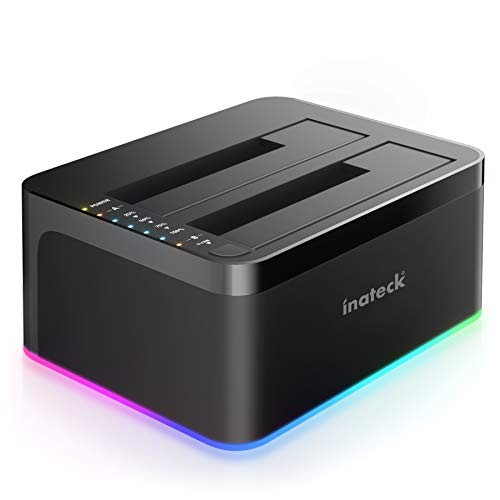
Inateck’s RGB dock adds a visual indicator while driving data transfers. It supports offline cloning and uses USB 3.0 with UASP for improved speeds. The RGB feature helps monitor drive activity at a glance, while the offline clone capability enables quick duplication tasks without a computer.
SABRENT EC-CH2B: USB Type C Dual Bay Dock

Two-drive setup with offline cloning capability and USB 3.0 speeds up to 5Gbps. The tool-free installation and HDD access LED simplify drive management, especially when cloning or swapping drives in bulk environments.
Buying Guide: Key Considerations for Selecting a SATA Docking Station
When choosing a SATA docking station, consider drive compatibility, bay count, transfer speeds, and cloning features. If you work with large backups or frequent drive migrations, a dual-bay model with offline cloning can save time. For media libraries or archives, higher maximum drive capacity (20TB+ per drive) is advantageous, and devices with UASP support typically deliver faster data transfers on compatible hosts.
- Drive compatibility and bay configuration: Ensure the dock supports 2.5″ and 3.5″ SATA drives and matches your needs for single or dual bays.
- Speed and interface: USB 3.0/3.1 with UASP yields faster read/write speeds. Verify host compatibility for optimal performance.
- Cloning capabilities: Offline cloning or one-button clone features can significantly streamline drive duplication without a computer.
- Power and cooling: Larger drives benefit from good ventilation and sufficient power supply; lay-flat designs can aid cooling.
- Cross-platform compatibility: If you use Windows, macOS, and Linux, choose a dock with broad OS support and straightforward hot-swapping.
- Firmware updates: Some docks require firmware updates to support larger drives or improve performance—check manufacturer sites for latest revisions.
Overall, select a model that aligns with your typical workflow: one-off backups, routine drive cloning, or large-scale data migration. The models listed here cover a range from single-drive simplicity to dual-drive versatility for clones and backups, all with reliable USB 3.0 performance and broad SATA compatibility.