The top choice for buyers seeking routers that use a SIM card is a clear path to staying online wherever cellular coverage exists. These devices blend cellular connectivity with Wi‑Fi to keep homes, vehicles, and remote workspaces connected when traditional broadband isn’t available. This guide highlights five reliable options and explains who each is best for, plus a practical buying guide and quick FAQs.
| Product | Key Benefit |
|---|---|
| Cudy 4G Cat 4 AC1200 Wi‑Fi 5 Router | Best for rural or backup internet with VPN and WAN failover |
| Dual Band 4G LTE Router (Unblocked) | Best for multi-device homes with AT&T or T‑Mobile SIMs |
| GL.iNet GL-X2000 Spitz Plus | Best for multi-WAN and OpenWrt VPN enthusiasts |
| N300 WiFi Unlocked 4G LTE Modem Router | Best for compact setups with broad carrier support |
| Portable 4G/5G WiFi Hotspot | Best for travel and on‑the‑go work |
Cudy 4G Cat 4 AC1200 Router With SIM Slot
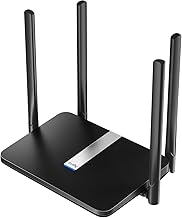
- 4G LTE Cat 4 cellular connectivity supports up to 150 Mbps down and 300 Mbps up, suitable for rural or backup internet. A SIM card provides on‑the‑go access without fixed broadband.
- Dual‑band Wi‑Fi 5 delivers 867 Mbps on 5 GHz and 300 Mbps on 2.4 GHz with beamforming for stable multi‑device streaming and gaming.
- VPN and WAN failover are built in, including WireGuard, OpenVPN, and IPsec. Automatic failover switches to cellular during outages to maintain critical connections.
Best for: Home users needing reliable backup connectivity or rural locations where fixed broadband is unavailable. Limitations: Cat 4 speeds may be lower than faster LTE or 5G alternatives; real-world results depend on carrier and signal strength.
Dual Band 4G LTE Router With SIM Card Slot

- Unblocked, 1200 Mbps total wireless speed via 2.4 GHz and 5 GHz bands. Designed to convert 4G LTE into robust home Wi‑Fi for multiple devices.
- Supports AT&T and T‑Mobile with no Verizon or Sprint compatibility; SIM card not included. Good for users who want a straightforward setup with broad device support.
- Plenty of capacity for up to 32 devices, making it suitable for small households or offices without fiber or cable.
Best for: Households needing a balanced 4G‑to‑Wi‑Fi solution with solid device support. Limitations: Not compatible with Verizon or Sprint networks; SIM needs to be supplied by the user.
GL.iNet GL-X2000 Spitz Plus 4G LTE CAT 12 Router

- Wi‑Fi 6 with up to 574 Mbps on 2.4 GHz and 2402 Mbps on 5 GHz, delivering strong performance for remote access, offices, or RV use.
- Dual‑SIM capability with single standby and Network Failover for continuous connectivity; certificated for AT&T and T‑Mobile networks.
- Multi‑WAN support includes Ethernet, Repeater, Cellular, and Tethering, enabling load balancing and flexible network topology.
Best for: Tech‑savvy users who want OpenWrt VPN capability and robust failover across multiple networks. Limitations: OpenWrt features may require configuration knowledge; price and advanced features vary by region.
N300 WiFi Unlocked 4G LTE Modem Router

- LTE Cat 4 with up to 150 Mbps download and 300 Mbps wireless speed for reliable streaming, gaming, and file sharing.
- Broad carrier support with compatibility for AT&T and T‑Mobile; four fast Ethernet ports support wired devices.
- High‑gain antennas expand coverage, making it suitable for smaller homes, cabins, or temporary setups.
Best for: Light to moderate internet needs in areas with 4G coverage and a simple, compact setup. Limitations: May not deliver the same speed or feature richness as higher‑end models; ensure your SIM plan supports desired data usage.
Portable 4G/5G WiFi Hotspot With SIM Slot

- Designed for travel with mobility in mind; supports 4G and 5G connectivity for dependable internet on the road or remote work sites.
- User‑friendly setup via Type‑C interface; simply insert a SIM, power on, and connect devices.
- Built‑in 2100 mAh battery provides over 10 hours of uptime, and charging options include USB and car adapters.
Best for: Professionals and travelers who need internet access while camping, road trips, or in temporary accommodations. Limitations: Battery life and peak speeds depend on network conditions; not a fixed broadband replacement in all setups.
Buying Guide: How to Choose The Right SIM‑Card Router
- Check which carriers are supported (AT&T, T‑Mobile, Verizon, etc.) and whether the device is SIM‑unlocked. Pick a model matching your preferred carrier.
- Speed class: LTE Cat 4 vs. Cat 12 and Wi‑Fi 5 vs. Wi‑Fi 6 affect real‑world performance. Choose based on your device load and streaming needs.
- Multi‑WAN and failover: If you rely on continuous connectivity, select routers with auto WAN failover to cellular and, ideally, multi‑WAN load balancing.
- Antennas and coverage: External antennas or higher gain can improve range in larger homes or remote areas. Consider devices with detachable antennas if you plan upgrades.
- Port options: If you need wired devices, ensure enough Ethernet ports and the option to use WAN/LAN modes as required.
- VPN and security: Built‑in VPN servers (WireGuard, OpenVPN, IPsec) help protect data across networks, especially for remote work.
- Portability: For travel, prioritize battery life, compact design, and ease of setup. For home use, prioritize higher speeds and more robust antennas.
Frequently Asked Questions
- Do SIM card routers require a data plan? Yes. A data plan from a carrier is needed for internet access, and data limits may apply.
- Can I use these routers with any SIM card? Most are SIM‑unlocked and compatible with major carriers, but verify network bands and carrier compatibility before purchase.
- Is Wi‑Fi 6 necessary for 4G/5G routers? Not strictly necessary; Wi‑Fi 6 provides better efficiency and capacity for many devices but is optional for basic needs.
- Will these devices work in a small apartment? Yes, especially models with dual‑band Wi‑Fi and stable antennas. Placement near windows can improve reception for cellular bands.
- Can I use these routers without a traditional broadband connection? Yes, many offer reliable cellular backup or primary 4G/5G service where fixed broadband is unavailable.
- Do these devices support VPN clients and servers? Several models include built‑in VPN features for secure remote access and privacy.