The best router with USB storage lets you share a connected USB drive or SD card across your home network, add a simple media server, and back up files directly over Wi‑Fi. This guide highlights five capable models that balance fast Wi‑Fi, robust USB storage support, and practical features for home offices, remote workers, or households with media streaming needs. Each pick target different buyer types—from travelers seeking portable storage sharing to home users who want a reliable multi-device hub.
Summary of selected products:
| Product | Wi‑Fi Tech | USB Storage | Best For | Notes |
|---|---|---|---|---|
| TP-Link Dual-Band BE3600 Archer BE230 | Wi‑Fi 7 | USB 3.0, USB 2.0 | Home networks needing high-throughput with multiple wired ports | 2.5G WAN/LAN, 4 antennas |
| TP-Link BE6500 BE400 | Wi‑Fi 7 | USB 3.0 | Medium‑to‑large homes with many devices | Dual 2.5G ports, solid coverage |
| TP-Link Roam 7 BE3600 Travel Router | Wi‑Fi 7 | USB 3.0 | Travel or temporary setups needing private network on public Wi‑Fi | Multiple modes for hot spots and travel use |
| ZBT AC1200 4G LTE Router | AC1200 Dual‑Band | USB Storage | Remote or rural areas needing LTE backup and USB storage sharing | 4G LTE with SIM card slot |
| NewQ Filehub AC750 Travel Router | AC750 Dual‑Band | USB Storage | Travel or compact setups needing portable USB storage sharing | File hub and multiple router modes |
TP-Link Dual‑Band BE3600 Archer BE230

Best for high‑performance homes with a mix of wired and wireless devices. This Wi‑Fi 7 router combines multi‑link operation and Multi‑RU technology to improve throughput and reliability. It includes a 2.5G WAN/LAN port and three 1G LAN ports, plus USB 3.0 for fast USB storage sharing. The 4‑antenna design supports broad coverage and robust signal quality across multiple floors.
Who this is for: households with many streaming devices, gaming consoles, and smart home gear that demand high bandwidth and consistent connections. Why selected: it pairs Wi‑Fi 7 capacity with a flexible 2.5G port mix to maximize gigabit internet where available. Caution: actual real‑world speeds depend on distance and walls, and Wi‑Fi 7 performance varies by device support.
TP-Link BE6500 Dual‑Band BE400

Best for larger homes or spaces with many devices needing robust Wi‑Fi 7 performance. This model pushes up to 6.5 Gbps total bandwidth across bands and offers dual 2.5Gbps ports plus USB 3.0. With HomeShield, Private IoT, and extensive coverage, it is well suited for households where device density and security matter. The 90‑device capacity note gives a sense of scale for busy environments.
Who this is for: families with multiple 4K streams, a home office, and smart devices spread across several rooms. Why selected: higher total bandwidth and dual 2.5G ports provide headroom for future internet upgrades. Caution: space planning matters to avoid dead zones in very large homes.
TP-Link Roam 7 BE3600 Travel Router

Best for travelers and spaces that rely on public Wi‑Fi while keeping a secure private network. This model supports multiple modes (Router, Hotspot, AP/RE/Client) and includes a 2.5G port along with USB 3.0 for USB storage sharing. It’s designed to create a private network on the go and can handle up to 90 devices in certain configurations.
Who this is for: travelers, hotel guests, or temporary setups such as Airbnb or RVs. Why selected: flexibility for private network creation in diverse environments. Caution: this model does not support 6 GHz Wi‑Fi bands, which may affect future‑proofing in some scenarios.
ZBT AC1200 4G LTE Router With USB Storage

Best for remote locations requiring cellular backup and local USB storage sharing. This router supports 4G LTE with a SIM card slot and provides five Ethernet ports (1 WAN, 4 LAN) for wired devices. The USB port enables storage sharing or a USB modem as a backup WAN option, depending on configuration.
Who this is for: homes or offices in areas with limited fixed line broadband where LTE backup improves uptime. Why selected: combines LTE connectivity with USB storage sharing while maintaining full Gigabit LAN potential. Caution: LTE performance varies with carrier signal strength and network congestion.
NewQ Filehub AC750 Travel Router
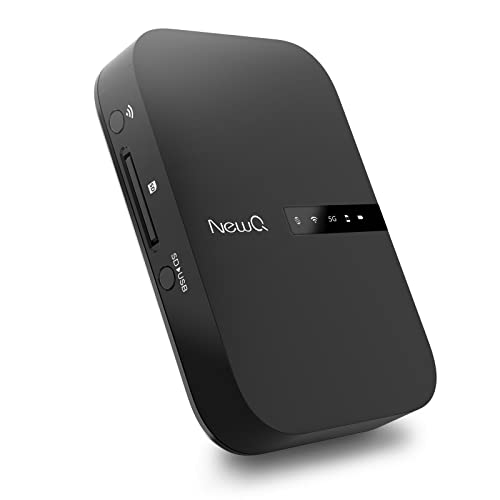
Best for compact travel setups needing portable USB storage sharing and multiple router modes. The Filehub function enables wireless access to attached USB storage devices, SD cards, or other media, turning external storage into a wireless drive. It supports AP mode, Router mode, and Bridge mode for versatile connectivity.
Who this is for: travelers who want to carry a simple network hub and portable storage access. Why selected: strong portability with USB storage bridging. Caution: software interfaces are browser‑based and may require occasional setup steps for file access.
Buying Guide: How To Choose The Right Router With USB Storage
What USB storage features should I expect?
Look for active USB 3.0 ports for fast drive sharing and a stable USB storage server feature. Some models support USB 2.0 for compatibility with older drives. Consider whether the router supports SMB/FTP/NFS sharing, media server compatibility (DLNA), and local cloud‑less backups on the network.
Which Wi‑Fi standard fits your needs?
Wi‑Fi 6 (AX) is common, but Wi‑Fi 7 (BE3600/BE400) offers higher theoretical speeds and better multi‑device performance. If you have many smart devices and 4K/8K streams, Wi‑Fi 7 can provide smoother experiences, especially in busy homes. Note that device compatibility matters; older devices may not fully benefit from Wi‑Fi 7.
How many wired ports do you require?
Consider the number of wired devices (PCs, NAS devices, gaming consoles) that need stable Ethernet. 2.5G WAN/LAN ports are valuable if you have gigabit internet or want a fast uplink to a NAS. More LAN ports help keep gaming and work devices wired for reliability.
Is VPN or private IoT support important?
Many routers on this list include VPN features or Private IoT networks to protect devices when using public Wi‑Fi or guest networks. If you prioritize secure remote work or IoT segmentation, verify that the device supports VPN protocols and secure guest networks.
What about travel versus home use?
Travel routers emphasize portability and easy mode switching, often with private networks on public Wi‑Fi. Home models prioritize coverage, multi‑device handling, and larger USB storage options. Choose based on where you’ll use the router most often.
What are the practical trade-offs?
- Wi‑Fi 7 offers speed and efficiency but may be less beneficial if your devices don’t support it yet.
- Dual 2.5G ports provide better uplink capacity—a key advantage for small offices or media servers.
- Complicated feature sets can complicate setup; simple interfaces help with day‑to‑day use.
Frequently Asked Questions
- What is USB storage sharing on routers?
- Do I need Wi‑Fi 7 to benefit from USB storage routers?
- Can I use these routers without internet service?
- Is private IoT important for security?
- What should I consider when selecting a travel router?
- How many devices can these routers support?
USB storage sharing enables a connected USB drive or SD card to be accessed by devices on the local network, effectively turning the drive into a network‑attached storage (NAS) for media, backups, or file transfers.
No. USB storage sharing works with many Wi‑Fi standards, but Wi‑Fi 7 provides better overall network performance with multiple devices, especially in busy homes.
Yes. USB storage sharing and local network features work without an active internet connection. Some routing features may require online services for updates or cloud features.
Private IoT helps segment and isolate IoT devices, reducing potential attack surfaces. It is beneficial in homes with smart devices and guest networks.
Portability, support for secure VPN connections, and a reliable USB storage function are key. Also check that the device can work with the kinds of public networks you encounter, such as hotels or airports.
Household models often handle dozens of devices, while travel models target fewer devices (often up to around 90 in some configurations). Device load depends on usage type and network conditions.