Choosing a router for a small or medium office demands reliable speed, robust security, and flexible connectivity. The following selections focus on cellular and Wi‑Fi 6 options that support high device counts, VPNs, and seamless failover, helping keep teams productive even when traditional broadband is unavailable. The list highlights five top models with strong performance, battery backup, and enterprise-friendly features.
| Product | Key Benefit | Best For |
|---|---|---|
| GL.iNet GL-XE3000 (Puli AX) | Wi‑Fi 6 cellular router with built‑in battery, dual SIM, multi‑WAN, OpenWrt support | Offsite offices, events, retail pop-ups |
| UOTEK 5G CPE Router | 5G with Wi‑Fi 6, dual-band, SIM card slot, fast parallel connections | Home office and small offices needing quick setup |
| U-SPEED N300 WiFi Router | Easy setup, 300 Mbps, repeater/WISP modes | Budget wireless extension and office coverage |
| Horizon HZ51 Dual‑Band Wi‑Fi 6 Router | Wi‑Fi 6 with 5G SA/NSA and WPA3 security | Small offices needing strong security and speed |
| Denash 5G CPE Router | Dual‑band Wi‑Fi 6 with SA/NSA and SIM slot | Portable office setups with cellular redundancy |
Note: The buying guide below provides essential considerations to help compare these options, including network standards, security features, and deployment scenarios for office environments.
GL.iNet GL-XE3000 (Puli AX) 5G Router

Key features include a fast Wi‑Fi 6 cellular router with dual SIM slots and a built‑in 6400mAh battery for up to eight hours of uptime. It supports multi‑WAN configurations and OpenWrt, making it suitable for office environments requiring VPNs and ongoing connectivity during power interruptions. The device prioritizes secure remote access and can operate in both 5G NSA/SA networks, with automatic failover to ensure business continuity.
UOTEK 5G CPE Router

This router offers 5G cellular access with a true 5G standard and a Wi‑Fi 6 802.11ax interface built for multi‑user environments. It uses OFDMA and DL MU‑MIMO to enhance throughput and reduce latency, with dual‑band capability up to 1800 Mbps total. It supports simultaneous connections for multiple devices, making it well-suited for small offices and home offices needing fast, reliable wireless internet without extra cables.
U-SPEED N300 WiFi Router

With 2.4 GHz N wireless networks up to 300 Mbps, the U‑SPEED N300 is a simple, cost‑effective solution for small offices. It features two 5 dBi antennas to improve coverage and stability and includes a WISP repeater mode to extend access by connecting to an upstream router. The device is ideal for basic office coverage or as a supplementary access point in larger layouts.
KiwiSIM 4G LTE WiFi Router
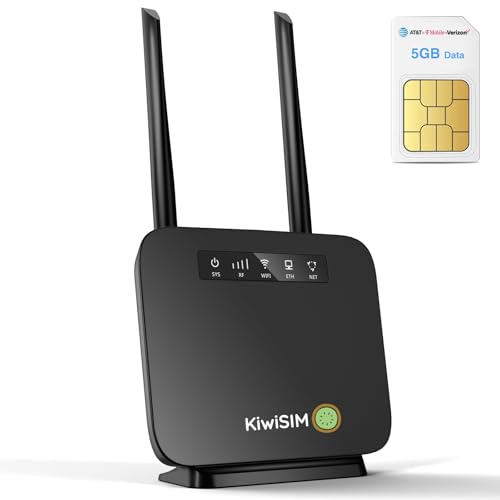
KiwiSIM combines a portable LTE router with a 3000mAh battery and a SIM card slot. It offers up to 300 Mbps Wi‑Fi with a broad device connection limit, and it includes a data SIM inside for broad carrier compatibility (Verizon, AT&T, T‑Mobile). This option is well suited for mobile office setups, temporary work sites, or travel scenarios where broadband is unavailable.
Horizon HZ51 Dual‑Band Wi‑Fi 6 Router

Powered by a Qualcomm X62 chipset, the Horizon HZ51 delivers high‑speed Wi‑Fi 6 (dual‑band) with support for 5G SA/NSA and LTE CAT 19. WPA3 encryption strengthens security for office environments, and six antennas help maximize range and reliability. This model is aimed at small offices or workspaces requiring robust wireless performance and modern security standards.
Denash 5G CPE Router

Denash combines dual‑band Wi‑Fi 6 with a SIM card slot and SA/NSA support for flexible 5G connectivity. It features eight built‑in wideband antennas for broader signal coverage and improved heat dissipation. The router is designed for stable, high‑speed cellular office networks, suitable for indoor use in home offices or mobile workspaces requiring reliable internet access.
Buying Guide
- Network standards and speeds: Look for Wi‑Fi 6 (802.11ax) for higher throughput and better multi-device performance, especially in busy offices. Consider 5G SA/NSA support if you need the fastest mobile broadband.
- SIM and failover capabilities: Dual‑SIM or automatic failover helps maintain connectivity during network outages. Check compatibility with major carriers in your region.
- Security: WPA3 is the current standard for home and office security. If VPN support or OpenWrt is important, verify firmware features and update policies.
- Battery backup and uptime: A built‑in battery or external UPS compatibility matters for continuity during outages, particularly in remote work sites or events.
- Deployment environments: For offices with many devices, prioritize devices with MU‑MIMO/OFDMA for more efficient traffic management and reduced latency.
- Coverage and placement: Multi‑antenna designs and the ability to work as a repeater or mesh node help eliminate dead zones in larger offices.
- Management and updates: Check the ease of setup, remote management options, and frequency of security updates to maintain a secure network.