Discover top RGB LED strips for PC builds and learn which option fits your setup. This guide highlights five durable, ARGB- and 12V-enabled strips, with clear reasons for who benefits most from each choice. Ideal buyers include DIY tinkerers, system builders seeking vivid effects, and anyone upgrading a case with magnetic mounting options or easy installation.
| Product | Best For | Why It Stands Out |
|---|---|---|
| airgoo ARGB 5V 3-Pin (15.75″) | Custom layered lighting, complex setups | Two strips, magnet mounting, AG-DRGB16 compatibility |
| BTF-LIGHTING PC RGB Strip 2-Pack (19.7″) | Broad motherboard compatibility | 4-pin 12V header support, robust brightness, durable tape |
| airgoo ARGB 5V 3-Pin (13.78″) | Compact builds with magnets | Clear silicone cover, independent control, AG-DRGB16 ready |
| BTF-LIGHTING PC RGB Strip 4-Pack (19.7″) | Large cases or multi-zone lighting | Multi-strip kit, 12V header compatibility, stable output |
| NEON ARGB 2×15.7″ (Speclux) | Premium DIY ARGB accents | 2 strips, strong magnetic brackets, IP65 protection |
Airgoo ARGB 5V 3-Pin 15.75″ LED Strip
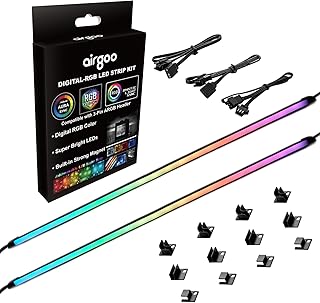
Best for complex ARGB setups where separate controller or motherboard ARGB header is used. This kit includes two addressable strips with a silicone housing that diffuses light. Each strip features 21 LED beads and uses a +5V ARGB 3-pin interface. It is ideal for users planning layered lighting with an AG-DRGB16 controller or compatible motherboards. A caution: the silicone surface can collect dust and may require periodic cleaning to maintain diffusion quality.
Who it’s best for
PC builders needing flexible, magnet-friendly mounting and compatible with Airgoo ARGB controllers. Good for multi-strip designs in elevated or creative cases.
Why selected
Two strips provide added color zones with a single purchase. The 5V ARGB system offers easy expansion if you already own compatible controllers or a motherboard header.
Caution
Ensure you power only with +5V ARGB; using other voltages may damage the strip.
BTF-LIGHTING PC RGB Strip 2-Pack, 19.7″ (12V)
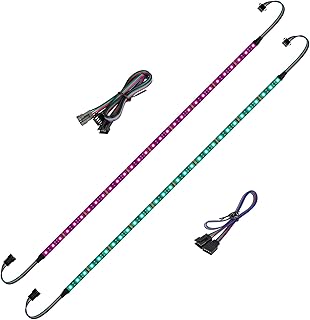
Best for mainstream builds that rely on standard motherboard RGB headers. These 12V 4-pin strips work with ASUS Aura Sync, Gigabyte RGB Fusion, MSI Mystic Light, and similar platforms. They should not be connected to 3-pin 5V ARGB headers. The kit promises uniform brightness and color effects via software control. A limitation: improper header pairing can damage the strip, so verify motherboard compatibility before installation.
Who it’s best for
Users with compatible 4-pin 12V motherboard headers seeking reliable performance across popular RGB ecosystems.
Why selected
Wide software support and a robust 2-pack presentation make it a strong choice for cases needing two separate color zones without extra wiring complexity.
BTF-LIGHTING PC RGB Strip 4-Pack, 19.7″

Best for expansive builds or multi-zone lighting projects. This 4-pack set uses a 12V 4-pin interface compatible with major motherboard brands. It offers consistent light output and straightforward installation with strong adhesion. A caution: avoid connecting these to 5V ARGB headers to prevent damage.
NEON ARGB 2×15.7″ Strips (Speclux)

Best for premium DIY ARGB accents with easily managed magnetic mounting. The Speclux kit includes two 15.7-inch strips designed for 5V 3-pin ARGB headers and supports popular sync ecosystems such as Asus Aura, Gigabyte Fusion, and Mystic Light. They feature IP65 waterproof silicone sealing for added durability in environments prone to moisture. Limitation: some motherboards require exact ARGB header compatibility to achieve full synchronization.
Buying Guide
Questions to ask before buying ARGB or 12V RGB PC strips help ensure compatibility and ease of use.
- What type of header does my motherboard have? ARGB 3-pin (+5V) or 4-pin 12V? This determines whether you should buy ARGB or standard RGB strips.
- Do you need magnetic mounting or silicone diffusion? Magnetic hardware simplifies installation, while diffusion affects light softness.
- What length and quantity suit your case? Measure available space and decide if you need one strip or a multi-pack for larger builds.
- Which controllers are compatible? Some strips work best with dedicated controllers like AG-DRGB16 or popular motherboard software.
- Is IP protection a concern? Waterproof or IP-rated strips are better for open PC builds or humid environments.
Practical tips
- Plan for future expansion by selecting strips that support compatible controllers and headers.
- Keep power requirements in mind; ARGB strips often run off +5V, while 12V strips use a different header standard.
- Use the included mounting hardware or magnetic brackets when provided to reduce stress on solder joints.
Comparison at a glance
The following at-a-glance comparison helps you choose quickly:
- ARGB (5V, 3-pin): Best for advanced, color-rich setups with compatible headers.
- 12V RGB (4-pin): Best for broad motherboard compatibility across major brands.
- Magnetic mounting: Eases installation in tight spaces and cases with removable panels.
- Diffusion vs. transparency: Affects light softness and diffusion quality; diffusion can hide single LEDs.
Common buying considerations
- Make sure the strips’ length matches your case width and panel heights.
- Confirm whether you need a separate controller or rely on motherboard software.
- Evaluate the ease of replacement or expansion in the future.
FAQ
- What is the difference between ARGB and RGB strips? ARGB uses a 3-pin header with +5V data, offering per-LED control; RGB uses a 4-pin 12V header and treats all LEDs evenly.
- Can I mix ARGB strips from different brands? Compatibility depends on whether the controller supports the same protocol; mixing can cause synchronization issues.
- Do magnetic mounts damage cases? When applied correctly, magnets are non-destructive and allow quick removal for maintenance.
- Are ARGB strips water-resistant? Some models protect LEDs with silicone; check IP rating if exposed to moisture or humid environments.
- What should I do if colors don’t sync? Verify header type, controller compatibility, and software settings before replacing hardware.
- Can I cut RGB strips to fit a custom length? Many strips are cuttable at specific intervals; follow manufacturer guidance to avoid damage.