The market for RGB fan controllers combines precise PWM fan control with vibrant lighting management. This guide highlights five top options from trusted brands to help American PC builders synchronize cooling performance with dazzling RGB effects. Each product section includes a quick overview, key features, and practical use considerations. Use this comparison to decide which controller best fits your case, number of fans, and lighting ecosystem.
| Product | Brand | Key Features | Ideal For |
|---|---|---|---|
| NZXT RGB & Fan Controller AC-CRFR0-B1-6 | NZXT | 6 lighting channels, 3 fan channels, CAM software control | NZXT CAM users seeking integrated lighting and fan control |
| Thermalright ARGB Fan HUB Controller | Thermalright | ARGB fan hub with 8 ARGB groups, 8 ports, strong mounting | Mid-to-larger builds needing multiple ARGB devices |
| ShakingTank ARGB and PWM Fan Hub | Shaking Tank | 9-port PWM + ARGB hub, magnetic backplane, 5V 3PIN | Flexible, cable-clean installations with magnetic mounting |
| Corsair Commander Duo iCUE Link | Corsair | 12 daisy-chained PWM fans, iCUE and ARGB compatibility | Users investing in Corsair ecosystem for dual lighting/fan control |
| ASUS TUF Gaming ARGB PWM Hub | ASUS | Six fans, PWM and ARGB connectors, clear indicators | ASUS motherboard users seeking simple, reliable hub |
Note: This table summarizes the five selected products and their primary strengths. For each item, the detailed sections below describe compatibility, installation, and how they fit different PC builds.
NZXT RGB & Fan Controller AC-CRFR0-B1-6
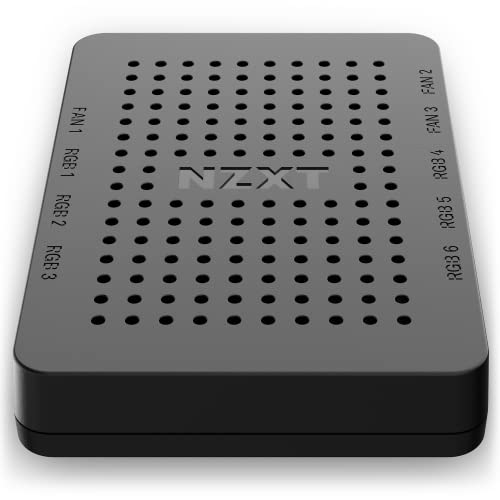
The NZXT AC-CRFR0-B1-6 provides six RGB lighting channels and three PWM fan channels, all managed through NZXT CAM software. This setup is ideal for users who want a cohesive, branded RGB experience across compatible NZXT hardware. Installation is designed to be plug-and-play with built-in magnets and adhesive strips, and it can be mounted in a 2.5-inch drive bay if needed. This controller emphasizes a smooth integration with CAM, making it a strong choice for NZXT-focused builds.
Key considerations:
- Compatibility with NZXT CAM software for synchronized lighting and cooling profiles.
- Supports up to nine PWM fans across its controller ecosystem, depending on how fans are wired.
- Mounting options include magnets or adhesive strips for flexible placement.
Performance and design notes indicate reliable RGB customization alongside fan-speed management, suitable for builds prioritizing a unified look with CAM-powered control.
Thermalright ARGB Fan HUB Controller

The Thermalright ARGB Fan HUB supports up to eight groups of ARGB fans with a 4-pin ARGB interface, designed for streamlined wiring and strong mounting options. It uses a SATA power feed for direct connection, and the kit includes a robust double-sided adhesive option for chassis mounting. The hub is built to maintain stable output under high load, suitable for systems with extensive ARGB lighting and multiple fans. It is positioned as a reliable hub for ARGB enthusiasts looking to simplify wiring while expanding lighting control.
Key considerations:
- Eight ARGB fan groups enable extensive lighting setups without excessive cable clutter.
- SATA power provides a straightforward power path for stable operation.
- Double-sided mounting options help secure the hub within the chassis cleanly.
Ideal for builders who need a robust ARGB hub without relying solely on motherboard headers, balancing both aesthetics and cooling management.
ShakingTank ARGB and PWM Fan Hub

This ShakingTank hub offers a 9-port configuration combining both ARGB and PWM controls, allowing synchronization of fan speeds with lighting effects. The magnetic backplane design makes it easy to attach to metal surfaces without tape, which can be convenient for compact builds or temporary testing setups. It supports up to nine fans with separate ARGB and PWM ports, accommodating a broad range of case layouts while simplifying cable management.
Key considerations:
- Magnetic backplane enables flexible placement and quick adjustments during assembly.
- 9-port capacity supports large custom loops or densely populated cases.
- Compatible with 5V 3-pin ARGB controllers and standard 4-pin PWM fans for broad compatibility.
In practice, this hub is well-suited for users who want both broad lighting control and fan speed management without complex software dependencies.
NZXT Control Hub

NZXT Control Hub is designed to digitally manage RGB lighting and PWM fan speed for multiple fans, including up to five PWM fans or four NZXT single-frame fans. It relies on NZXT CAM software to synchronize lighting across connected components. The hub is ideal for users who want precise fan control and cohesive RGB effects across a smaller to mid-sized setup, particularly when using NZXT’s ecosystem.
Key considerations:
- Best used with NZXT components to maximize software-driven syncing and features like Zero RPM mode.
- Eight-pin PWM and RGB headers facilitate integrated control of several fans and lighting devices.
- Zero RPM mode helps reduce noise during light workloads.
Overall, the NZXT Control Hub is a compact option for NZXT-centric builds seeking a centralized control solution without third-party software conflicts.
ASUS TUF Gaming ARGB PWM Hub

The ASUS TUF Gaming ARGB PWM Hub connects up to six case fans and supports PWM fans plus ARGB lighting. It provides visible power and operation indicators to simplify status checking, which can be helpful in troubleshooting or during initial setup. This hub emphasizes reliability and straightforward installation, making it a good option for users who want a simple, well-supported ARGB and PWM control solution within the ASUS ecosystem.
Key considerations:
- Six-fan capacity suits mid-sized builds or mid-tower cases with multiple fans.
- Clear indicators help during installation and debugging.
- Seamless operation with ARGB lighting and PWM control-friendly design.
For builders using ASUS components, this hub provides a cohesive experience without introducing compatibility concerns.
Buying Guide: Key Purchase Considerations
When selecting an RGB fan controller hub, consider the following dimensions to align with your build goals:
- Fan count and layout: Determine the number of fans and whether you need ARGB, PWM, or both. Some hubs support 8–9 ports, while others focus on a smaller, more compact footprint.
- Software ecosystem: If you already use CAM, iCUE, or motherboard RGB software, pick a controller that integrates smoothly with that ecosystem to avoid conflicts and maximize features like Zero RPM and synchronized lighting.
- Power delivery: Check whether the hub uses SATA or Molex power, or if it draws from the motherboard. Ensure sufficient power delivery for all connected devices, especially with multiple ARGB strings.
- Mounting and cable management: Consider magnetic backplanes, adhesive options, and mounting holes. A tidy build reduces airflow obstruction and improves aesthetics.
- Future expandability: If you plan to add more fans or RGB devices later, choose a hub with extra ports or a scalable ecosystem that won’t require a full replacement.
- Build compatibility: Confirm compatibility with your case layout, motherboard headers, and any other lighting controllers you already own to avoid conflicts.
In practice, users prioritize a balance between control precision, ease of use, and aesthetic integration. For NZXT ecosystems, CAM-based controllers offer deep software integration; for Corsair or ASUS, ecosystem-specific hubs deliver strong compatibility and reliable operation. Magnetic mounting and simple SATA power are practical features for clean builds and straightforward installation.