Answer: The best remotes for cable boxes are simple-to-use, reliable options that work with your specific set-top box and TV setup. This guide highlights five solid choices that cover Spectrum/Charter, Altice, and general TV/Cable integrations. Each option is chosen for ease of use, compatibility, and practical features like backlighting, large buttons, or quick setup. This list fits buyers seeking straightforward operation, seniors needing large buttons, or households with multiple devices seeking unified control. Below is a brief comparison to help you decide at a glance.
| Product | Best For | Key Benefit | Limitations |
|---|---|---|---|
| Charter Spectrum TV Remote Control TIME Warner CLIKR-5 UR5U-8780L | Basic Spectrum/Charter users | Compact with backlit keypad | Specialized for Spectrum/Charter |
| Flipper Big Button Universal TV Remote | Seniors, dementia care | Large color-coded buttons | Does not support streaming apps |
| SJUIF Replacement Remote For Optimum Cablevision | Optimum/Cablevision users | Plug-and-play with no programming | Not compatible with other brands |
| SatelliteSale UR5U-8780L Clikr5 | Multiple devices | Easy setup and navigation | Generic for several brands |
| WKOLF URC1160 Replacement Remote | Broad Spectrum/Charter devices | Backlit, clear codes | Requires initial programming |
Charter Spectrum TV Remote Control Time Warner CLIKR-5 UR5U-8780L

Best For: Spectrum/Charter cable box users who want a compact remote with backlit keys. This unit emphasizes a comfortable grip and straightforward controls, making it suitable for everyday TV viewing without extra setup complexity.
Why selected: The remote combines delicate key design with a small, easy-to-hold body and backlit illumination for low-light viewing. It is designed to be compatible with Spectrum and Charter boxes, simplifying operation for casual viewers and those who appreciate tactile feedback.
Limitation: It is primarily intended for Spectrum/Charter systems. If you use a different service or an all-in-one universal setup, consider alternatives with broader compatibility.
Best use case: A user who wants a familiar, minimal interface for a single set-top box without extra features or streaming controls.
Flipper Big Button Universal TV Remote for Seniors

Best For: Seniors or caregivers seeking a simple, large-button remote for TV-only or TV plus a basic cable set-top box. This option reduces confusion with a focused set of essential controls.
Why selected: It targets users who need minimal programming and a clearly labeled interface. The remote can control several IR devices, including TV, cable box, and soundbars, offering a unified option for basic operations.
Limitation: It does not support streaming apps or full universal control for every device. If you need broader compatibility, consider remotes with broader code libraries.
SJUIF Replacement Remote For Optice Optimum Cablevision
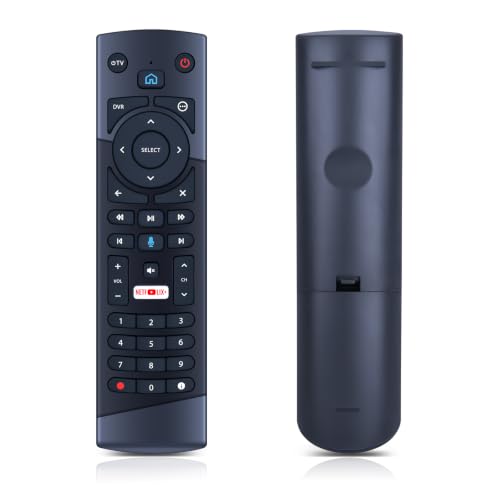
Best For: Optimum/Cablevision users needing an easy, plug-and-play replacement. No complex pairing is required, which makes it ideal for quickly restoring control over a specific cable box.
Why selected: It emphasizes compatibility with Optimum Cablevision models (T4HU171436K, T4HIU210436K), and its infrared technology provides straightforward operation with minimal setup.
Limitation: Not compatible with other brands. If your system uses a different service, this remote may not function correctly.
SatelliteSale UR5U-8780L Clikr5 Remote

Best For: Households needing a straightforward, universally compatible remote for Spectrum/Charter set-top boxes and TVs. It is suited for users who prefer quick pairing with minimal steps.
Why selected: It features easy setup with auto-search or direct code entry, plus clear navigation. The design prioritizes legibility and simple operation for daily use.
Limitation: As a general-purpose remote, it may lack advanced features or streaming controls found on newer high-end models.
WKOLF New URC1160 Remote Control

Best For: Spectrum/Charter cable set-top boxes with backlit keys for low-light viewing. This model is suitable when backlighting and a robust layout matter most.
Why selected: It supports the characteristic URC1160 family with backlit functionality and is designed for use with Spectrum/Charter devices, offering practical setup steps.
Limitation: The initial programming step is required to confirm proper function with your exact TV or audio devices; non-members may need to try multiple codes.
Buying Guide
What should you consider when selecting a remote for a cable box?
- Compatibility: Confirm the remote supports your service (Spectrum, Charter, Optimum, etc.) and your specific cable box model.
- Ease of use: Look for large buttons, clear labeling, or backlighting if you watch TV in dim rooms.
- Connection type: Most remotes are infrared (IR); some newer options add Bluetooth or RF for broader compatibility. Choose based on your devices’ receiving methods.
- Programming: Some remotes require simple code-entry; others pair automatically. Consider how much setup you’re willing to do.
- Consolidation: If you want a single remote for multiple devices (TV, soundbar, cable box), ensure the model supports controlling all intended devices.
- Durability and comfort: A compact, grippable design helps, especially for users with limited dexterity.
FAQ
- What is the simplest remote for Spectrum boxes?
Remotes designed for Spectrum/Charter, such as CLIKR-5 UR5U-8780L, emphasize minimal setup and direct compatibility.
- Do these remotes control more than the cable box?
Many options can control additional devices like TVs and soundbars, but always check the model’s features to confirm supported devices.
- Can I use a universal remote with my Optimum box?
Yes, some replacements are designed for Optimum/Cablevision. Verify compatibility with your exact box model before purchase.
- Is backlighting important for cable remotes?
Backlighting helps in low-light rooms and during late-night viewing, improving button visibility and reducing mistakes.
- Do I need to program these remotes?
Most will require basic programming or code entry; a few offer plug-and-play operation with compatible boxes.
- Are these remotes covered for streaming devices?
Most listed remotes focus on cable boxes and TVs; they may not support streaming apps. If you need streaming, look for remotes labeled as universal with streaming capabilities.