Finding a reliable portable printer can make business trips, study sessions, and home office tasks far easier. The following five models represent top-rated options for different needs—from inkless thermal printing to high-quality color photos on the go. Each entry highlights core features, connectivity, and portability so you can compare at a glance and decide which fits your workflow. This guide also offers practical buying considerations to help you choose with confidence.
| Product | Brand | Key Feature |
|---|---|---|
| Canon PIXMA TR160 Wireless Portable Printer | Canon | 5-Color Hybrid Ink, compact and light for travel |
| Gloryang Inkless Portable Printer | Gloryang | Inkless thermal printing; carries three rolls of paper |
| A285M Portable Printer | TATTMUSE | Ultra-compact, multiple paper widths, Bluetooth or USB-C |
| Second A285M Model | TATTMUSE | Carrying case included; multiple sizes; inkless printing |
| Rongta Portable Printer | Rongta | 8.5″ print width; SoPrint app; lightweight |
Canon PIXMA TR160 Wireless Portable Printer

Canon’s PIXMA TR160 is designed for travelers who still need sharp documents and color photos. It weighs in as a compact, lightweight option that easily fits in a bag. The printer supports printing up to 8.5 x 11 inches and uses a 5-Color Hybrid Ink System to deliver crisp black text and vivid color images. Connectivity is simple and flexible through the Canon PRINT app, Apple AirPrint, or Mopria, with cloud printing as an option for remote work. The 1.44″ display helps manage settings on the go, and the tray supports everyday document tasks alongside photos.
The TR160 balances portability with print quality, making it suitable for receipts, reports, and class projects while traveling. Users benefit from on-the-go setup and straightforward software integration, reducing friction when starting a print from a mobile device or laptop. The device is ideal for students, business travelers, and remote workers who need reliable prints without a desktop setup.
Gloryang Inkless Portable Printer For Travel

The Gloryang inkless printer emphasizes cost efficiency and portability. It uses thermal technology, so no ink, toner, or ribbons are needed. The package includes three rolls of thermal paper, a carrying case, and a charging cable, supporting immediate printing on the go. It’s particularly suited for travelers who print documents, tickets, boards, or labels in black and white. Bluetooth compatibility with iOS and Android devices is straightforward via the Jadens Printer app, and a driver option exists for computer use. At about 1.75 pounds, it’s a practical light-to-medium duty option for fieldwork or campus life.
Note that this model works exclusively with Gloryang thermal paper, which helps keep ongoing costs predictable. Its foldable footprint and bundled accessories provide a compact printing solution for meeting notes, receipts, and quick proofs of work during travel. The device is best for users who prioritize portability and simple, inkless operation over high-volume color printing.
Portable Printers Wireless for Travel, A285M

The A285M from TATTMUSE is a compact wireless option designed for travel and small offices. It weighs roughly 1.5 pounds and supports multiple thermal paper widths, including 8.5 x 11 inches US Letter and A4. Bluetooth provides mobile printing from smartphones or tablets, while USB-C enables connection to a laptop or desktop. The device is inkless, relying on thermal technology to reduce ongoing costs. Its small footprint makes it ideal for on-the-go contracts, receipts, or forms, especially where space is limited.
Users should consider paper compatibility and driver availability for a seamless printing experience on laptops. The A285M is well-suited for fieldwork, classrooms, and casual home use where convenience and low operating costs matter more than color fidelity or high-volume output.
TATTMUSE A285M Bluetooth Inkless Thermal Printer Kit
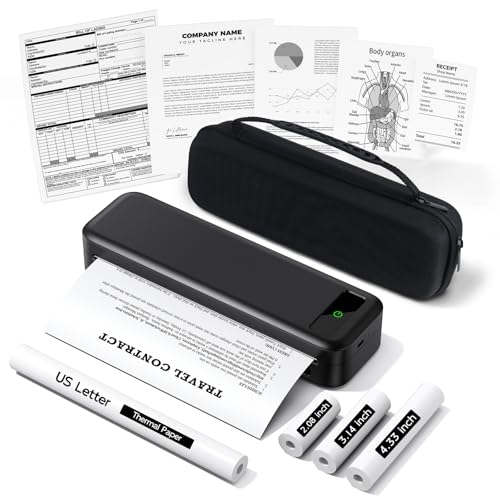
This second A285M listing from TATTMUSE emphasizes a carrying case and additional thermal paper rolls, enhancing portability for travelers who print frequently. The inkless design minimizes maintenance and costs since no ink or toner is required. Bluetooth remains the primary wireless connection with USB-C as a wired option for laptops. The printer supports various thermal paper widths, making it flexible for receipts, forms, and simple color-free documents. The included accessories reduce the need to search for compatible paper on the road.
When evaluating, consider how often you’ll print photos versus documents. The A285M line excels at utility and portability, but it doesn’t compete with color photo printing. It is best for receipts, tickets, notes, and standard documents on business trips or in classrooms.
Rongta Portable Printer Wireless for Travel
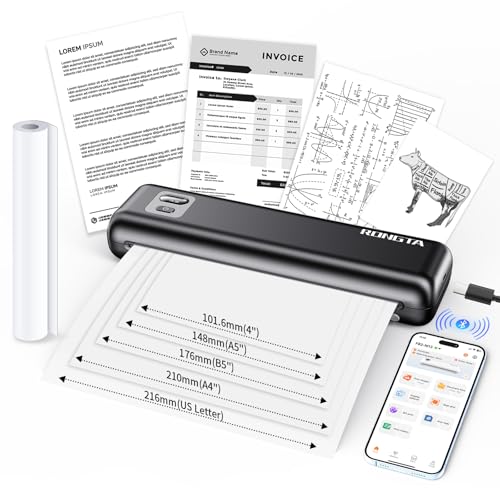
The Rongta portable printer focuses on a compact, travel-friendly design with an emphasis on broad compatibility. It uses thermal printing and supports Android, iOS, and laptop connections via Bluetooth or USB. Its 8.5″ maximum print width makes it versatile for documents, itineraries, and forms. The included setup involves downloading the SoPrint app and pairing via Bluetooth, followed by straightforward printing from mobile devices or a computer. This model suits road warriors, students, and teams that need a simple, economical way to print on demand while away from a full office setup.
Rongta’s unit stands out for quiet operation and a clean hardware aesthetic. Users should verify driver availability for desktop OSs and confirm compatibility with their preferred thermal paper stock. The device offers a balance of portability, ease of use, and practical print dimensions for everyday travel tasks.
Buying Guide: Key Purchase Considerations And Comparisons
What to evaluate when selecting a portable printer includes print technology, paper compatibility, weight, and connectivity. Inkless thermal printers offer cost savings but are limited to thermal paper and monochrome output; they shine for receipts, labels, and simple documents. If color accuracy and photo printing matter, look for printers that use dye-based or pigmented inks and larger display interfaces for easier setup on the move.
Portability is often a trade-off with speed and output size. Lighter devices with smaller paper options tend to be ideal for travel and fieldwork, whereas slightly bigger units may provide more robust paper handling and faster print speeds. Consider whether you need battery life, a carry case, and bundled paper, as these can influence the total cost of ownership.
Connectivity should align with your devices. Bluetooth and Wi-Fi provide flexibility for smartphones, tablets, and laptops. Some models offer USB-C for laptops, which can be a more reliable option in mixed work environments. Ensure your chosen printer supports the primary operating systems you use, and verify app availability for easy mobile printing.
Paper format versatility matters if you print a mix of documents and receipts. An 8.5 x 11 inch capacity is a common standard, but you may want to print narrower receipts or wider A4 sheets. Check whether the printer supports multiple widths and whether you must buy compatible paper from the same brand to maintain print quality.
Maintenance and consumables are practical considerations. Inkless thermal systems reduce ongoing costs but require purchasing compatible paper. For color capability, budget for ink cartridges and potential maintenance. Finally, read user reviews and look for models with reliable customer support and straightforward driver/software setup to minimize onboarding friction while traveling.