Finding the right cooling solution for your Raspberry Pi can dramatically improve performance, stability, and longevity. This guide highlights five strong cooling-focused cases—from lightweight fan-assisted builds to heavy-duty passive heatsink enclosures—designed to keep temperatures down during demanding tasks. Each option supports popular Pi models, provides accessible ports, and offers different cooling philosophies to fit your build. Read on to compare features, materials, and integration details so you can choose the best case for your project.
| Product | Brand | Model | Key Benefit |
|---|---|---|---|
| iUniker Pi 4 Case | iUniker | Pi 4 Case with Cooling Fan | Active cooling with removable top |
| Geekworm Pi 4 Aluminum Case | Geekworm | P173 Aluminum Case | Heavy-duty passive cooling |
| Miuzei Pi 4 Case | Miuzei | Pi 4 Case With Fan | Silent fan with aluminum heatsinks |
| Miuzei Pi 3 B+ Case | Miuzei | Pi 3 Case With Fan | Active cooling for Pi 3 models |
| RasTech Pi 5 Case | R∞RasTech | Pi 5 Case With Active Cooler | Active cooling for Pi 5 |
iUniker Case For Raspberry Pi 4 With Cooling Fan
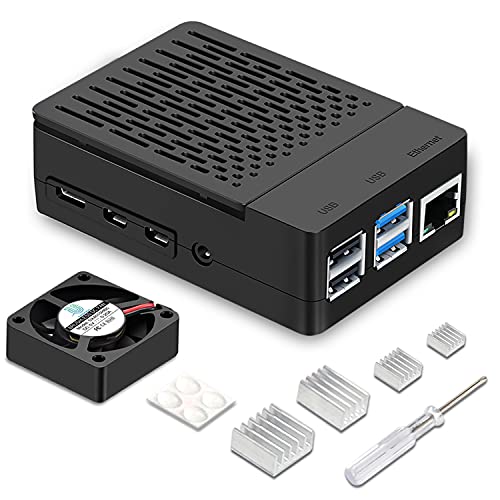
The iUniker Pi 4 case combines a simple removable top cover with a built-in 40mm quiet cooling fan to lower CPU temperatures under load. The design provides easy access to GPIO and camera connectors, expanding DIY capabilities while keeping the Pi cooler. A Raspberry Pi 4 heatsink is included to further boost heat dissipation. This option is especially appealing for users who want straightforward assembly and effective active cooling in a compact enclosure. The combination of a removable top and integrated fan makes maintenance and testing convenient.
Geekworm Pi 4 Aluminum Case With Passive Cooling

This Geekworm P173 aluminum case focuses on passive cooling with a robust heatsink pillar design. It’s a compact enclosure that fits Raspberry Pi 4 Model B boards across memory variants, providing strong thermal management without a fan. The case keeps ports accessible and maintains signal integrity with an open design. Weighing around 174 grams, it’s a solid choice for headless setups or projects where noise is a concern. Easy port access ensures compatibility with essential cables and peripherals while preserving heat dissipation pathways.
Miuzei Pi 4 Case With Fan And Heatsinks

The Miuzei Pi 4 case provides a balanced cooling solution with a 5V cooling fan and four aluminum heatsinks. This dual cooling approach helps maintain lower temperatures during sustained workloads, helpful for multimedia projects or compute-heavy tasks. The kit often includes a compatible power supply with a Type-C connector and a practical On/Off control, allowing quick power management. It’s designed to be beginner-friendly, with straightforward assembly and clear access to all ports for convenient configuration changes as your project evolves.
Miuzei Pi 3 B+ Case With Fan Cooling

This Miuzei case for Raspberry Pi 3 B+ combines a clear acrylic shell with a silent 5V cooling fan and three aluminum heatsinks. The dual cooling approach helps maintain stable operation under load on Pi 3 models, making it a practical choice for retrofits or legacy projects. An included 5V 3A power supply with an On/Off switch contributes to safe and convenient operation. The design ensures easy access to power, USB, HDMI, and networking ports, enhancing compatibility with a wide range of setups while supporting effective thermal management.
Raspberry Pi 5 Aluminum Armor Case With Dual Fans

The Raspberry Pi 5 Armor Case from WEIYIXING is a dual-fan, aluminum enclosure designed for the latest Pi 5 boards. It emphasizes aggressive cooling to support demanding workloads, with easy access to all ports and a sturdy exterior that guards against physical damage. The case aligns with all Pi 5 configurations (4GB/8GB) and preserves GPIO, Micro HDMI, USB, SD card, and power connections. Its aluminum body promotes efficient heat spreading and robust mechanical protection for portable or lab deployments where heat and durability are critical considerations.
RasTech Pi 5 Case With Active Cooler Kit
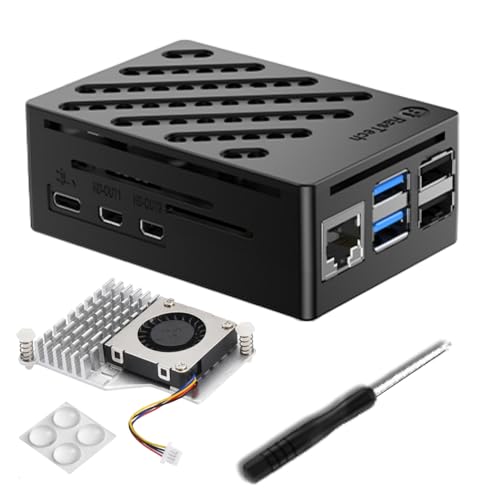
The RasTech kit is a dedicated Pi 5 case featuring an active cooler that combines a PWM-controlled fan with integrated aluminum heatsinks. The design emphasizes tight integration with all Pi 5 ports, including USB-C power, micro HDMI, and Ethernet. The case supports easy port access while maintaining a compact footprint. It provides a reliable thermal solution for users running container environments, media servers, or AI experiments on Raspberry Pi 5 hardware, where consistent cooling is essential for sustained performance.
Geekworm Pi 4 Armor Case P122 With Passive Heatsink

The Geekworm Armor Case P122 provides a slim, aluminum alloy housing designed for Raspberry Pi 4 Model B. It features an open case design to minimize signal interference and includes two GPIO headers to extend GPIO access without obstruction. The case is compact, with exacting dimensions to fit Pi 4 boards while offering a passive cooling approach that reduces noise. This option is suitable when you need a low-profile enclosure that preserves wireless performance and provides straightforward assembly for hobbyists and developers alike.
Buying Guide: Key Purchase Considerations For Raspberry Pi Thermal Solutions
- Cooling Method: Choose between active cooling (fan-based) and passive cooling (heatsinks) based on your workload. Active cooling is preferable for sustained, high-load tasks, while passive options are quieter and suitable for light to moderate use.
- Case Material And Build: Aluminum cases typically offer superior heat dissipation, while acrylic or plastic shells can be lighter and cheaper. Consider durability, weight, and EMI considerations when selecting a case.
- Model Compatibility: Verify compatibility with your Raspberry Pi model (Pi 3, Pi 4, Pi 5) and RAM variant. Some cases are designed specifically for a single model and may not fit others without modification.
- Port Access And GPIO Access: Ensure the case provides easy access to GPIO pins, USB, HDMI, microSD, and camera interfaces as needed for your project. Open designs can reduce signal interference.
- Power Supply and Safety: If the kit includes a power supply, check its amperage and connector type. Built-in on/off switches add convenience and safety for ongoing experiments.
- Noise And Vibration: Consider fan specifications (dB level, speed) if noise matters in your environment. Some cases use quieter fans or optimized airflow paths to minimize disruption.
- Maintenance And Upgrades: Look for removable tops or modular components that simplify maintenance, testing, or future upgrades to the Pi board or accessories.
- Aesthetics And Form Factor: While functional, case design may also affect how you mount the Pi in a chassis, enclosure, or rack. Slim, low-profile designs save space, while larger cases offer better airflow paths.
- Thermal Performance Ratings: Review any included thermal performance notes or customer feedback about temperature reductions under load to gauge real-world effectiveness.
- Price-To-Performance Ratio: Balance cooling effectiveness with build quality and price. A little extra investment in a robust cooling solution can extend device life and stability.
In summary, choosing the right Raspberry Pi cooling solution depends on workload, environment, and desired balance between noise, size, and performance. The featured cases provide a spectrum—from compact, passive aluminum designs to full active cooling enclosures—that can help you maintain stable operation and maximize your Pi’s potential across various projects.