Choosing a RAID enclosure designed for Mac users can boost data safety, speed, and expandability. This guide highlights five top USB or DAS RAID enclosures that pair well with Apple devices, including Mac mini setups and Mac notebooks. Each option supports multiple RAID modes, large capacities, and fast transfer speeds to handle media libraries, backups, and project archives. Read on to compare features, performance, and expandability to find the right fit for your Mac workflow.
| Product | Brand | Raid Type | Max Capacity | Interface |
|---|---|---|---|---|
| TERRAMASTER D2-320 | TERRAMASTER | RAID 0/1, SINGLE, JBOD | 44TB per drive (88TB total typical scenario) | USB 3.2 Gen 2, 10Gbps |
| ORICO MiniTower 2 Bay M435 | ORICO | RAID 0/1/JBOD | up to 56TB total (24TB + 8TB NVMe + HDDs) | USB 3.2 Gen 2, 10Gbps |
| Yottamaster 2 Bay 10Gbps RAID | Yottamaster | RAID 0/1/JBOD | 56TB total (up to 24TB + 8TB NVMe) | USB 3.2 Gen 2, 10Gbps |
| CENMATE 4 Bay RAID Enclosure | cenmate | RAID 0/1/3/5/10/NORMAL/JBOD | Up to 80TB (per drive up to 20TB) | USB 3.0, USB-C 3.0 |
| MAIWO 4 Bay RAID Enclosure | MAIWO | RAID 0/3/5/1/10/Clone/Large | Up to 96TB | USB 3.0/USB-C 3.0 |
Note: All models are external enclosures designed for direct-attached storage (DAS) rather than networked NAS. If you need ongoing data protection, verify RAID support and drive compatibility with your Mac, plus cooling and noise levels for your workspace.
Terramaster D2-320 USB RAID Enclosure

The Terramaster D2-320 is a two-bay DAS enclosure that uses USB 3.2 Gen 2 for speeds up to 10Gbps. In RAID 0 with two HDDs, read/write performance can reach about 521 MB/s; with two SSDs, up to 1075 MB/s. It supports RAID 0, RAID 1, JBOD, and SINGLE modes, allowing flexible data protection and performance configurations for Mac users. It can house two 3.5″ or 2.5″ drives with up to 22TB per drive, totaling up to 44TB of storage. This makes it suitable for multimedia work, backups, and large archives.
ORICO MiniTower 2 Bay RAID Enclosure for Mac Mini M4
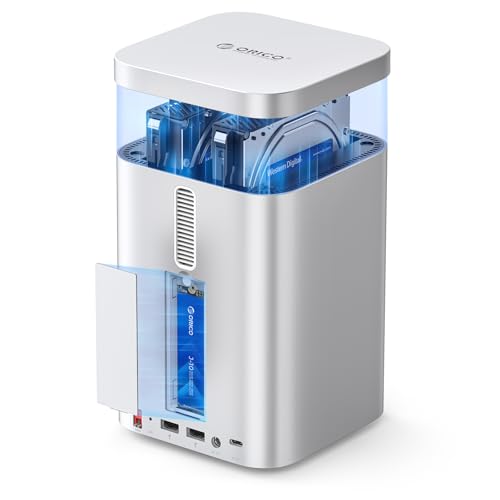
The ORICO MiniTower 2 Bay offers 10Gbps-ready USB 3.2 Gen 2 connectivity and supports two SATA drives plus an M.2 NVMe slot, enabling a hybrid storage approach. It delivers up to 56TB total capacity (24TB across HDD/SSD plus up to 8TB NVMe) and expands a Mac Mini’s ability to handle large projects. The hub-like design adds USB-A, USB 2.0 ports, and SD/TF card slots, making it a versatile external storage and expansion solution for macOS workflows.
Yottamaster 2 Bay 10Gbps RAID Enclosure

The Yottamaster docking station combines bulk storage with a built-in NVMe slot, offering a total of up to 56TB capacity. It supports two SATA HDD/SSD drives (up to 24TB) plus an M.2 NVMe SSD (up to 8TB) for high-speed caching or external editing work. Using USB 3.2 Gen 2, you can achieve up to 10Gbps, and the included NVMe slot broadens compatibility for Mac mini M4 and other macOS systems. A comprehensive connectivity hub enhances productivity with USB-A, USB 2.0, and card readers.
CENMATE Aluminum Dual Bay RAID Enclosure

The CENMATE 2-bay enclosure supports 2.5″/3.5″ SATA HDD/SSD with RAID modes including 0, 1, JBOD, and NORMAL. It uses aluminum construction for cooling and quiet operation and supports up to 20TB per drive. The enclosure is designed for reliability in personal and small-business settings, with a simple user interface for RAID configuration and drive replacement. It prioritizes heat dissipation and data integrity for macOS environments.
CENMATE 4 Bay RAID Enclosure With Cooling

The 4-bay CENMATE enclosure supports RAID 0/1/3/5/10, JBOD, and LARGE modes. It accommodates up to 80TB total capacity (20TB per drive) and includes a cooling fan to help manage heat during long sessions. The design emphasizes data protection and flexible RAID management, suitable for Mac workstations that manage large media libraries or backups. It requires careful RAID mode selection to avoid data loss during reconfiguration.
Buying Guide: Key Considerations For Mac Users
When selecting a RAID enclosure for Mac, consider drive compatibility, RAID options, and performance characteristics. MAC OS compatibility can vary with RAID mode and requires careful management during reconfigurations. Look for enclosures that support both HDD and NVMe drives, allowing a high-capacity storage pool with a fast external cache. USB 3.2 Gen 2 or USB4 interfaces deliver the highest real-world transfer rates for video editing, backups, and large file transfers.
Cooling is an important factor for sustained workloads. Enclosures with built-in fans help prevent thermal throttling and extend drive life, especially when driving multiple disks. Noise levels matter in office or studio environments; check fan specs if you are sensitive to sound. Reliability features, such as hot-swap capability, automatic RAID reconstruction, and clear RAID status indicators, simplify long-term management. Finally, ensure the enclosure supports your preferred drive mix (2.5″ and 3.5″ HDD/SSD) and offers expansion options for future growth.
For Mac mini users in particular, hub and expansion capabilities can be a major benefit. Some models provide extra USB-A ports, memory card readers, and additional USB-C or HDMI interfaces to support external displays and peripherals. In professional workflows, pairing a fast external RAID with a robust backup strategy can help safeguard critical projects while maintaining high throughput for editing and rendering tasks.