Choosing the right RAID controller can unlock faster disk performance, better data management, and expanded drive capacity for a gaming PC, workstation, or media server. Below are five well-regarded PCIe/PCI options from reputable brands that support various RAID levels and interfaces. This guide highlights each card’s core strengths, compatibility notes, and what to consider when upgrading your system.
style=”display:none”>Summary Table
| Product | Interface | RAID Levels | Key Benefit |
|---|---|---|---|
| Pomya 6 Port PCI Express SATA III | PCIe 2.0 | AHCI mode, supports SATA6G/3G/1.5G | Broad compatibility; AHCI mode for system disks |
| 10Gtek Internal SAS/SATA HBA RAID Card | PCIe 2.0 x8 | 256 SAS/SATA devices supported | SAS/SATA mix with high port count |
| HighPoint RocketRAID 640L | PCIe 2.0 x4 | 0,1,5,10,JBOD | Multiple RAID levels; BIOS boot to RAID |
| GODSHARK 4 Ports PCI SATA | PCI (not PCIe) | RAID 0/1/0+1 via optional utility | Cheap expansion with software RAID |
| IO CREST Internal 5 Port Non-Raid | PCIe x4 | Non-RAID; supports port multipliers | Simple expansion, easy setup |
Pomya 6 Port PCI Express SATA III RAID Controller Card

The Pomya card provides six SATA ports via a PCI Express 2.0 interface. It is compatible with Serial SATA 3.0 and backward compatible with SATA2.0 and SATA1.0. It supports HDDs across SATA6G, 3G, and 1.5G speeds and is compatible with multiple Gen levels. The card operates in AHCI mode for SATA3.0, and system disks must be installed in AHCI mode on the motherboard for the system to boot after installation. It is suitable for expanding storage in a desktop or home server environment where AHCI mode is preferred.
10Gtek Internal SAS/SATA HBA RAID Controller Card

Featuring the LSI SAS 2008 chipset, this PCIe 2.0 x8 card supports SAS/SATA interfaces with up to 6 Gb/s. It includes two Mini SAS SFF-8087 ports and supports up to 256 SAS and SATA devices. It is designed for users who need a robust mix of SAS and SATA expansion with a focus on enterprise-style connectivity, though note that hot swapping is not supported. This card is well-suited for building a larger storage array with multiple drives in a workstation or NAS-like PC setup.
HighPoint RocketRAID 640L Internal RAID Controller

The RocketRAID 640L offers a versatile set of RAID levels, including 0, 1, 5, 10, and JBOD, with BIOS boot support for RAID configurations. It uses a PCIe 2.0 x4 interface and supports multiple connectivity options for a reliable, scalable storage array. This card is a strong option for users needing varied RAID configurations and boot-time RAID functionality, making it suitable for media servers or workstations requiring redundancy or speed improvements across several drives.
GODSHARK 4 Ports PCI SATA RAID Controller Card
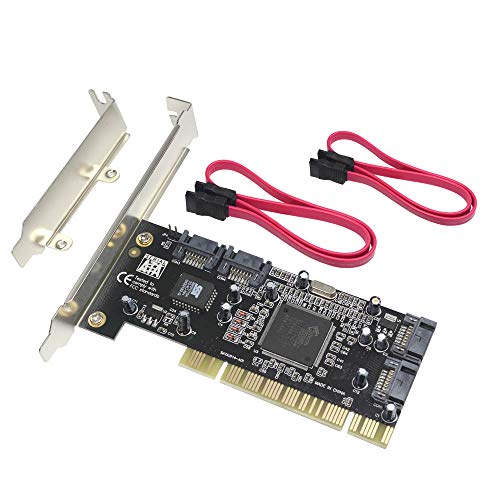
GODSHARK’s PCI-based card adds four independent SATA ports with an optional RAID utility offering RAID 0, RAID 1, or RAID 0+1 configurations across two or more ports. This card is a straightforward choice for users working with older motherboards that are PCI-enabled rather than PCIe, and who want a simple, software-driven RAID setup without requiring PCIe hardware RAID support.
IO CREST Internal 5 Port Non-Raid SATA III Card
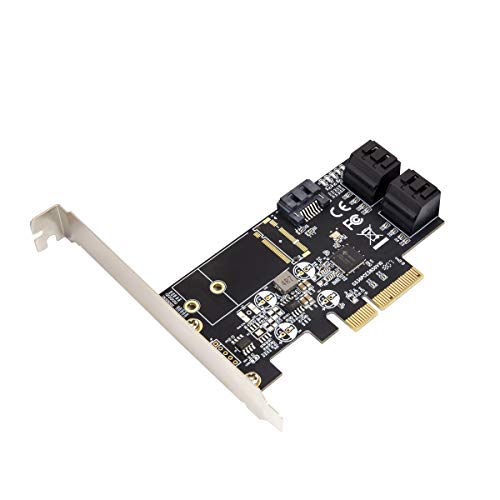
IO CREST’s five-port PCIe x4 card focuses on simple expansion with SATA III performance. It does not require a RAID configuration, supporting port multipliers for expanding storage capacity. This option is ideal for users who need additional drive slots for throughput and capacity without the complexity of configuring RAID, making it suitable for multi-drive data storage or media libraries.
Buying Guide: Key Considerations For Choosing A RAID Controller
- Interface And Compatibility: Ensure the card is compatible with your motherboard’s PCIe or PCI slots (x1, x4, x8, etc.) and supports your drives (SATA, SAS). If you intend to boot from the array, verify BIOS/UEFI support and AHCI compatibility for the system disk.
- RAID Levels And Features: Consider which RAID levels you need (0, 1, 5, 6, 10, JBOD) and whether you require hardware-accelerated RAID or software/firmware-based RAID. Some cards offer basic RAID with software utilities; others provide robust hardware RAID with BIOS boot options.
- Port Count And Expandability: Match the number of drives you plan to attach. Some cards include two Mini SAS connectors or multiple SATA ports; assess whether you need support for port multipliers or large arrays.
- Performance And Bus Width: PCIe versions (2.0 vs 3.0) affect throughput. If you work with multiple high-speed drives, prioritize cards with wider PCIe lanes and higher sustained transfer capabilities.
- Bootability And System Impact: If the RAID array will host your OS or critical software, verify boot support and driver availability. Some cards require AHCI mode for system disks, and mixed environments may demand compatibility with your OS version.
- Reliability And Support: Look for cards from reputable brands with active firmware updates, solid warranty, and accessible support. Enterprise-grade options often offer advanced management utilities and diagnostics.
- Power And Cooling: More drives in an array increase power consumption. Ensure adequate PSU capacity and proper chassis cooling to maintain drive health and performance.
- Price-to-Performance Balance: While higher-end hardware RAID controllers can deliver superior performance and features, assess whether a consumer-grade card meets your performance goals without unnecessary cost.
When selecting a RAID controller, align the card’s capabilities with your storage strategy: whether you need maximum I/O throughput for video editing, reliable redundancy for backups, or a simple expansion for a large media library. Consider future expansion and whether your motherboard and case can accommodate additional drives and cooling requirements.