Looking for a robust RAID 10 NAS setup that combines fast performance with data protection? This guide highlights five Amazon-sourced options ideal for mirrored, high-availability storage. Each choice is examined for who it’s best for, RAID capabilities, and practical trade-offs, so you can pick the right system for small offices, prosumers, or enthusiasts.
| Product | Bay Count | RAID Support | ||
|---|---|---|---|---|
| CENMATE Aluminum 4 Bay RAID Enclosure | 4 | 0/1/3/5/10, Clone, Large, Normal | Users needing external RAID 10-capable enclosure | Hardware-based RAID; noise may be noticeable |
| TERRAMASTER D5-310 HDD Enclosure | 5 | 0/1/5/10, Single | Hardware RAID with hot-spare for data security | Diskless; requires user drives |
| UGREEN DXP4800 Plus 4-Bay NAS | 4 | RAID 0/1/5/6/10 and more | Small office or prosumer needing high-speed networking | Includes 10GbE and 2.5GbE; diskless |
| UGREEN DXP480T Plus 4-Bay All-Flash NAS | 4 | RAID and all-flash optimizations | Creators requiring extreme read/write speeds | All-Flash SSD design; 10GbE plus Wi-Fi 6 |
| Asustor Lockerstor 10 AS6510T | 10 | RAID-capable with multiple networks | Small business needing large-scale storage | Enterprise-like feature set for a NAS |
CENMATE Aluminum 4 Bay RAID Enclosure

The CENMATE 4-bay enclosure provides 2.5″ and 3.5″ SATA HDD/SSD compatibility with capacities up to 80TB total. It supports RAID 0/1/3/5/10 and a clone mode for quick data duplication. The aluminum chassis includes a built-in 2-inch cooling fan for thermal management, making it suitable for desktop setups or small workspaces. Note: fan noise runs around 40–50 dB, which may matter in quiet environments.
Best for: Individuals who need a desktop external RAID solution with multiple RAID options and a compact form factor. If you want a dedicated external RAID device without networking capabilities, this enclosure is a solid pick. Choose this if you’re comfortable managing RAID via hardware controls and want up to 80TB of raw storage outside a NAS.
TERRAMASTER D5-310 HDD Enclosure 5Bay

The D5-310 uses a hardware RAID controller to switch between RAID 5, 0, 1, 10, or Single modes via a back-mounted RAID knob. It supports a hot spare for enhanced data security and is fully OS-compatible with Windows, macOS, and Linux without extra drivers. USB 3.1 Gen 1 offers high-speed local transfers, with reported speeds up to 5Gbps. This unit is diskless at purchase and relies on user-supplied drives.
Best for: Users who want a true hardware RAID path with clear physical controls and cross-OS compatibility. Choose this if you value hardware RAID reliability and hot-spare features for a RAID 10-like setup, and you don’t need integrated networking.
UGREEN DXP4800 Plus 4-Bay NAS

This 4-bay desktop NAS blends a Xeon-like workstation approach with robust NAS features. It ships diskless and offers 8GB DDR5 RAM with BIOS-level optimization for Docker, VMs, and AI workflows. It features dual 10GbE and 2.5GbE ports for ultra-fast data transfer and centralizes storage for backups, media, and collaboration. Best for: small offices or power users who want a high-performance private cloud with flexible virtualization and container support. Limitation: drives not included, so total capacity depends on installed disks.
UGREEN DXP480T Plus 4-Bay All-Flash NAS

All-Flash NAS designed for creators and editors, offering instant file access and fast reads/writes. It includes a 10GbE port, Wi-Fi 6, and a 12th-gen Intel Core i5 processor with 8GB RAM (upsizable) for demanding workloads. Best for: professionals needing near-storage-class speeds for 4K/8K media workflows and on-device AI tasks. Limitation: higher power and cost due to SSD-only architecture; no traditional HDDs for bulk archival unless configured with NVMe storage.
Asustor Lockerstor 10 AS6510T
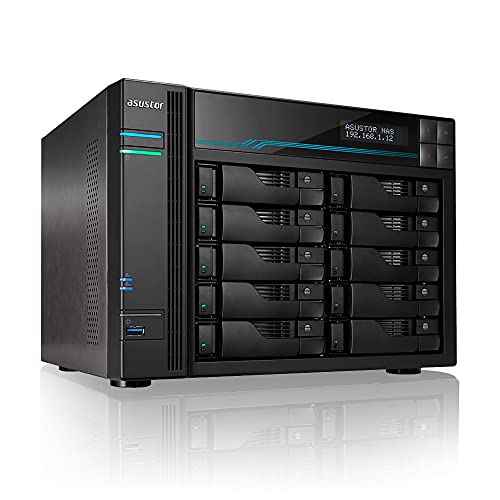
The Lockerstor 10 AS6510T is a 10-bay NAS with an Intel Atom C3538 quad-core CPU, dual 10GbE + dual 2.5GbE network ports, and 8GB DDR4 memory. It is designed for business and professional workloads requiring centralized storage, data protection, and high-speed networking. Best for: small businesses needing scalable NAS with enterprise-like networking options and multi-user collaboration. Limitation: larger footprint and higher power usage compared to compact enclosures.
Buying Guide: RAID 10 NAS Considerations
- RAID level trade-offs: RAID 10 combines mirroring and striping for redundancy and speed but requires more drives. Ensure your enclosure or NAS supports RAID 10 or equivalent (hardware or software-based).
- Storage needs: Estimate capacity with redundancy in mind. All-Flash vs HDD-based arrays trade speed for cost per GB and may impact power use and heat.
- Network bottlenecks: For high-speed RAID arrays, onboard 10GbE or 2.5GbE ports reduce transfer times, especially with multi-user access or large backups.
- Cooling and noise: External enclosures with fans can generate noise; place them away from quiet spaces if needed.
- Management and OS compatibility: Cross-OS support (Windows, macOS, Linux) simplifies backups and file sharing in mixed environments.
FAQ
- What is RAID 10 best for in a NAS? It provides a balance of redundancy and performance, suitable for mixed workloads and frequent read/write operations.
- Do I need a NAS or an external RAID enclosure for RAID 10? A NAS provides networking and centralized access; an external RAID enclosure can work for direct-attached storage. Choose based on access needs.
- Is all-flash better than HDD for RAID 10? All-flash delivers higher performance; HDDs offer higher capacity and lower cost per TB, which may matter for large archives.
- Will these devices protect against data loss? RAID provides redundancy but is not a substitute for backups. Always maintain separate backups.
- Do these devices require software to configure RAID 10? Some rely on hardware RAID controls; others offer software-based options. Follow the product’s setup instructions for RAID changes.
- Can I expand storage later? Many NAS units support adding drives or expanding capacity with expansion enclosures; check each model’s expandability options.