Finding a quiet wireless keyboard and mouse combo helps you work or study without distracting others or yourself. This guide highlights five top options that emphasize silent typing and smooth navigation. It’s ideal for office workers, students, and home-based professionals who value a low-noise setup and reliable wireless performance. Below, you’ll see who each product suits best, plus a compact buying guide to compare features like noise reduction, battery life, and connection stability.
Overview: Quick picks for different needs
- Best overall quiet performance: Logitech MK295
- Best everyday typing feel: Logitech MK335
- Best budget quiet option: Trueque KM31
- Best USB-receiver simplicity: RECCAZR Wireless Keyboard and Mouse
- Best compact modern layout (Windows focus): Logitech MK470
Logitech MK295 Wireless Mouse & Keyboard Combo

This combo uses SilentTouch technology to deliver 90% less noise on keystrokes and clicks. It includes a full keyboard with a numpad and eight shortcuts for quick media and Internet access, plus a contoured mouse with precise tracking. It’s best for desk-based workers who want a quiet, reliable setup with simple plug-and-play wireless operation. A caveat: the silence is great for most environments, but users who need high-frequency gaming input may notice slower feedback compared with gaming-centric peripherals.
Who it’s best for: Professionals in open offices or shared spaces who prioritize silent operation without sacrificing a full-size keyboard and dedicated number pad.
Logitech MK335 Quiet Wireless Keyboard And Mouse Combo

The MK335 focuses on a low-profile keyboard with whisper-quiet keys and a reliable 2.4 GHz connection. It’s ideal for users who want a cohesive, silent experience with a compact, ambidextrous mouse option that suits both left- and right-handed use. Wireless encryption adds an extra layer of security for home and office setups. A potential limitation is that some users may prefer more programmable keys for specialized workflows.
Who it’s best for: People who value a stylish, quiet keyboard with reliable connectivity, and who prefer an ambidextrous mouse for flexibility around a desk or workspace.
Trueque KM31 Wireless Keyboard And Mouse Combo
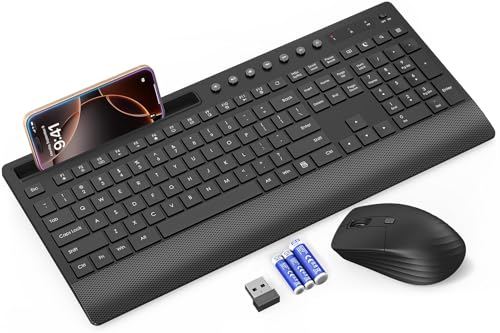
The KM31 bundle emphasizes full-size quiet typing with a palm rest, multimedia keys, and an included power switch. It pairs a quiet keyboard with a silent, comfortable mouse. It’s well suited for office tasks, content creation, and study sessions where long typing hours require reduced noise. Battery life is advertised for up to 90 days on the keyboard and 30 days on the mouse with included batteries. Limitations include typical battery-dependent longevity, which may vary with usage and sleep settings.
Who it’s best for: Users who want a comfortable, full-size setup with built-in media controls and long keyboard battery life, ideal for all-day typing in quiet environments.
RECCAZR Wireless Keyboard And Mouse Combo

This 2.4 GHz combo uses a single nano USB receiver to connect both keyboard and mouse, delivering up to 10 meters of reliable wireless range. It features a full-size keyboard with a numeric keypad and multimedia shortcuts, and a quiet mouse designed to keep noise to a minimum. It’s a practical choice for users who want straightforward plug-and-play setup without software. A note: like many budget options, performance may depend on USB interference or battery life in heavy use scenarios.
Who it’s best for: Budget-conscious buyers who want a simple, dependable setup for Windows or mixed OS environments, with a clear emphasis on quiet operation and ease of use.
Logitech MK470 Slim Wireless Keyboard And Mouse

The MK470 delivers a modern, compact layout with ultra-quiet scissor keys and a low-profile design. It pairs a compact keyboard with a three-button ambidextrous mouse that features precise optical tracking and a quiet scroll wheel. It’s especially suitable for users who want a space-saving setup that still provides full Windows compatibility and plug-and-play simplicity. Limitation: the compact form factor may reduce palm support for longer typing sessions compared to full-size keyboards.
Who it’s best for: Those who prioritize a minimal desk footprint without sacrificing quiet typing and reliable 2.4 GHz connectivity, especially in small workspaces or portable setups.
Buying Guide: Quiet Keyboard And Mouse Considerations
- Noise Reduction Technology: Look for SilentTouch or similar silent-switch designs. These reduce both key and click noise, which is crucial in shared spaces or late-night work.
- Connection Type: Wireless options typically use 2.4 GHz USB receivers or Bluetooth. 2.4 GHz often offers lower latency; Bluetooth provides multi-device pairing across OS platforms but may introduce slight delays with busy Bluetooth environments.
- Key Feel And Layout: Full-size keyboards with a numeric keypad are preferable for data entry; compact layouts save space but may reduce comfort for long typing sessions.
- Mouse Ergonomics: Ambidextrous mice suit mixed-dominant users; consider grip style (palm, claw, fingertip) and button placement for quiet, precise navigation.
- Battery Life: Check advertised life expectancy and whether batteries are included. Some sets offer rechargeable options or energy-saving sleep modes to extend use between charges.
- Additional Features: Multimedia keys, on-keyboard shortcuts, and software support (like Logi Options+) enable customization but may add setup steps or OS requirements.
- Durability And Surface Adaptability: Keyboard stability on different desk surfaces and spill resistance can impact long-term reliability in busy environments.
Choosing By Use Case
- Quiet open-office work: MK295 offers strong noise reduction with a full-size setup.
- Home study or dorm setups: MK335 and MK470 provide balance between quiet typing and space efficiency.
- Budget-friendly quiet option: Trueque KM31 and RECCAZR provide dependable performance with fewer frills.
Maintenance And Compatibility
All listed products support Windows primarily; many offer cross-OS compatibility or easy pairing with Mac systems. To maintain quiet performance, keep keyboard and mouse surfaces clean and replace worn keycaps or mouse feet as needed. Ensure your PC or laptop has up-to-date USB drivers and that your wireless receiver isn’t physically blocked by obstructions.
FAQ
- Do quiet keyboards reduce typing speed? Generally no. Quiet switches are designed to mimic standard typing feel while reducing noise. Some users may need a short adjustment period for different key travel.
- Is a wireless keyboard more reliable than wired for quiet work? Reliability depends on the USB receiver and interference. Modern 2.4 GHz connections are stable for most daily tasks, but wired keyboards have zero input lag and no interference.
- Which is best for multi-device use? The MK955 Signature and similar multi-device models support switching across devices, useful for people who work on more than one PC or laptop.
- Can these setups work with macOS? Many can pair with Macs, but some keys or shortcuts might differ. Check product descriptions for macOS compatibility and software availability.
- What should I consider for long typing sessions? Look for full-size keyboards with palm rests and adjustable tilt to minimize wrist strain and maintain quiet operation during extended use.
- Do these sets include batteries? Several bundles include batteries; some offer rechargeable options. Battery life varies with usage and sleep settings.
| Product | Best For | Noise Reduction | Connectivity | |
|---|---|---|---|---|
| Logitech MK295 | Open-office workers | High | 2.4 GHz | Full size with numpad |
| Logitech MK335 | Everyday quiet typing | High | 2.4 GHz | Ambidextrous mouse |
| Trueque KM31 | Budget quiet setup | High | 2.4 GHz | Palm rest included |
| RECCAZR Wireless | Simple plug-and-play | Moderate | 2.4 GHz | Single USB receiver for both devices |
| Logitech MK470 | Space-saving quiet setup | High | 2.4 GHz | Ultra-compact layout |