Finding the right quality web cam improves video calls, streaming, and content creation. This guide highlights top options for American buyers seeking sharp 1080p or 4K output, clear audio, and practical features. The selections below are best for remote workers, educators, streamers, and everyday video chatters who want dependable image quality and easy setup. The table summarizes the five recommended models to help you compare at a glance.
| Product | Brand | Best For | Key Feature |
|---|---|---|---|
| Lumina 4K Webcam | LUMINA | Studio-quality calls | AI-enhanced 4K with ultrawide FOV and dual mics |
| Logitech MX Brio Ultra HD 4K | Logitech | Professional meetings | AI-enhanced image, privacy, USB-C |
| NexiGo Iris | NexiGo | Low-light, tracking | 4K-like smart framing, Sony sensor, PiP |
| Lenovo Essential FHD Webcam Gen 2 | Lenovo | Everyday calls | 1080p, dual mics, privacy shutter |
| Logitech C920x HD Pro | Logitech | Budget high-quality | 1080p, stereo mics, versatile for teams |
Lumina 4K Webcam: Studio-Quality AI-Powered Video

Product overview: Lumina’s AI-powered camera targets pro-level studio performance. It delivers DSLR-like 4K video with a wide 95-degree field of view and dual mics for natural, clear sound. This model is best for: professionals who present frequently on video calls and want a polished look without external lighting gear.
Why selected: Best for users who prioritize ultra-crisp 4K video and intelligent noise reduction, making it easier to look sharp in varied lighting. The room-sound capture helps reduce ambient noise without post-processing.
Best-for statements: Choose this if you need top-tier video fidelity and AI-assisted image enhancement. Better for users who often work with large groups or panel calls due to the wide FOV. Avoid if you primarily need modest 1080p on a tight budget.
Caution: 4K streaming requires compatible hardware and bandwidth; performance can vary with system resources.
Logitech MX Brio Ultra HD 4K Webcam

Product overview: The MX Brio delivers 4K Ultra HD at 30fps or 1080p at 60fps with AI-enhanced image quality and privacy features. It’s designed for professional environments and content creators who demand precise color, exposure, and focus control. This model is best for: executives, remote teams, and streamers who need high-fidelity output and robust software controls.
Why selected: It balances top-tier image quality with practical privacy protections and USB-C connectivity for modern devices. The AI features help maintain sharpness in challenging lighting and busy backgrounds.
Best-for statements: Choose this if you want a premium, versatile webcam that grows with high-end conferencing platforms. Better for users who value adjustable image settings and privacy. Avoid if you require budget-friendly options or prefer USB-A connections.
Caution: Higher-end features may require compatible software and ports; setup can be longer for newcomers.
NexiGo Iris 4K AI Webcam
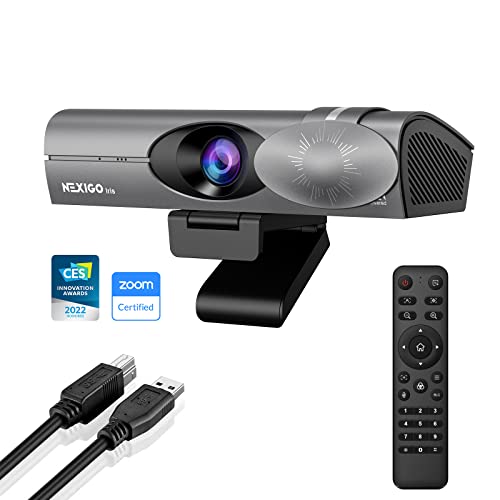
Product overview: NexiGo Iris features a 1/1.8″ Sony sensor, onboard memory, and HDR. It excels in dynamic framing with AI tracking and PiP, plus a flexible FOV. This model is best for: creators and professionals who need accurate framing, strong low-light performance, and easy on-device controls.
Why selected: It offers uncompressed 4K output via HDMI and reliable 1080p at 60fps through USB, making it suitable for recording and streaming alongside live calls. The remote control adds convenience for adjusting features on the fly.
Best-for statements: Choose this if you want DSLR-like control and advanced on-device processing. Better for users who often switch between solo and multi-person scenes. Avoid if you need a simple, budget-friendly option with minimal setup.
Caution: The advanced features rely on hardware compatibility; novices may need time to learn the controls.
Logitech C920x HD Pro Webcam

Product overview: The C920x offers Full HD 1080p at 30fps with stereo mics and broad compatibility with major video platforms. It is a reliable choice for everyday calls and small teams who prioritize solid performance without premium pricing. This model is best for: budget-conscious buyers who want dependable 1080p quality and simple setup.
Why selected: It provides dependable image quality with clear audio at a lower price point, plus broad platform compatibility. It lacks a privacy shutter in some variants, which is a consideration for privacy-minded users.
Best-for statements: Choose this if you want a straightforward, cost-effective 1080p webcam. Better for general office use and casual streaming. Avoid if you need 4K or built-in privacy features.
Caution: Some bundles omit a privacy shutter; verify included accessories if privacy is important to you.
Buying Guide: What Matters When Choosing a Quality Webcam
- Resolution and frame rate: 4K offers the sharpest images but requires a powerful PC and bandwidth. 1080p at 60fps provides smooth motion for most tasks and is easier to support.
- Sensor and image processing: A larger sensor and AI-based features improve low-light performance and color accuracy. Look for HDR and auto exposure/white balance.
- Field of view: Wide angles are great for group calls but can cause fisheye distortion. Pick 65°–85° for balanced framing; choose wider for panel discussions.
- Audio quality: Dual mics, directional microphones, or noise suppression help ensure clear voice pickup in busy environments.
- Privacy features: Built-in shutters or physical covers protect privacy when not in use.
- Connectivity and compatibility: USB-C is common on newer devices; ensure compatibility with your operating system and conferencing software.
- On-device controls: Some models offer remote controls, physical buttons, or on-camera dials for quick adjustments without software.
FAQ
- What is the difference between 4K and 1080p webcams?
- Do I need AI features to get good video quality?
- Is a privacy shutter important?
- Which webcam is best for gaming or streaming?
- Can I use these webcams with both Mac and PC?
4K provides crisper detail and larger image capture, useful for cropping and professional presentations. 1080p offers smoother motion at lower bandwidth and is widely supported.
AI features can improve exposure, color, and noise reduction, especially in challenging lighting. They are helpful but not essential for basic calls.
Yes, if you want physical assurance that the camera is off when not in use. Some models include shutters; others rely on software toggles.
Models with 4K output, high frame rates, and robust AI or manual controls (like the NexiGo Iris or Logitech MX Brio) suit streaming and broadcasts well.
Yes, all listed models support cross-platform use via USB, with compatible drivers or plug-and-play functionality.