Push pin CPU coolers and mounting pins provide a simple, tool-free way to secure cooling before power-on. This guide highlights five practical options that fit common Intel sockets and are easy to install for first-time builders or upgraded systems. The top picks include a mix of replacement pins and complete mounting kits designed for LGA 775, 1150/1155/1156, and other legacy and modern sockets. Each product is chosen for compatibility, ease of use, and durability.
Buyer type guide:
– Quick replacements: simple mounting pin kits (no-fuss installation).
– Universal fitters: pins and clips that cover multiple socket types.
– Budget-conscious builders: reliable nylon or plastic mounts that deliver steady performance.
– DIY upgraders: lightweight, easy-to-handle hardware for quick swaps.
| Product | Socket Compatibility | Best For |
|---|---|---|
| ZZHXSM 12PCS Heatsink CPU Pin Mounting Plastic Pins | Intel LGA Socket 775 | Quick replacement for broken pins |
| 10Pcs Heat Sink Mounting Pins Plastic CPU Fan Clips | Intel LGA 775/1150/1155/1156/136 | Universal replacement for common sockets |
| i3/i5/i7 LGA115x CPU Heatsink — Aluminum Heatsink | 1200/1151/1150/1155/1156 | Aluminum heatsink with tool-free push pins |
| YTgilo 12PCS Push-in Pins for Intel LGA 775/1150/1155/1156/1366 | LGA 775, 1150, 1155, 1156, 1366 | Durable plastic mounting pins |
| LiebeWH 100Pcs Heatsink Mount Pins | General CPU cooling installations | Bulk pack for multiple builds |
ZZHXSM 12PCS Heatsink CPU Pin Mounting Plastic Pins
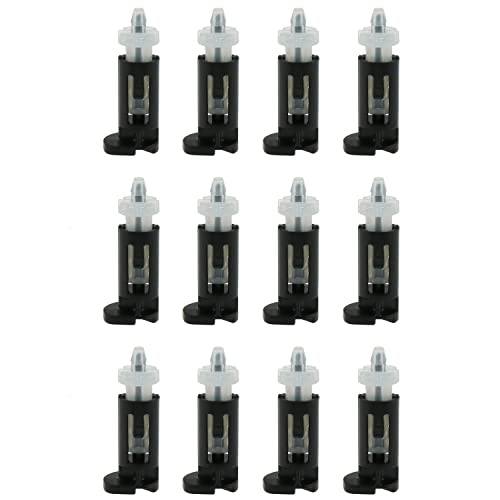
Product is a heat-dissipation plastic rivet set for installing and fixing fans and heatsinks. It is described as durable, lightweight, and long-lasting, with easy installation. Best for builders needing a reliable replacement for broken CPU screws. A potential limitation is that it is a plastic mounting solution, which may be less robust in very high-heat or high-vibration environments.
10Pcs Heat Sink Mounting Pins Plastic CPU Fan Coolers

These mounting pins are a universal replacement option suitable for Intel Socket LGA 775/1150/1155/1156/1366. They come in a black and white color option and are positioned as a quick fix to replace broken screws. Best for DIYers who want a ready-made, multi-socket solution. A drawback is that color and finish may not perfectly match all coolers, which could matter for visible builds.
i3/i5/i7 LGA115x CPU Heatsink — Aluminum Heatsink

This aluminum heatsink option is designed for Intel i3/i5/i7 processors with support for LGA 1200/1151/1150/1155/1156 sockets. It features pre-applied thermal paste and tool-free push-pin installation. Best for users seeking a compact, integrated cooling solution with simple mounting. Limitation: may be best suited for CPUs with moderate TDPs rather than high-end, high-heat builds.
YTgilo 12PCS Push in Pins

Materially, these are high-quality plastic mounting pins compatible with Intel LGA 775 sockets. They are positioned as an ideal replacement for damaged CPU screws. Best for users who need a straightforward, affordable pin-based mounting solution. Caution: the plastic construction may limit long-term rigidity under heavy cooling configurations.
LiebeWH 100Pcs Heatsink Mount Pins

Bulk pack of nylon plastic mounting pins for heatsinks, designed to secure fans and coolers firmly. Best for builders undertaking multiple installations or upgrades. The large quantity helps reduce repeat purchases. Limitation: bulk packaging may include mixed socket compatibility; verify socket type before use.
ZZHXSM 10Pcs Useful Mounting Clip Fan Mount Pins

This set includes ten mounting pins designed for Intel Socket LGA 775 cooling fans. The product emphasizes durability and a lightweight plastic construction. Best for quick replacements during builds that prioritize speed. Limitation: focused on LGA 775; check socket support for broader builds.
AMD Wraith Stealth Socket AM4 Cooler

Note: This item is included for reference as a common cooler but uses a different mounting style (screw-based for AM4) and not a push-pin system. Best for AM4 builds or when a dedicated cooler is preferred. Avoid relying on it for Intel push-pin setups without compatible adapters.
Buying Guide
- Socket compatibility matters: Verify exact socket compatibility (LGA 775, 115x, 1200, etc.) before purchase to ensure a physical fit and correct mounting method.
- Mounting method suitability: Push-in or clip-based pins offer tool-free installation but may differ in long-term rigidity. Consider your case environment and vibration exposure.
- Material choices: Nylon or plastic pins are budget-friendly and lightweight; metal alternatives may offer greater strength but require different installation steps.
- Quantity vs. need: Bulk packs are economical for multiple builds, while smaller sets suit a single PC upgrade. Ensure you actually need multiple pins for your setup.
- Thermal performance: Aluminum heatsinks with pre-applied paste can simplify installs and improve heat dissipation for moderate TDP CPUs. For high-end CPUs, evaluate overall cooling solution rather than just mounting hardware.
FAQ
- What is a push-pin CPU cooler?
It is a cooling solution that uses push-in pins to secure the heatsink to the motherboard socket without screws. - Are plastic mounting pins reliable for long-term use?
They are durable for many standard builds but may be less rigid under high vibration or extreme overclocking. - Can I use these pins on multiple sockets?
Some sets are designed for multiple sockets; always check socket compatibility listed by the manufacturer. - Do these kits include thermal paste?
Some do (pre-applied paste in aluminum heatsinks); others require separate paste application. - Which option is best for a budget rebuild?
Bulk pin sets or universal replacement kits typically offer the best balance of cost and compatibility.