Find the right charger for your PlayStation 3 controllers with reliable charging, long cables, and convenient docking. This guide highlights five top options suited for different setups, from couch-side charging to organized charging stations. Best for casual players who want flexibility, best for cord-conscious setups, and best for anyone who values simultaneous charging without being tethered to a dock.
| Product | Length | Best For | Notes |
|---|---|---|---|
| SCOVEE PS3 Controller Charger Cord, 2 Pack 10ft | 10 ft | Long-range charging while gaming on the couch | Two-pack, simultaneous charging; robust stainless heads |
| SCOVEE PS3 Charger Cable, 10ft | 10 ft | Extended reach and flexible setup | Long, durable mini-USB cable for PS3 controllers |
| VSEER PS3 Controller Charger Docking Station | Convenient multi-controller charging with LED indicators | Dual-charge dock with color indicators; compact stand | |
| TNP Compatible PS3 Controller Charger Stand | 2-tier dock with built-in ports | Space-saving, multi-controller charging | LED indicators; supports up to 4 controllers |
| Vancle 2 Pack PS3 Controller Charging Cable | 3.3 ft per cable | Split cables for quick, flexible charging | Two-pack, reliable daily charging |
SCOVEE PS3 Controller Charger Cord, 2 Pack 10ft

The SCOVEE 2-pack 10ft PS3 controller charging cord is best for players who want to game from a distance. With two long cables, you can charge and play simultaneously without moving close to the console. The design emphasizes durability for daily use. Choose this if you want extra-long reach and a second spare cable for multiplayer sessions. One limitation is the absence of a docking station, so it relies on a direct USB connection.
SCOVEE PS3 Charger Cable, 10ft
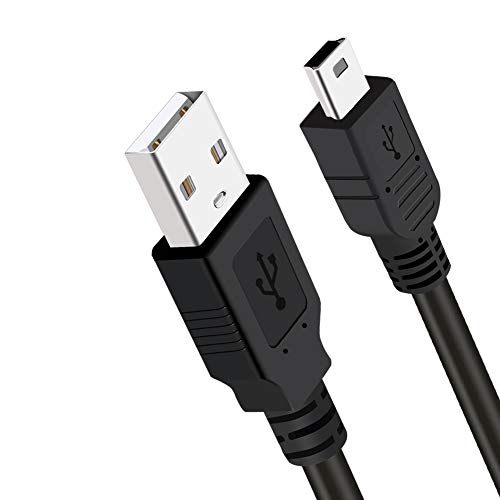
This 10ft SCOVEE PS3 charging cable is ideal for setup where the console is farther from the seating area. It supports simultaneous charging and gameplay, avoiding interruptions. It’s best for larger rooms or living rooms. A potential drawback is the single-cable setup; if you need multiple controllers charging at once, you’d benefit from a dual-pack or a dock alternative.
VSEER PS3 Controller Charger Docking Station

This docking station is best for households with multiple PS3 controllers and a need for a neat charging solution. It supports two controllers at once and uses LED color cues to indicate charging status. The built-in smart protection helps guard against overcurrent. If you have only one controller, a smaller charging option might be more economical.
TNP Compatible PS3 Controller Charger Stand
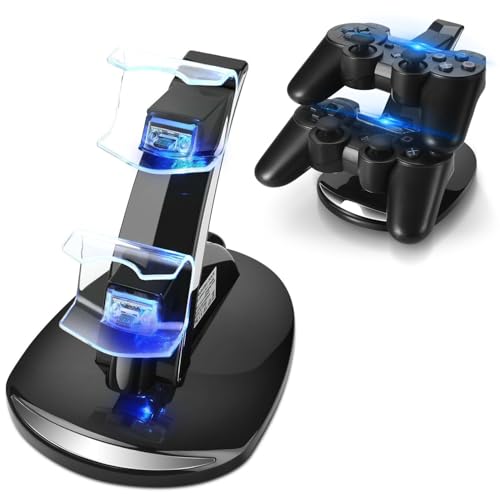
The TNP charger stand is best for organized setups where space efficiency matters. Its two-tier design holds two controllers on top and provides two additional USB ports on the side for charging cables, enabling up to four devices simultaneously. A caution is that LED indicators focus on charging status rather than detailed metrics, and the tower may be bulkier on small desks.
Vancle 2 Pack PS3 Controller Charging Cable

The Vancle two-pack 3.3ft cables offer a compact option for quick charging needs. They are best for users who want to keep a few shorter cables around for desk setups or travel. Better for individuals who need a spare short cable, though fewer people will find the extra length of 10-foot cables indispensable with this choice.
Buying Guide: Key Considerations for PS3 Controller Chargers
- Cable length vs. space: Longer cables enable couch-style gaming, but shorter cables reduce clutter. Pick based on your seating distance and setup.
- Docking vs. direct cable charging: Docks simplify organization and status indicators, while cables provide flexibility for relocating consoles or players.
- Charging speed and safety: Look for cables with USB 2.0 compatibility and built-in protections against overcurrent and overheating.
- Indicator features: LED indicators help confirm charging status at a glance. Consider whether you prefer simple or detailed indicators.
- Durability and bend resistance: Reinforced connectors and high-quality jackets extend cable life, especially with frequent plugging/unplugging.
- Multi-controller support: If you own multiple PS3 controllers, a dock or multi-cable setup can save time and reduce mismatch of charging times.
FAQ
- Q: Do PS3 controllers require a specific USB type for charging?
- A: Yes. PS3 controllers typically charge via a Mini USB connection using a USB A to Mini B cable.
- Q: Is a docking station necessary for charging PS3 controllers?
- A: Not necessarily. Cables can charge controllers directly, but docking stations offer organized charging and status indicators for multiple controllers.
- Q: Can these cables charge and play at the same time?
- A: Many options support simultaneous charging and gameplay, especially longer cables and dedicated charging docks.
- Q: Are longer cables more prone to wear?
- A: Longer cables can experience more wear if frequently bent or pulled, so choose durable builds with reinforced connectors.
- Q: Do these products work with all PS3 controller models?
- A: Most PS3 controllers (DualShock 3 and similar models) use Mini USB and are compatible with these options, but verify cable compatibility with your specific model if uncertain.