Looking for a reliable ceiling-mounted projector kit? This guide compares top-rated options to fit most home, classroom, or small office setups. Each pick highlights who it’s best for, plus practical pros and a clear limitation to consider before you buy. For quick reference, a summary table below helps you compare key points at a glance.
| Product | Best For | Knock-Cnock Limitation |
|---|---|---|
| QualGear Pro-AV QG-KIT-CA-3IN-W | Regular wood or concrete ceilings; simple install | 3-inch joist adapter may require compatible ceiling structure |
| YiePhiot Mini Ceiling Wall Mount | Compact, lightweight mini projectors | Designed for mini projectors, may not fit larger models |
| WALI Universal 3-in-1 Mount | Flexible ceiling or wall setup; higher weight capacity | May be too heavy for very light fixtures |
| Epson Universal Ceiling Mount Kit | Low-profile aesthetic and universal interface | Limited manual detail on extreme tilts |
| XINLEI Universal Ceiling Mount | Broad compatibility, 360° rotation | Heavy steel build; installation may be more involved |
QualGear Pro-AV Ceiling Mount Kit
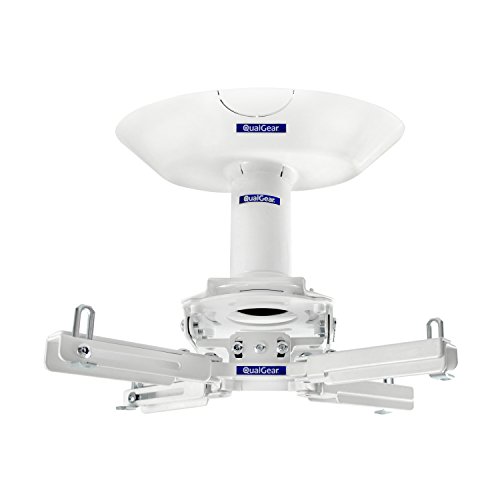
The QualGear Pro-AV QG-KIT-CA-3IN-W is a single-joist ceiling adapter designed for regular wood and concrete ceilings. It uses a 1.5″ NPT thread, and comes with color-coded installation guidance. This mount is best for buyers seeking a straightforward, sturdy solution for typical ceiling joists and standard projector placements. The kit’s compact profile helps minimize visual impact while keeping the projector securely positioned. A potential limitation is ceiling compatibility with specific joist spacing, which may require additional hardware.
Best for: Home theater enthusiasts and small offices with standard ceiling joists seeking a simple, dependable mount.
YiePhiot Mini Ceiling Wall Projector Mount Stand
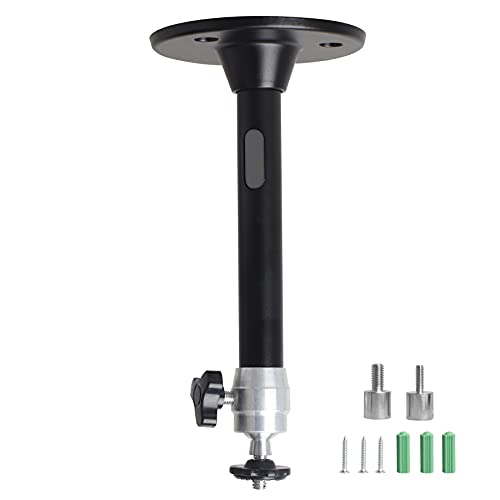
The YiePhiot Mini Ceiling Wall Mount is designed for compact projectors and lists compatibility with several popular mini projector brands. This mount is best for buyers with lighter, smaller projectors who want a flexible mounting option that can transition between ceiling and wall use. The limitation is its suitability mainly for mini projectors; larger models may exceed its load or reach capabilities.
Best for: Users with mini projectors needing a lightweight, adaptable mount for ceiling or wall use.
WALI Universal 3-in-1 Projector Mount

The WALI 3-in-1 mount supports ceiling and wall installations and offers a wide range of adjustment. It has a heavy-duty steel build and supports up to 44lbs, with tilt and swivel capabilities for precise alignment. Note that it does not suit vaulted ceilings or drywall-only installations, so verify your ceiling type before purchase. The extension length is generous for ceiling use, which helps in achieving the correct screen position.
Best for: Classrooms or home theaters needing flexible ceiling-to-wall mounting and strong load capacity.
Epson Universal Projector Ceiling Mount Kit

The Epson Universal Ceiling Mount Kit offers a low-profile design with a universal interface compatible with most projectors. Independent roll, pitch, and yaw adjustments enable quick and precise projector registration, which helps align images accurately. A potential limitation is that some projectors with unusual mounting patterns may require adapter plates not included in the kit.
Best for: Users prioritizing a slim, discreet mount with precise alignment controls for a wide projector range.
XINLEI Universal Ceiling Mount

The XINLEI PR14W is a universal ceiling mount featuring a broad compatibility range, heavy-duty cold rolled steel construction, and full adjustment including +/- 15° tilt, +/- 20° swivel, and 360° rotation. It supports a wide array of projectors up to 30 lbs and accommodates both flat and sloped ceilings. A limitation is the heavier build, which may require sturdier installation and ceiling reinforcement.
Best for: Buyers with a wide projector selection and mixed ceiling types seeking maximum versatility.
suptek Extended Mini Mount with Thread Adapters

The suptek Extended Mini Mount provides a 3-in-1 installation path for ceiling, sloped ceiling, or wall mounting. It fits projectors with a 1/4 inch thread and supports up to 30 lbs. It uses cold rolled steel for durability and an aluminum alloy pole for lightness. Caution: Only suited for single-hole mounting; avoid if your setup requires multiple mounting points.
Best for: Small to mid-size projectors needing a flexible, all-purpose mounting option for different room geometries.
Buying Guide — Key Considerations for Ceiling Projector Mounts
What should you check before buying a ceiling projector mount? Start with projector compatibility, including mounting hole patterns and weight. Ensure the ceiling type (wood joists, concrete, or brick) supports the selected mount’s load and installation method. Consider the mounting flexibility you need: tilt, swivel, and 360-degree rotation affect image alignment. Pay attention to extension length and whether you want a low-profile mount or a more adjustable arm. If you plan to switch between ceiling and wall placements, a 3-in-1 mount offers convenience. Compare whether a mount supports sloped ceilings or vaulted ceilings in your space. Finally, verify that there is easy access to cable management for a clean setup.
What type of ceiling should you choose a mount for?
Wood joists and concrete ceilings are common, but each requires different hardware. A universal mount often covers both scenarios, while some mounts are optimized for specific ceiling types. If you have drywall, confirm the mounting approach can anchor into studs or use masonry anchors as needed.
How do you decide between a flush-mount and an extended-arm mount?
A flush-mount keeps the projector close to the ceiling, reducing visibility and potential glare. Extended arms provide more reach for screen alignment but may introduce more weight leverage. If ceiling height is limited, a shorter extension is usually better; for large rooms, a longer arm can improve positioning flexibility.
Is slim design more important than load capacity?
In many home setups, a low-profile mount reduces visual distraction and avoids obstructing ceiling fixtures. However, for heavier projectors, prioritizing load capacity and secure mounting is essential to avoid sag or failure over time.
What about safety and maintenance?
Choose mounts with solid construction and proper locking mechanisms. Check mounting hardware compatibility with your projector’s mounting pattern. Regularly inspect screws and joints and ensure cable pathways remain clear to prevent strain on connections.
FAQ
- Q: Can I mount a projector on a vaulted ceiling? A: Some mounts support sloped or vaulted ceilings, but verify product specs before purchasing.
- Q: Do these kits require professional installation? A: Most can be installed by a confident DIYer with basic tools, but consider professional help for complex ceilings.
- Q: Will a universal mount fit my projector? A: Check the projector’s mounting hole pattern and weight; universal mounts usually accommodate common ranges.
- Q: How do I avoid projector brightness glare? A: Place the projector at an appropriate distance and angle; use mount tilt and swivel to align the image without obstruction.
- Q: Can I reuse an existing ceiling plate? A: Some mounts include a standard plate; others require adapters or new plates compatible with your projector.
- Q: Do these mounts support ceiling-to-wall conversion? A: Several 3-in-1 mounts offer both ceiling and wall installation options; verify the product’s configuration.