Whether you’re an aspiring artist, a teacher, or a parent helping kids learn to draw, a tracing projector can elevate practice sessions and creative projects. The following five projectors are selected for their tracing accuracy, ease of use, and versatility—from kids-friendly drawing aids to compact home theater options with drawing features. This guide presents concise specifications and practical considerations to help you choose the right tool for your needs.
| Product | Brand | Key Benefit |
|---|---|---|
| Drawing Projector, Art Projector for Tracing | GIKUCNZL | Dual-use for tracing and as a movie/projector |
| Flycatcher Smart Sketcher 2.0 | Flycatcher | Pre-loaded content and kid-friendly app features |
| CiBest Mini Projector | CiBest | Ultra-compact, 1080p support, broad device compatibility |
| Caydo P1 Art Projector | Caydo | Exclusive drawing app with 4K-related features and 100” display |
| Caydo P3 Art Projector | Caydo | Native 1080p, advanced drawing tools, multiple mirroring options |
| Caydo T3 AI Drawing Projector | Caydo | AI-assisted drawing and 700+ activities for kids |
| Mini Projector, CLOKOWE 2025 | ClokoWe | 9000 lux brightness in a portable form factor |
Drawing Projector For Tracing By GIKUCNZL
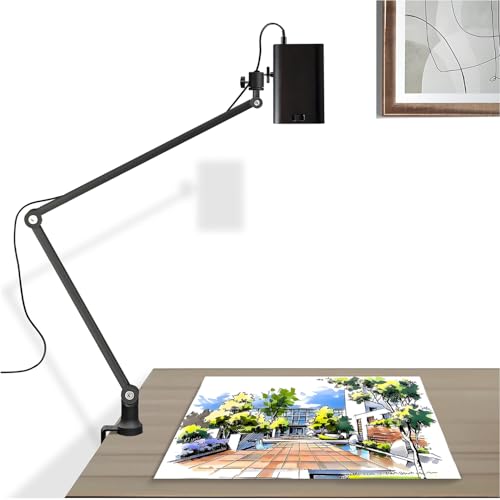
This dual-purpose projector blends tracing support with movie projection, making it a practical option for artists who want to overlay images onto canvases, desks, or walls. It delivers a projection reach up to 10.5 feet, enabling convenient setups for large canvases or classroom walls. The device supports a physical resolution of 1280×720 with 4K and HDR compatibility for sharp, vibrant visuals. It also offers flexible connectivity, including wireless and wired screen mirroring to pair with smartphones, tablets, laptops, and gaming devices. This combination makes it suitable for art studios, home classrooms, and casual movie nights alike.
Flycatcher Smart Sketcher 2.0
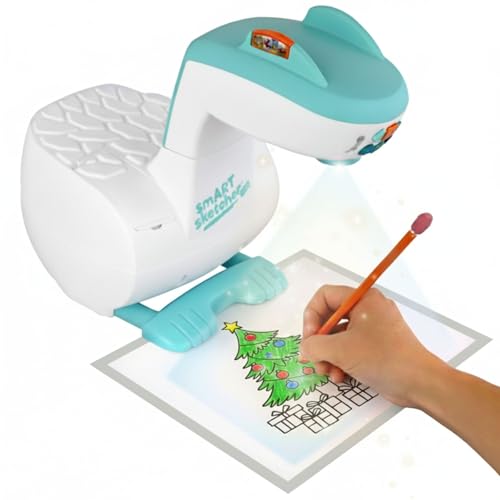
The Flycatcher model emphasizes a kid-friendly learning experience with a structured path from tracing to original drawing. It offers an extensive library of over 60 pre-loaded images and supports app-based content that extends drawing tutorials, making it a compelling option for beginners and children. Bluetooth connectivity enables seamless pairing with smartphones and tablets to access additional tutorials and customize drawing sessions. The projector also supports custom cartridges for expanded content, helping young artists grow their skills through guided practice and creative exploration.
CiBest Mini Projector 1080P

The CiBest Mini Projector prioritizes portability without sacrificing essential clarity. It supports 1080p Full HD projection with a recommended display range of 60-130 inches, depending on environment lighting. While it lacks built-in Wi-Fi and Bluetooth, it provides multiple input options, including HDMI, USB, and AV, making it compatible with phones, tablets, laptops, and TV boxes. An eye-friendly diffuse reflection approach helps reduce fatigue during extended sessions. Its compact footprint makes it ideal for travel, classrooms, or quick demonstrations where space is limited.
Caydo P1 Art Projector With Exclusive App

This Caydo P1 focuses on a rich drawing workflow with an exclusive drawing app. The device supports 4K-related features and offers a 100-inch display for sizable tracing and projection projects. It includes a built-in drawing assistant with options like zoom, rotation, and a 3×3 grid to facilitate precision. The app also supports easy image transfer via QR code or USB drive, enabling smooth content migration without reliance on a constant internet connection. Screen mirroring options ensure entertainment remains a secondary benefit to drawing sessions.
Caydo P3 Art Projector With App

The Caydo P3 offers a native 1080p projection with 400 ANSI lumens, delivering crisp images suitable for art projects in moderately lit spaces. Its exclusive drawing app includes flexible zoom, 360° rotation, and 3×3 grids, plus three background colors and four drawing modes like Gridify and Sketchify to accommodate different artistic workflows. The device supports easy image transfer via QR code or USB, and it mirrors content for video playback from a variety of devices. Note that mirror compatibility excludes certain subscription streaming services, which should be considered when planning entertainment use alongside drawing tasks.
Caydo P1 Art Projector With App (Upgraded)

This upgraded Caydo P1 maintains core drawing features while emphasizing a robust app ecosystem. It supports a 4K display pipeline and offers an exclusive drawing assistant with zoom, rotation, and 3×3 grids. The transfer process is simplified through QR code or USB drive methods, enabling immediate start of creative sessions. Built-in mirroring supports both entertainment and drawing workflows, with compatibility across iOS and Android devices, making it suitable for classrooms, studios, and family use.
Caydo T3 AI Drawing Projector

The Caydo T3 integrates AI features to diversify the tracing experience, offering 700+ activities and interactive modes that turn photos into sketches or AI-generated art. This model targets kids and learners, providing step-by-step drawing guidance and an engaging, gamified learning path. It also supports transforming real-world images into easy-to-follow sketches and project-ready guides. While AI features can boost creativity, users should assess how these tools align with their preferred drawing workflow and how they may complement traditional tracing practices.
Mini Projector CLOKOWE 2025 Upgrade

The CLOKOWE mini projector emphasizes high brightness with 9000 lux and 1080p Full HD support in a compact form factor. Weighing under a kilo, it offers easy portability for on-the-go drawing sessions, classroom demonstrations, or casual movie nights. It includes broad device compatibility through HDMI, USB, and AV inputs, allowing connection to phones, tablets, laptops, and streaming devices. While designed for portability, its brightness makes it a practical choice for small to medium spaces, especially when space or setup time is a priority.
Buying Guide: Key Purchase Considerations
- Intended use: If tracing is primary, prioritize models with strong edge clarity, large projection size, and stable focus across surfaces. If entertainment matters, look for brighter outputs and reliable screen mirroring.
- Resolution and brightness: Higher resolution (1080p) and adequate brightness improve tracing accuracy and viewing experience. Look for models offering HDR or enhanced color rendering for vivid previews.
- Platform compatibility: Confirm device compatibility (iOS/Android/Windows) and available input options (HDMI, USB, AV). Wireless mirroring adds convenience but may have latency on some setups.
- App ecosystem: Some Caydo and Flycatcher models include drawing apps and content libraries. Consider how the app features align with your learning or teaching goals.
- Portability vs. size: Compact projectors are easy to transport, but ensure brightness and projection size meet your environment requirements. Larger units may deliver steadier images for classrooms or studios.
- Content transfer: USB or QR-based transfer can simplify workflows—especially when internet access is inconsistent. Check supported file formats and transfer speeds.
- Safety and eye comfort: Diffuse reflection and diffused light strategies reduce eye strain for extended sessions, a critical factor for kids and beginners.
- Copyright considerations: Some devices block streaming content mirroring from services like Netflix or Prime; plan entertainment use accordingly.
In summary, the best projector for tracing balances accuracy, ease of use, and adaptability to both drawing practice and media projection. The selections above cover a range of budgets and use cases—from kid-friendly learning tools to compact home theater options with drawing features. Evaluate how often you trace, the surfaces you project onto, and whether you need app-based tutorials or external content libraries to determine the right fit for your workspace or classroom.