Finding a reliable printer that works seamlessly with macOS can be challenging. This guide highlights five printers that offer robust macOS support, easy setup, and features suited for home offices and small businesses. Each entry provides key specifications and why they’re a good pick for Mac users.
| Product | Brand | Mac Compatibility | Highlights |
|---|---|---|---|
| Canon Pixma iX6820 Wireless Business Printer | Canon | Mac OS X supported, AirPrint | |
| JADENS Bluetooth Thermal Shipping Label Printer | JADENS | Mac compatible via Bluetooth/USB | 4×6 labels, dry-thermal technology |
| HP ENVY 6455e All-in-One | HP | macOS compatible, AirPrint | Two-sided printing, built-in scanner |
| MUNBYN RW403B Bluetooth 4×6 Label Printer | MUNBYN | Mac compatible via Bluetooth/USB | High duty cycle, durable build |
| KNAON Bluetooth 4×6 Label Printer | KNAON | Mac compatible via USB/Bluetooth with app | Large template library, flexible label sizes |
Canon Pixma iX6820 Wireless Business Printer

The Canon Pixma iX6820 is designed for small offices needing reliable performance with Mac systems. It includes AirPrint support for easy wireless printing from iPhone, iPad, and Macs. The device supports multiple Windows versions as well, making it versatile for mixed environments. It leverages Canon’s Fine print head technology for precise text and graphics. Mac users can benefit from built-in PPS (Pixma Printing Solutions) for cloud printing and device management. This model is best for users who print a mix of documents and photos and want straightforward setup with Apple devices.
JADENS Bluetooth Thermal Shipping Label Printer

This thermal label printer from JADENS is a cost-efficient solution for shipping labels up to 4×6 inches. It operates wirelessly via Bluetooth for PCs and Macs, with USB connectivity as a backup option. It uses a Japanese high-tech 203 DPI print head, offering clean, ink-free labels suitable for ecommerce workflows. The device supports Android and iOS through dedicated apps, though some users may need the Jadens printer app for mobile use. It’s ideal for online sellers needing fast, dependable label production without ink or toner.
HP ENVY 6455e All-in-One Printer

The HP ENVY 6455e All-in-One is a versatile choice for home offices, combining printing, scanning, and copying with wireless connectivity. It supports two-sided printing and features a 35-sheet automatic document feeder for efficient workflow. Mac compatibility is emphasized with AirPrint support, and the device works within the HP Smart app ecosystem. This model is suitable for users who want a compact, all-in-one solution with easy mobile printing from Apple devices and compatibility across major platforms.
MUNBYN RW403B Bluetooth 4×6 Label Printer

The MUNBYN RW403B combines Bluetooth connectivity with a rugged 4×6 shipping label printer. It’s designed for small businesses and supports Mac devices via Bluetooth or USB. The printer is engineered to reduce jams and handle high-volume labeling, with a long-lasting print head and a suitable duty cycle. It is a practical option for ecommerce operators who print a large number of shipping labels and require reliable performance on macOS systems.
KNAON Bluetooth 4×6 Label Printer
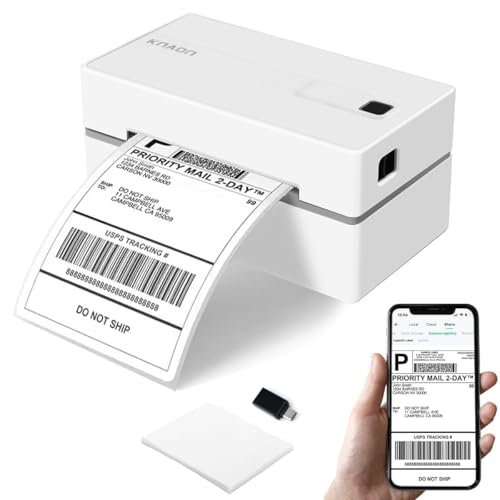
The KNAON Bluetooth shipping label printer emphasizes wireless printing with a recommended app path for macOS users. It supports a broad range of label sizes and works with iOS and Android through apps, plus USB usage for Mac and Windows. It’s a flexible option for small businesses that require a combination of printing tasks and label customization, including barcode and shipping labels. The app-based setup helps streamline macOS integration alongside other devices.
Buying Guide: Key Purchase Considerations
When selecting a printer to pair with a Mac, consider these factors to ensure optimal compatibility and value:
- macOS compatibility: Confirm supported macOS versions and any required drivers or apps. AirPrint support is a major convenience for Apple users.
- Printer type: Choose between inkjet for color documents and photos, or laser for faster text printing. For labels, ensure the printer supports the label sizes you use (commonly 4×6 inches).
- Connectivity: Favor devices with USB and wireless options (Wi‑Fi, Bluetooth) to accommodate desktop and mobile printing.
- Two-sided printing and auto document feeder (ADF): Helpful for office efficiency and reducing manual work.
- Print head and consumables: For label printers, look for durability, high duty cycles, and easy head replacement or maintenance.
- Software ecosystem: Availability of companion apps (AirPrint, HP Smart, or vendor apps) affects ease of setup and ongoing use on macOS and iOS.
- Support and warranty: Especially for business use, consider manufacturers’ warranty and customer support quality.
- Total cost of ownership: Include ink or toner costs, printer longevity, and replacement parts when evaluating a purchase.
Product selections in this guide cover a mix of all-in-one printers and label printers that work with Mac environments. Each option balances macOS compatibility with practical features for home offices or small businesses, helping users choose based on their primary use case—document printing, photo output, or shipping label production.