Finding a reliable printer for home office tasks, schoolwork, and everyday stationery needs is essential. This guide highlights five suitable models that balance print quality, ease of use, and cost efficiency. Each option is designed for home use, with features like wireless printing, scanning, and automatic duplexing where available. Use the buying guide below to compare paper handling, ink costs, and compatibility with your devices to choose the right match for your stationery workflow.
| Product | Brand | Key Feature |
|---|---|---|
| HP DeskJet 2827e | HP | AI-enabled printing with compact design |
| HP Envy 6155e | HP | Auto 2-sided printing, versatile all-in-one |
| Canon PIXMA TS4320 | Canon | Duplex color printing, easy setup |
| Canon PIXMA TS3720 | Canon | Budget all-in-one for home use |
| HP Smart Tank 5101 | HP | High-volume ink system with included ink |
HP DeskJet 2827e Wireless All-in-One

The DeskJet 2827e is designed for home use with a focus on everyday tasks such as to-do lists, letters, and recipes. Print speeds reach up to 5.5 pages per minute in color and 7.5 in black, and HP AI helps ensure pages print with correct formatting by removing unnecessary content. It supports color printing along with copy and scan functions, and a 60-sheet input tray enhances lightweight home office work.
HP Envy 6155e Wireless All-in-One

The Envy 6155e is well-suited for home use, delivering reliable color printing of documents and borderless photos. It has faster color and black speeds (up to 7 ppm color / 10 ppm black). HP AI helps create clean prints without wasted pages, and the device includes auto 2-sided printing and a 100-sheet input tray for larger workloads.
HP DeskJet 2855e Wireless All-in-One

The DeskJet 2855e is a versatile home printer with color printing, copying, and scanning capabilities. It offers a 60-page input tray and dependable performance for everyday tasks, making it a solid choice for families that handle documents and schoolwork. The printer supports wireless printing and is designed for easy setup and use.
Canon PIXMA TR4720 All-in-One

Canon’s PIXMA TR4720 combines print, scan, copy, and fax in a compact wireless 4-in-1. It emphasizes home usage with an Auto Document Feeder and built-in fax, making it suitable for small offices or households needing occasional faxing. It consumes modest power (7W operational) and offers solid print speeds at 8.8 ipm black and 4.4 ipm color.
Canon PIXMA TS4320 Wireless Color Printer

This TS4320 offers affordability with strong all-around performance for home users. It features a two-cartridge hybrid ink system for crisp text and vivid colors, easy smartphone setup, and reliable duplex printing. It’s a compact option for those prioritizing space-saving design and straightforward operation in a stationary workflow.
Canon PIXMA TS3720 Wireless All-in-One

The TS3720 is a budget-friendly all-in-one printer that suits basic home printing needs. It offers a straightforward setup process and reliable performance for tasks like documents and light photo printing. The compact design makes it convenient for small desks or shared spaces in a stationary-focused home.
HP Smart Tank 5101 Wireless All-in-One
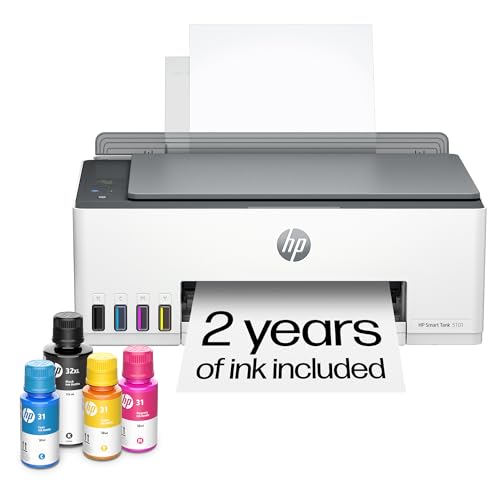
HP’s Smart Tank 5101 focuses on high-volume printing with its refillable ink system. It includes up to two years of ink, making it ideal for users with heavy document needs. Features include print, copy, scan, and borderless printing with mobile and wireless connectivity, though it operates on 2.4 GHz networks.
Buying Guide
- Print volume and ink costs: Choose high-yield ink systems or refillable tanks for heavy daily use, or standard cartridges for light, occasional printing.
- Connectivity: Look for wireless printing compatibility with your devices (phones, tablets, laptops). Ensure support for the network frequency (2.4 GHz vs 5 GHz) your router uses.
- Print quality vs. speed: For documents and stationery, prioritize sharp text and reliable color reproduction. Fast printing helps when completing multiple pages quickly.
- Paper handling: Check input tray capacity and whether auto duplexing is available to save time and paper for larger stationery tasks.
- All-in-one features: If you need scanning, copying, or faxing, ensure the model provides these features without compromising print quality.
- Ease of setup and maintenance: Favor models with straightforward smartphone setup and easy ink replacement or refilling.
- Size and footprint: Choose a compact model if desk space is limited, while ensuring the paper tray and feeder meet your needs.
- Warranty and support: Consider the manufacturer’s warranty and availability of customer support for troubleshooting and replacements.
- Software compatibility: Verify compatibility with common office software and mobile printing apps to streamline workflow for stationery tasks.