Choosing a printer that consistently delivers true-to-life photos requires evaluating color accuracy, print size, ink system, and connectivity. The following selections cover compact home use to professional-grade wide-format needs, highlighting reliable brands and modern features that support high-quality photo output, wireless workflow, and easy setup.
| Product | Brand | Key Benefit |
|---|---|---|
| HP Envy Photo 7975 | HP | AI-enabled photo and document versatility |
| Liene M100 4×6 | Liene | Portable, dye-sublimation photo printing |
| Canon PIXMA PRO-200S | Canon | Professional 13″ wide-format color prints |
| Epson EcoTank Photo ET-8550 | Epson | Cartridge-free ink tank with large formats |
| Canon imagePROGRAF PRO-310 | Canon | 9-color pigment inks for gallery-quality output |
The following picks balance photo quality, ease of use, and long-term reliability for American homes and small studios. Each entry includes a concise overview, notable features, and how it fits photography workflows—from quick color-corrected proofs to large-format fine art printing.
HP Envy Photo 7975: All‑round Photo Printer
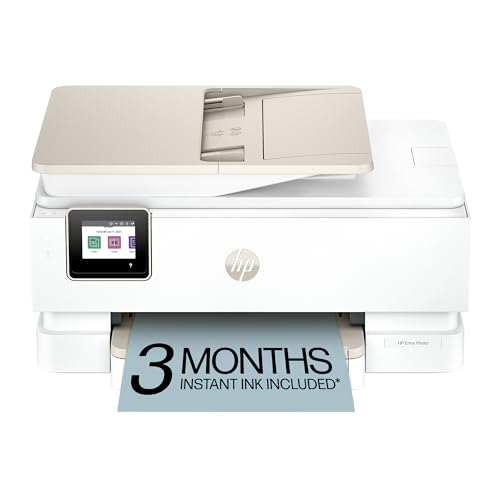
The HP Envy Photo 7975 is a premium home printer designed to handle photos, homework, and documents with equal ease. It supports wireless printing, scanning, and copying, and includes a three-month Instant Ink trial. Its AI-enabled features help optimize layouts and reduce waste, making it suitable for households that produce high-quality borderless photos. Print speeds reach up to 10 pages per minute in color and 15 pages per minute black, helping keep timelines on track for school and family projects.
Key strengths for photography workflows include true-to-screen image formatting, borderless photo printing, and secure wireless connectivity. The AI-assisted formatting aims to minimize wasted pages and awkward layouts, delivering prints that align with on-screen previews. This model suits families who want an all-in-one device without sacrificing photo quality.
Liene M100 4×6 Photo Printer

The Liene M100 is a compact, portable photo printer designed for quick 4×6 prints from iPhone, Android, or PC. It uses thermal dye-sublimation to produce vibrant colors with a laminated, water- and fade-resistant surface. The package includes multiple cartridges and a substantial amount of photo paper, making it ideal for on-the-go events, family gatherings, or immediate photo sharing. Its small footprint and built-in Wi-Fi hotspot simplify printing from mobile devices without a computer.
Canon PIXMA PRO-200S: 13″ Studio Printer

Canon PIXMA PRO-200S targets photographers seeking professional-quality, wide-format color prints up to 13″ x 19″. Its 8-color dye-based ink system yields vivid color with strong gradients, making it suitable for proofs and finished art prints. The compact studio footprint helps small spaces while delivering gallery-ready results. The printer’s borderless printing capability supports creative projects and large-format photo work with precise color reproduction.
Epson EcoTank Photo ET-8550: Wide-Format Flex

The Epson EcoTank ET-8550 uses a cartridge-free ink-tank system to deliver high-volume color printing with economical running costs. It supports wireless printing and Ethernet, enabling flexible workflows for photo proofing, brochures, and 13″ wide-format photography. The large touchscreen and Connect solutions simplify cloud or mobile printing, making it a strong choice for households and small studios seeking long-term ink savings without sacrificing print quality.
Canon imagePROGRAF PRO-310: Gallery-Grade Color

The Canon imagePROGRAF PRO-310 is a professional-grade, 9-color pigment ink printer designed for gallery-quality outputs and fine art printing. The 3.0-inch color LCD monitor and precision pigments support accurate color reproduction across a range of media, with reliable black density for deep, rich images. Anti-clogging features and skew correction help maintain print quality in demanding workflows, making it suitable for photographers requiring archival-quality prints.
Buying Guide: Key Considerations For Photo Printing
When selecting a photo printer, consider the following factors to align with your needs and budget:
- Print size and format: Decide whether you need borderless 4×6, larger studio formats, or professional gallery sizes. Wide-format printers enable larger, more detailed prints.
- Ink system: Pigment inks offer archival stability and longevity; dye inks can yield vivid colors with crisp gradients but may fade faster. Ink-tank systems reduce running costs for frequent printing.
- Color management: Look for printers with color calibration tools, ICC profile support, and software that helps you maintain color accuracy across devices and media.
- Media compatibility: Check supported paper types and weights, including glossy, luster, satin, matte, and fine-art papers, to match your creative needs.
- Ease of use: A user-friendly interface, touchscreen controls, wireless setup, and mobile printing capabilities simplify day-to-day tasks.
- Maintenance and cost: Consider replacement ink/toner costs, refill accessibility, and maintenance needs. Some models offer bulk ink options to lower long-term costs.
- Connectivity: Wireless, Ethernet, and cloud-print options enable flexible workflows for home offices and studios.
- Reliability and support: Choose brands with robust warranties, accessible customer support, and widely available replacement parts.
These considerations help balance print quality with ongoing costs and workflow efficiency. For enthusiasts who value large-format prints, wide-format models like the Canon PRO-310 and Epson ET-8550 offer expanded capabilities. For everyday photo enthusiasts, compact models like the HP Envy Photo 7975 and Liene M100 deliver strong results with easy operation. Evaluation should align with your typical print sizes, volume, and how often you’ll produce professional-quality photographs.