Choosing the right printer for photos means balancing print quality, ease of use, and portability. The following five models, drawn from a range of brands and technologies, cover pocket-sized mobile options to full-feature home printers. Each selection prints vibrant 4×6 or 2×3 inch photos, supports smartphones, and offers unique advantages like instant-dye sublimation, zero-ink design, or convenient docking. Review the options to find a solution that fits your photo-writing routine, whether you’re capturing memories on the go or building a home gallery.
| Product | Brand | Paper Size | Key Benefit |
|---|---|---|---|
| Liene M100 4×6” Photo Printer | Liene | 4×6 | Wi-Fi, portable, dye-sub technology |
| KODAK Dock Plus 4PASS Instant Photo Printer | KODAK | 4×6 | Dock and charge while printing, bundle value |
| Nelko PP01 Color Mini Portable Photo Printer | Nelko | 2×3 | Sticky-back, pocket-sized, Bluetooth |
| KODAK Step Instant Smartphone Photo Printer | KODAK | 2×3 | Zero-Ink technology, app editing |
| HP Envy Photo 7975 | HP | Letter/Photo | All-in-one home printer with AI features |
Liene M100 4×6” Photo Printer

The Liene M100 uses thermal dye sublimation to deliver vibrant, water- and fade-resistant 4×6 prints. It’s designed for mobile use with Wi-Fi connectivity, allowing quick printing from iPhone, Android, or a PC. The package includes multiple cartridges and photo papers for immediate use, and the design emphasizes compact storage with a minimalist, magnetic form factor. A built-in hotspot ensures a stable connection directly from your phone, avoiding external networks.
Printing tips: keep the print head clean to avoid smudges, and follow the included guidelines for cartridge and paper handling to maximize color depth and durability. The M100 supports a steady workflow for weekend scrapbooks or event memories, making it a practical pick for on-the-go photo printing.
KODAK Dock Plus 4PASS Instant Photo Printer

The KODAK Dock Plus 4PASS is a versatile home-and-gift printer that combines docking, charging, and wireless printing. It supports Apple and Android devices via Bluetooth and includes a bundle with 50 sheets for ready-made photo sessions. The 4PASS technology layers color with a protective laminate, producing durable prints suitable for albums or gifts. The dock feature is especially useful for charging a phone while printing, adding convenience to a family photo workflow.
Considerations: while it emphasizes affordability and value, the step-up in features for advanced editing occurs through the companion app. It’s ideal for households that want a reliable, all-in-one solution for daily photo printing and sharing.
Nelko PP01 Color Mini Portable Printer

The Nelko PP01 is a tiny, pocket-friendly option that prints 2×3 inch photos on sticky-backed, waterproof, and tear-resistant paper. Bluetooth connectivity makes pairing with iOS and Android devices straightforward. The printer is rechargeable and designed for situations where you want a quick physical photo to paste into a journal, planner, or scrapbook. The sticky backing enhances the utility for memorabilia projects or impromptu gifts.
Usage notes: ensure the paper orientation is correct and follow the Nelko app steps to load paper, install cartridges, and connect via Bluetooth. The PP01 is best for casual, everyday prints and small, personal projects rather than high-volume photo jobs.
KODAK Step Instant Smartphone Photo Printer

The KODAK Step is a compact, 2×3 inch printer that uses ZINK Zero Ink paper and offers a robust editing app with filters, borders, stickers, and text. It connects via Bluetooth or NFC, letting users print from iOS or Android devices. The embedded dye crystals in the paper deliver durable photos with a satin-like finish that resists moisture and fingerprints. The app-based editing suite enables quick customization for social sharing without external software.
Ideal for: quick, personalized prints from mobile devices, school events, and casual crafting. The Step is particularly appealing for users who want a simple, app-driven workflow with strong photo-editing features built in.
HP Envy Photo 7975
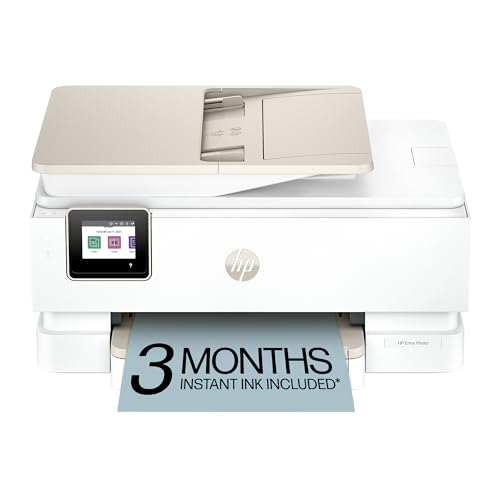
The HP Envy Photo 7975 is a multipurpose home printer designed for families. It offers wireless printing, scanning, and copying with AI-enabled features that help optimize layouts and photo presentation. This model accommodates high-quality photo printing alongside documents, making it a versatile choice for households that value cohesive performance across tasks. It includes a trial of HP Instant Ink and provides compatibility with mobile devices for on-the-go printing.
Considerations: this is a larger, more capable home printer, so it’s best for users who want photo quality integrated with office or school productivity. For those seeking a dedicated portable or compact unit, other options in this list may be more suitable.
Buying Guide: Key Purchase Considerations
- Print technology: Dye-sublimation, dye-sub or ZINK zero-ink each produce different finishes and durability. Dye-sub tends to be long-lasting with a glossy or laminate finish, while ZINK is convenient and ink-free but may have a different texture.
- Paper size and backing: 4×6 is common for wall-ready prints, while 2×3 is excellent for scrapbooks and quick label-like photos. Sticky-back sheets add versatility for planners and albums.
- Portability: Pocket-sized printers are great for travel or events, whereas multi-function home printers suit households needing more capabilities beyond photo printing.
- Connectivity: Bluetooth, Wi-Fi, or direct docking affect setup and ease of use. A built-in hotspot can simplify phone connections for some models.
- Edits and app features: Some printers include extensive mobile apps with filters, frames, and collage options. Apps can impact the overall user experience and printing speed.
- Durability of prints: Look for water, fingerprint, and fade resistance if you want photos to last without special frames or laminates.
- Paper and cartridge availability: Check whether the model ships with starter packs and how easy it is to restock supplies—bundles can offer better initial value but may be higher ongoing costs.
- Intended use case: Casual snapshots, scrapbooks, or home errands each point to a different best-fit model—mobile devices often favor pocket printers, while a family-focused home office may benefit from a versatile all-in-one printer.
- Price-to-value: While price isn’t shown here, compare per-print costs, cartridge longevity, and the variety of compatible papers to gauge long-term costs.