Looking for a printer that makes photo books look professional at home? This guide highlights five solid options, focused on ease of use, print quality, and portability. Each pick suits different buyers: compact mobile printers for on-the-go scrapbooks, dock-style printers for neat smartphone-to-paper workflows, and larger, feature-rich models for gift-worthy photo books. The following table summarizes the top choices to help you compare quickly.
| Product | Brand | Best For | Key Benefit |
|---|---|---|---|
| Liene M100 4×6” Photo Printer | Liene | Well-rounded portable printing | Thermal dye sublimation for durable, vibrant prints |
| KODAK Dock Plus 4×6” | KODAK | Easy, docked smartphone printing | Integrated docking station for charging while printing |
| KODAK Step Instant Printer | KODAK | Budget-friendly mobile prints | Zero-ink technology, pocket-sized |
| Canon Ivy 2 Mini Photo Printer | Canon | Sticky-back mini prints on the go | Peel-and-stick backing for quick scrapbooking |
| HP Sprocket Studio Plus | HP | Home photo book projects | Vibrant 4×6 prints with editing options |
Liene M100 4×6” Photo Printer

The Liene M100 is a compact, portable photo printer designed for smartphone users who want quick, full-color 4×6 prints. It ships with a complete kit including cartridges and photo paper, and the package can expand to 100 sheets for ongoing projects. This model uses thermal dye sublimation, which helps the color lifelike and resistant to water, scratches, and fading. Best for travelers or crafters who want a ready-to-use mobile setup.
Who it’s best for: busy families and on-the-go scrapbookers who value a simple one-device workflow. Why chosen: strong all-in-one package, easy Wi-Fi connectivity, and durable print finish. Caution: ensure proper print head maintenance if you notice smudges during operation.
KODAK Dock Plus 4×6” Photo Printer

The KODAK Dock Plus pairs an integrated docking station with a 4×6” dye-sub print process. It’s designed for straightforward operation from a smartphone, with charging while printing. Prints gain a protective lamination layer and fingerprint resistance, making it a solid pick for families printing albums and gift photos. Best for: users who want a simple, all-in-one dock solution for quick photo books or frames.
Who it’s best for: beginners and families who value quick setup. Why chosen: easy wireless printing, quick turnaround, and durable prints. Limitation: may require occasional paper reloading for larger photo-book projects.
KODAK Step Instant Printer
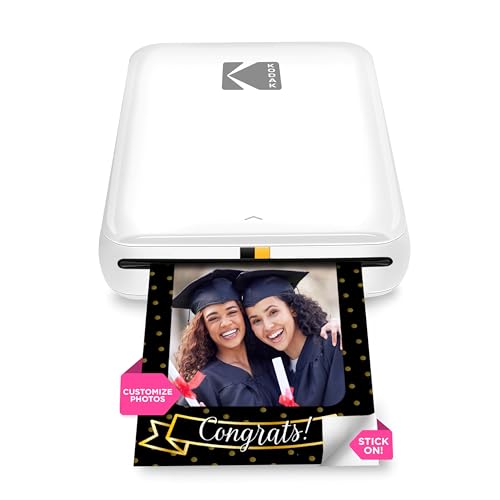
The KODAK Step is a pocket-friendly 2×3” printer that uses ZINK zero-ink technology. It’s ideal when you want tiny, sticky-backed photos—great for scrapbooks and quick gift ideas. The app offers editing tools and filters, helping you tailor each photo before printing. Best for: social media lovers who want to convert digital posts into small, adhesive keepsakes.
Who it’s best for: casual creators who enjoy quick, personalized prints. Why chosen: zero-ink convenience and app-based editing. Caution: 2×3” prints may not suit larger photo book pages; plan your layout accordingly.
Canon Ivy 2 Mini Photo Printer

The Canon Ivy 2 Mini Printer uses ZINK technology for borderless, sticky-back 2×3” prints. It’s designed for ultra-portable use with no ink replacement. The peel-and-stick backing makes it easy to place photos into scrapbooks or journals. Best for: quick, on-the-go photo projects and small craft inserts. Limitations: 2×3” size restricts page layout options for standard photo books.
Nelko PP01 Color Mini Portable Printer

The Nelko PP01 is a compact 2×3” printer using inkjet-based color printing on sticky-backed, water-resistant paper. Its AI-assisted app helps with layouts and sharing, and the device is light enough for travel. Best for: personalized mini-photos to add to cards or scrapbooks. Limitation: 2×3” size may require more pages to assemble larger photo books.
Buying Guide
What matters most for photo-book printing?
Print size and finish: 4×6” standard photos provide generous space for photo books, while 2×3” prints fit small inserts. Dye-sub finishes tend to last longer and resist fading. Consider whether you want sticky-back prints for quick scrapbooks or traditional adhesive-backed pages.
Portability and workflow
If you travel often or create on the go, a compact printer with Wi-Fi or Bluetooth is ideal. Docked printers simplify charging and setup when you’re at a desk. Look for models that pair quickly with iOS and Android and offer straightforward editing apps.
Ink and paper economy
Some printers include 100 sheets bundled in the package, while others require separate paper purchases. Zero-ink options save ongoing costs but limit available sizes. Dye-sub prints involve durable lamination and water resistance, which is beneficial for keepsake albums.
Ease of use and reliability
Choose models with simple onboarding, clear instructions, and predictable print times. A model with a dedicated app and easy head-cleaning guidance minimizes maintenance and downtime during project-building sessions.
Buying considerations by buyer type
- Casual scrapbooker: prioritize sticky-back 2×3” or 4×6” prints, easy app workflows, and quick start-up.
- Hybrid scrapbooker: look for a mix of print sizes and a reliable app for editing and collage creation.
- Gift/project-focused user: pick a printer with sturdy finishes and rich color output for long-lasting photo books.
FAQ
- What size is best for photo books? – 4×6” is the most versatile for standard albums, while 2×3” works well for inserts and captions.
- Do these printers require ink cartridges? – Some use dye-sub cartridges; others are inkjet-based with paper pre-embedded color crystals. Check each model’s refill needs.
- Can I print from iOS and Android? – Most listed options support both via their companion apps and built-in wireless features.
- Are sticky-back photos durable? – Sticky-backed prints are designed for quick assembly and crafting; durability depends on the paper quality and finish.
- Is a built-in dock important? – A dock simplifies charging during printing and can improve stability for desk setups.
- What about print speed? – Some printers deliver prints in under a minute; others take longer depending on size and technology.